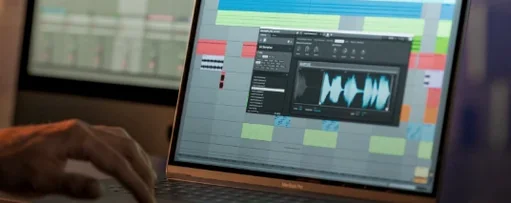
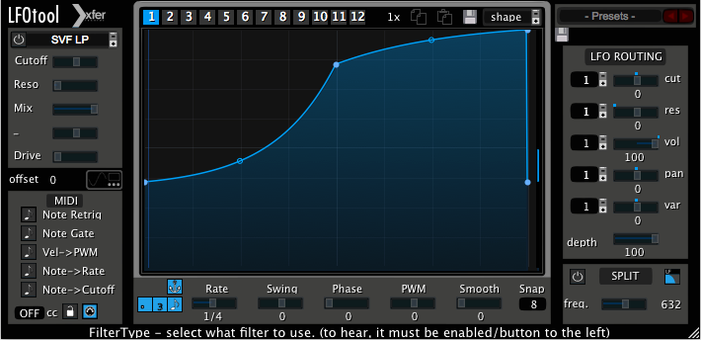
Finding a modulation source that moves exactly the way your track needs, instead of settling for a sine wave and a prayer, is the whole point here. LFOTool gives you a drawable curve editor so the wobble, pump, or filter sweep matches the rhythm in your head, not a preset list. It also spits out MIDI CC in real time, so the same shape can drive a hardware synth or another plug-in without hacking together a janky routing workaround.
Formats, Hosts, and What Keeps It Ticking
LFOTool lands as a VST, AudioUnit, or AAX plug-in — you pick the format your DAW likes. It runs on Intel and Apple Silicon Macs back to macOS 10.11, and the C++ engine keeps CPU load low even when you stack a dozen graphs. Host sync is sample-accurate, so the wobble stays locked to the grid no matter how complex the curve gets. A single preset can hold up to 12 independent graphs, and the factory bank ships with dozens of starting points for AutoPan, tremolo, ducking, and autofilter patches.
Where the Sound Comes From
The sound is whatever you route into it, but the motion is all LFOTool. Drag breakpoints to draw trance gates, sidechain-style volume dips, or stepped filter sequences. The MIDI output turns that same curve into a control stream for anything that listens to CC messages — software synths, outboard effects, even lighting rigs if that's your thing. It’s a modulation hub that treats an LFO as a proper performance tool, not a one-knob afterthought.
Building a Sidechain Pump That Actually Grooves
A basic kick-to-bass ducking setup in LFOTool takes about two minutes once you know the moves. Load the plug-in on your bass track or group bus — AudioUnit or VST, whatever the session is running. Skip the default sine wave and grab a blank graph. The curve needs a sharp drop right at the transient, then a release shape that matches the kick's tail. Set the rate to 1/4 notes and engage BPM sync so it stays locked when your drummer speeds up in the bridge.
Drag the first point to zero on the Y-axis at the very start of the graph. Pull the tension handle until the fall-off feels snappy — about the speed of an 1176 with a fast attack. Now curve the release back to unity gain by the time the next kick hits. That middle zone is where the groove lives or dies. Too linear and the bassline sounds seasick. A slight concave bend usually sits right in a mix, letting the sustain of the bass breathe before the next duck. Engage the filter section if you want the volume dip to feel darker, dropping cutoff along with gain for a more natural pump. Assign a second graph to resonance if the low end needs tightening on the way down.
Once the bass is ducking, copy the preset to a pad or reverb send. Lower the depth to about 30% — full pumping washes out the tail, but a subtle tug keeps the ambience from masking the kick. Hit save. That's your custom sidechain curve, reusable across any session without a compressor routing mess.
Accidentally Resetting the Filter Curve Just by Clicking
The Plug-in Won't Pass Audio
New users often drop LFOTool on a track and hear silence, convinced the download is broken. The plug-in's output stage defaults to full attenuation until a curve pushes the gain back up. Check graph one — if no points are placed above the minimum, the volume stays at zero. Drag at least one breakpoint to the top of the editor and audio returns immediately.
MIDI CC Isn't Reaching the Target
LFOTool sends MIDI on a virtual port, but the receiving instrument needs to be on the same chain or routed explicitly. In Logic, insert LFOTool before the synth and set the sidechain input in the synth to the same channel LFOTool is broadcasting. In Ableton Live, drop it on a MIDI track and route the output to the destination track via the dropdown. The CC number in LFOTool's MIDI tab must match the parameter the target expects — filter cutoff is usually CC 74, but check the destination's MIDI implementation chart.
Graphs Drift Out of Sync on Long Passes
Sample-accurate sync is enabled by default, but some hosts override plug-in timing when delay compensation kicks in on other tracks. If the LFO starts drifting after a minute of playback, toggle the sync mode from BPM to Hertz and back. That forces a re-lock to the transport. Also confirm the DAW's plug-in delay compensation isn't set to "audio and software instruments only" — full compensation keeps everything aligned.
Preset Graphs Won't Switch via MIDI
A preset can hold 12 graphs, but they don't auto-cycle. Assign a MIDI note or CC to the graph selector in the plug-in's mapping tab. Without that assignment, the plug-in stays on graph one regardless of what the preset contains. Most people miss this on the first pass and assume the switching feature is buggy.
Drawing Rhythmic Gate Patterns Instead of Static Sidechain Ducking
LFOTool vs. Cableguys VolumeShaper
VolumeShaper focuses entirely on volume modulation with a multiband twist — you can draw curves per frequency band, which LFOTool doesn't do natively. LFOTool answers back with MIDI CC output and filter modulation built into the same graph editor. If the job is pure multiband ducking and nothing else, VolumeShaper has an edge. If you want one curve to drive volume, cutoff, resonance, and a hardware synth's filter simultaneously, VolumeShaper can't touch that workflow.
LFOTool vs. Gatekeeper by Polyverse
Gatekeeper is a volume modulation gate with an absurdly fast envelope section and a randomizer that generates stutter patterns. It excels at glitchy, chopped rhythmic effects. LFOTool is smoother, with a curve editor that handles long release tails and subtle filter sweeps more naturally. Gatekeeper's MIDI implementation is limited compared to LFOTool's full CC streaming, so producers who rely on hardware integration usually lean toward the Xfer plug-in for anything beyond volume chops.
LFOTool vs. Stock DAW LFOs
Every major DAW ships with an LFO device — Live's LFO, Logic's Modulator MIDI FX, Bitwig's modulators. Those cover basic shapes and one or two destinations. LFOTool replaces the sine/triangle/square menu with a freeform curve and lets that curve hit four destinations simultaneously per graph, with 12 graphs per preset. Stock tools work for a basic AutoPan; LFOTool takes over when the track needs a custom rhythmic envelope that a sine wave can't approximate.
A Sound Designer's Secret Weapon for Sci-Fi Ambiences
Picture a sound designer on a game project, building a drone for an alien hive. The brief calls for a slow, organic pulse that feels like breathing — not a mechanical throb. They load LFOTool on a reverb return fed by a bowed metal texture. Graph one draws a 6-second rise and fall with uneven tension, more exhale than inhale, shaped like a lopsided bell curve. Graph two modulates a bandpass filter cutoff on the same timeline, opening slightly on the inhale and clamping down on the exhale. Graph three sends CC 1 to a hardware Prophet for a subtle amplitude wobble that tracks the same shape.
The three graphs run simultaneously, locked to Hertz mode so the timing ignores the session tempo — the creature shouldn't breathe in 4/4. They save the preset as "Hive Respiration" and map three more graphs to different drone states, switching via a MIDI foot controller while the director watches playback. No track automation lanes, no routing between three separate LFO plug-ins, just one instance doing all the heavy lifting. That's the kind of session where a generic LFO falls apart and a drawable, MIDI-capable tool earns its spot in the template.
- macOS 10.11 or later
- Intel or Apple Silicon processor
- A VST, AudioUnit, or AAX-compatible host application
Questions I actually get
Can LFOTool send MIDI to external hardware?
Yes, it generates a MIDI CC stream that can control external hardware, software synthesizers, or any effect that responds to MIDI CC.
Does LFOTool work as a sidechain compressor substitute?
Absolutely. Drawing a custom volume curve lets you simulate sidechain pumping without routing a kick drum to a compressor, and the curve editor gives you way more control.
How many LFO graphs can I use in one preset?
A single preset can contain up to 12 graphs, each with its own shape, rate, and routing.
Notes from the edit bay · 0
Sign in or get an edit-bay pass to leave a note.
No notes from the edit bay yet. They go up after I read them.