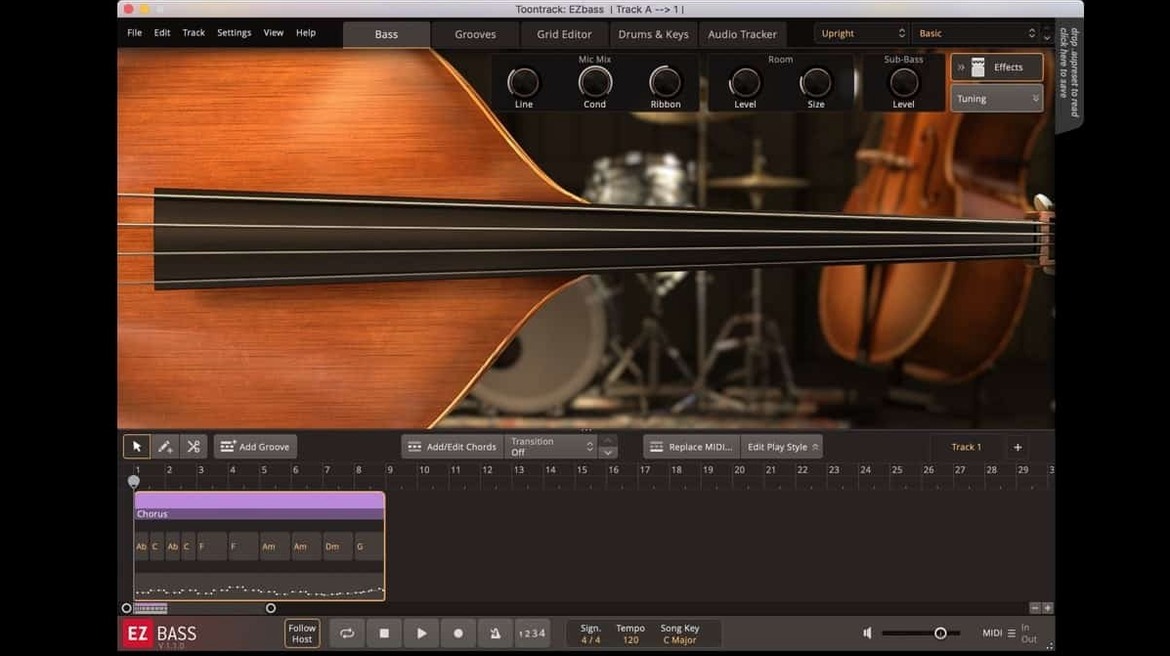
Two basses. One vintage finger-style, one modern picked tone. EZbass ships with a pair of instruments that cover the ground most pop and rock sessions need. Not a 40-gigabyte library you’ll spend an hour auditioning. Just two solid sounds, well-recorded, that sit in a mix fast.
Where it fits in a session depends on your starting point. Writing a chord progression on keys? Drag the MIDI to EZbass and it builds a bassline that follows the harmony. Already have a drum pattern laid down? Feed it that MIDI and the engine locks into the kick and snare phrasing. The audio-to-MIDI converter is the sleeper feature: hum a part, pull the audio from a guitar DI, or toss in a reference loop, and you’ll get a MIDI track you can clean up and feed right back to the sampler.
On the mix side, I treat it like a DI bass that skipped the preamp. Run it into an amp sim on its own bus, split the low end to a clean channel, or slap a channel strip on the insert and move on. The generated MIDI is editable, so you can tweak fills or swap articulations without ever opening a piano roll you didn’t intend to. It’s a writing tool that also lands as a mix-ready source.
Shift-Drag Locks Notes to the Current Scale
Right-click the hand position knob. It snaps to the bridge for immediate bite — no dragging, no guessing. The same kind of care hides in the grid editor: hold Shift while dragging a note and it locks to the current scale degree, which means you can reharmonize a line without accidentally landing on a chromatic neighbour that fights the chord.
Tap-to-find browsing works across the entire MIDI library, not just the bassline presets. Type “syncopated” or “walking” into the search bar and EZbass filters everything — song structures, intro phrases, fills — in under a second. The keyboard shortcut customization added in 1.3.3 makes this even faster if you prefer your own mapping for the tap-to-read and audition commands.
A workflow detail I keep using: drag a drum MIDI block from Superior Drummer 3 or any groove player directly onto the EZbass track header. It analyzes the kick and snare hits and proposes three bassline variations instantly. No menu diving. No export dance. Just drag, listen, pick one, and move to the next section.
900 MB RAM Leaves Room for Amp Sims
On an M1 MacBook Air with 16 gigs of RAM, a full instance with both samplers loaded sits around 900 megabytes in Logic. That leaves plenty of headroom for amp sims and a drum track before the swap file gets involved. The audio-to-MIDI converter processes a 30-second DI phrase in under two seconds — same engine as Superior Drummer 3, so the transient detection is tight and false triggers are rare.
Latency is negligible at a 128-sample buffer. I’ve stacked three instances in a dense mix session without a dropout. The 1.3.3 update ironed out the menu click lag some users hit in recent Logic versions, and the audio export timing fix means stems printed at 48 kHz line up perfectly with your grid. No nudge-into-place ritual after a bounce.
CPU-wise, EZbass barely registers. It’s not modelling an amp or a room — it’s a sample playback engine with some MIDI logic riding on top. Even on Intel machines running Rosetta, the performance hit is in single-digit percentages. That makes it a candidate for keeping active while you track other parts, rather than freezing it the moment the arrangement gets busy.
Drag in MIDI, Get Three Bassline Options Instantly
I open a scratch project with a drum groove and a Rhodes sketch. The verse needs movement, not roots on the downbeat. I drag the Rhodes MIDI region to the EZbass track. Three generated options appear in the browser. The second one follows the kick pattern and adds a slide into the fourth bar — that’s the one.
I swap the instrument model to the vintage bass, roll the tone knob back a touch, and nudge the hand position toward the neck for a rounder transient. A quick listen against the drums tells me the pickup attack is masking the snare. I switch articulation on the accented notes from “finger” to “muted” — the right-hand mute support from the 1.3.3 update makes this available on my Rock Legend expansion — and the pocket opens up immediately.
The bridge needs something simpler. I grab a “straight 8ths” fill from the tap browser, drop it over four bars, and shorten the final note so it breathes before the chorus hits. One render later, I’m running the processed DI through a bass amp plugin on a send, blending clean low end with a driven midrange. Twenty minutes from blank tracks to a bass part that sounds played, not programmed.
Version 1.3.3 adds a right-hand mute articulation for Rock Legend EBX, some customizable keyboard shortcuts in Settings, and a visual refresh with Mac icons updated to the macOS Tahoe style.
Also fixed: timing drift in audio exports at sample rates other than 44.1 kHz.
- macOS 10.15 or later
- Apple Silicon and Intel 64-bit Macs
- Plug-in formats: VST, AU, AAX
Notes from the edit bay · 0
Sign in or get an edit-bay pass to leave a note.
No notes from the edit bay yet. They go up after I read them.