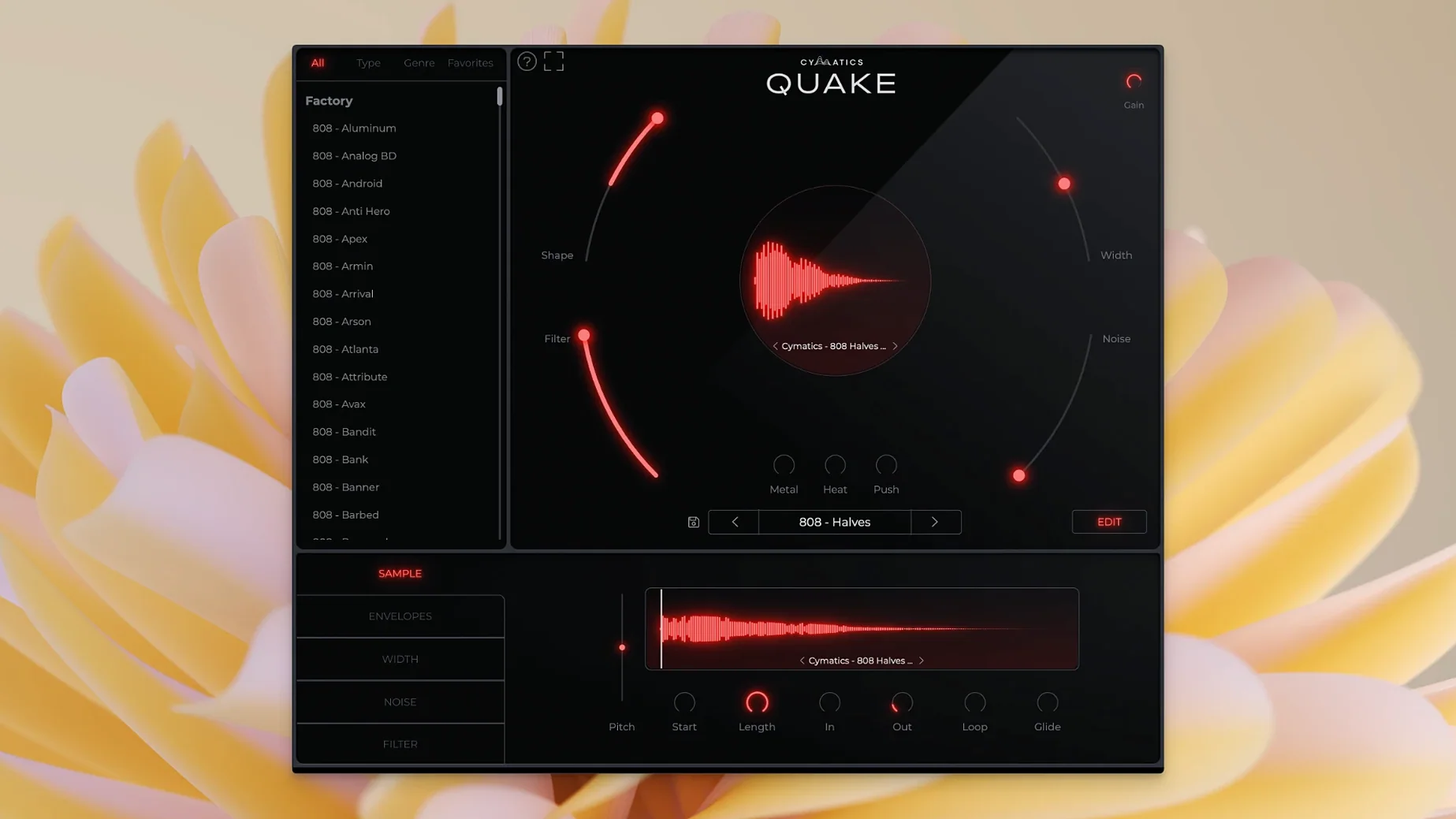
Stitching together a bass that punches through the mix usually means stacking EQs, saturators, and stereo tools until you lose the original idea. QUAKE puts the whole chain in front of you, so the sound stays your focus, not the routing.
Shape the Tone
The Shape and Filter controls do the heavy lifting for clarity. Shape moves between clean sub and a more aggressive mid-range presence, while Filter carves away mud the instant it appears.
Add Texture
Metal, Heat, and Push are three saturation flavors that hit differently. Metal bites with a sharp, resonant edge. Heat warms the low end without turning it into sludge. Push drives the signal into heavy, speaker-rattling distortion that still reads as a note.
Place It in the Stereo Field
Width tightens a mono 808 or spreads a bass stab across the sides without phase collapse. A touch of the Noise knob adds grit that glues the tail of a sustained note to a lo-fi or Trap beat.
A Session with QUAKE
I open a beat that needs weight — the kick hits, the hi-hats skate, but the low end is a blank. Drop QUAKE on an instrument track, arm it, and pull up a Trap preset called something like "Concrete Sub." Two bars of MIDI, and already the room shakes.
First thing I do is reach for Shape. The default preset has too much mid-range buzz for this mix, so I dial it back toward the sub region. The tone sinks into the floor immediately. Filter follows — I sweep it slowly while the loop plays, stopping where the kick and bass stop arguing. That's a thirty-second fix that used to take three plug-ins and a spectrum analyzer.
Next, I want the note attack to cut through phone speakers. I nudge Metal up to about 11 o'clock. It adds a sharp transient click without thinning the body. Heat stays low — just a hair to warm the sustain. Push I leave alone for now; this beat wants clean weight, not destroy-the-club distortion.
Width I set to mono below 120 Hz with an external utility, so inside QUAKE I keep Width near zero for the sub layer. Then I duplicate the MIDI to a second instance, pick a brighter preset — something from the Drill folder — hi-pass it, and widen it out. QUAKE handles both layers without me leaving the plugin window. Twenty minutes, bass done.
Where QUAKE Fits in a Workflow
QUAKE isn't a mixing tool, and it doesn't try to be. It lives at the composition and sound design stage — right after you lay down chords or a melody and realize the low end is a ghost. I treat it like a dedicated hardware box that only does bass, but with recall.
With other plugins, QUAKE plays nice as a sound source. Push its output into a compressor like an 1176-style plugin for envelope shaping. Follow it with a limiter if the distortion peaks get wild. Since QUAKE handles tone, width, and saturation internally, the external chain stays lean — maybe one EQ move and a sidechain trigger. That's it.
macOS integration is straightforward. QUAKE shows up in any AU host — Logic Pro, Ableton Live, FL Studio on Mac, even in a patcher like Blue Cat's PatchWork. MIDI learn works through the DAW, so map the Shape or Push knob to a controller and perform bass changes in real time while the arrangement plays. Audio Units on Apple Silicon run natively; no Rosetta translation layer to eat CPU cycles when you stack four or five instances.
A Beatmaker's Go-To
Consider someone making Drill beats every night, deadlines piling up. They're not engineering a bass from an init patch — they're scrolling presets, listening for attitude. QUAKE gives them thirteen genre folders, each with sounds that already sit in the right tonal pocket. They pick a preset, twist Shape to match the 808 pattern's speed, add a little Noise for texture, and bounce the stem. The whole decision takes under two minutes. When the beat gets placed, they open the project three weeks later and all the QUAKE settings are saved, no notes needed.
Design priorities visible in the seven-knob layout
Version 1.0.0 is the launch, so there's no update history to trace. That said, the design priorities are clear from what shipped. The seven-knob layout — Width, Shape, Filter, Noise, Metal, Heat, Push — suggests the developers stripped away everything that wasn't essential to making a bass sound work in a track. No hidden menus, no modulation matrix, no effects rack tucked behind a tab.
For everyday use, the preset library being tagged by genre matters more than it sounds. When you're flipping through Trap, House, and R&B folders, you find usable starting points fast. The customization stays shallow by synth standards, but that's the point — a cymatics quake session isn't about designing a patch for an hour. It's about grabbing a bass sound, shaping it to the beat, and moving on.
Also worth noting: the plugin format support is standard AU and VST, so a cymatics quake vst instance in Ableton or FL Studio behaves exactly like the AU in Logic. That consistency helps when you switch DAWs mid-project or collaborate with someone on a different platform. The single-window interface means you don't lose the bass controls behind a piano roll or mixer panel — the knobs stay visible until you close the plugin.
The preset library covers Trap, House, R&B, EDM, and Drill—all fully customizable, so you never start from silence unless you want to.
- macOS 10.14 or later
- Intel or Apple Silicon Mac
Questions I actually get
Does QUAKE come with presets?
Yes, it includes a preset library with bass sounds for Trap, House, R&B, EDM, Drill, and other genres, and every preset is fully customizable.
Notes from the edit bay · 0
Sign in or get an edit-bay pass to leave a note.
No notes from the edit bay yet. They go up after I read them.