Songwriters who need a drum track to chase down an idea, not a mixing desk disguised as a sampler, are who Toontrack built EZdrummer for. It opens like a tape machine with a drummer already in the room—pick a kit, grab a groove from the MIDI browser, and the skeleton of a song is moving before the click track gets a chance to annoy you.
Where the Plug-in Lands in Your DAW
EZdrummer 3.1.2 lands as a VST, AU and AAX plug-in alongside a standalone app, so it slides into Logic, Ableton Live, Pro Tools or any DAW that respects those formats. The standalone icon and project icon now follow the macOS Tahoe style, which keeps things tidy on recent desktops. Under the hood, version 3.1.2 is the required baseline for any EZX expansion pack released from Q4 2025 onward, and it runs native on both Intel and Apple Silicon Macs from macOS 10.15 forward. If you drag audio or MIDI into Bandmate, the engine suggests parts that fit the feel—no browsing required. A recent fix also tidied up song-track CC recording and a quirk where toggling Solo or Mute in the mixer could forget the opposite state, so routing stays predictable when you're printing stems.
Sound That Starts Before You Tweak
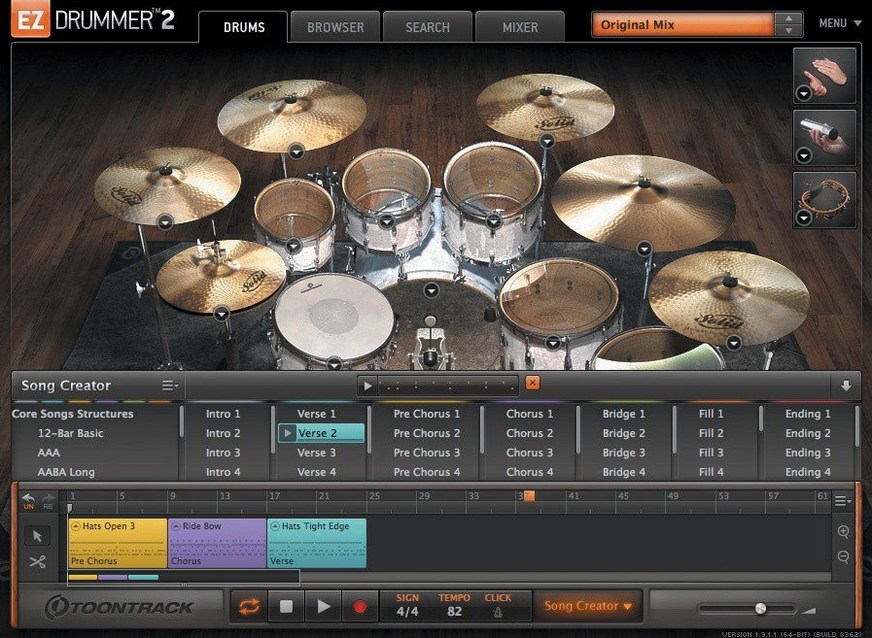
Three full rooms come in the box, each with mix-ready presets that let you commit to a sound and keep writing. The MIDI groove library previews in sync with your project, and the Song Creator can block out an entire arrangement from a single idea, which makes it a writing partner more than a sound module. It’s not trying to be Superior Drummer’s raw-mic playground—this is the songwriter-focused side of Toontrack’s lineup, where a finished drum track matters more than a perfect snare transient.
Building a Full Drum Track from a Single Loop
Here's a workflow I use when a song idea is still just a verse riff and a vocal melody humming around my head. Open the standalone app or load EZdrummer as a plug-in on an instrument track. Pick a kit—the Bright Room preset usually sits well in a pop-rock mix without touching a fader. Drag your rough guitar or piano audio onto the Bandmate tab. It takes about four bars of playing before Bandmate suggests groove variations that match the rhythmic push of your part.
Audition a few suggestions in the browser while your loop plays. Star the two or three that lock into the pocket. Now switch to the Song Creator. Drop your main verse groove into slot one, then let the Song Creator generate an intro, chorus, bridge and outro based on that single choice. Most of the time it nails the energy shift into a chorus by opening the hi-hat and pushing the kick pattern. If the generated bridge feels too busy, highlight it on the song track and pull the complexity slider back in Edit Play Style. That control tightens fills and ghost notes without rewriting the whole part.
From there, drag the remaining starred grooves onto the song track to replace any sections that feel stiff. Use Tap2Find for the one fill you hear in your head but can't find in the library—tap the rhythm on your keyboard and EZdrummer pulls matching MIDI from all loaded libraries. Cut, copy and arrange blocks on the song track like you're editing video, not programming drums. Render or route the multi-out channels to your DAW, print the stems, and you've got a drum track that followed the song, not the other way around.
First Five Settings to Change
Out of the box, EZdrummer makes sensible choices, but a few tweaks save time on every project. First, set the default MIDI drag behavior to copy rather than move—otherwise dragging a groove from the browser to your DAW removes it from the song track in the plug-in. Find this in the settings pane under MIDI export.
Second, dial the velocity randomize up to about 8%. The stock grooves can sound a touch mechanical on headphones, and subtle velocity variation cures that before you start mixing. Third, map the Edit Play Style controls to a MIDI controller knob or a keyboard fader. Riding the complexity and velocity sliders while the song plays is faster than stopping to tweak a fill. Fourth, turn off auto-follow in the groove browser if you're auditioning parts while the song track scrolls—it prevents the browser from jumping away from a batch of grooves you're working through. Fifth, set your preferred room and kit as the default template so EZdrummer opens ready to play, not ready to browse.
Mistakes That Slow Down New Users
The most common trap is treating EZdrummer like a traditional drum machine. People open the Grid Editor and start clicking in kick and snare hits at bar one, ignoring the MIDI library entirely. The library is the engine here—the grid is for tweaks. Start with a groove, drag it in, then open the grid only if a specific hit needs moving.
Another frequent misstep is auditioning grooves without a song context. The browser previews in sync with host transport, but if your DAW is stopped, every groove sounds like an intro. Always let a loop of your song play during browsing, or use the standalone's built-in metronome at the right tempo. Beginners also overlook the percussion tab. The bundled hand percussion and shaker loops can glue a sparse verse together, and switching a hi-hat part to a shaker in Song Creator often saves a chorus from feeling cluttered.
Dragging grooves to the song track without trimming the tails causes chaos when arranging later. A groove with a crash cymbal ringing into the next section will spill over unless you trim the block edge. Zoom in on the song track, drag the right edge of the block back a quarter note, and the transition cleans up instantly.
The Hi-Hat Pedal CC Fix That Ends Dropouts
If hi-hat pedal CC data drops out during recording on the song track, update to 3.1.2. Earlier builds had a bug where continuous controller messages would stutter or fail entirely during real-time input. The fix is baked into this version, and it also resolves the mixer recall issue where soloing one channel could wipe the mute state of another.
Loading an EZX expansion and seeing a blank library usually means the expansion was packaged for an earlier version. Version 3.1.2 is the minimum for any EZX released from Q4 2025 onward, so older installers need a re-download from the content manager. The app itself doesn't warn you—it just shows empty folders. Reinstall the expansion after updating and the grooves populate.
Playback stutters on Apple Silicon Macs are almost always a buffer size issue, not a CPU problem. EZdrummer streams samples from disk, and a buffer of 128 samples or lower can choke the drive if your DAW project also streams audio tracks. Push the buffer to 256 in your host and the clicks vanish. For standalone mode, the same setting lives in the Audio/MIDI preferences panel.
Fitting EZdrummer into a Real Workflow
EZdrummer doesn't demand exclusivity. I often route its multi-out channels into separate DAW tracks, then add a touch of Logic's Channel EQ on the kick to carve space for the bass. The internal mix presets do the heavy tonal work; the DAW just handles surgical moves. For songwriters who already own ezdrummer 3 mac expansions, the plug-in sits inside any AU host, so stacking it with a piano VST and a synth pad is frictionless.
Tap2Find talks to anything that generates a rhythmic signal. Feed it a muted guitar strum recorded with a phone, a beatboxed idea, or a kick drum from another track, and it returns MIDI grooves that match the hits. That means EZdrummer bridges the gap between a scruffy voice memo and a finished arrangement faster than any manual programming workflow.
When a track needs more detailed kit control, I bounce the EZdrummer MIDI out of the song track and into Superior Drummer, keeping the arrangement intact. The opposite works too—grab grooves from Toontrack EZdrummer 3 torrent libraries and pull them into EZdrummer's browser for quick songwriting sessions. The MIDI is interchangeable across the Toontrack ecosystem, and the song track retains all block edits when moving between hosts.
macOS integration is straightforward. The standalone app respects Core Audio device switching, so plugging in an interface mid-session doesn't require a restart. Drag-and-drop from the groove browser into Finder creates MIDI files that Dropbox or iCloud can sync to another Mac. The updated Tahoe-style icon means it doesn't look out of place on a recent desktop, which is a small thing that keeps the dock tidy when you're switching between a half-dozen creative tools.
The standalone and project icons are refreshed in macOS Tahoe style, and internal improvements pave the way for Infinity Grid EZX. Also fixed: song-track CC recording and a Solo/Mute recall state bug in the mixer that could drop your routing choices.
- macOS 10.15 or later
- Intel or Apple Silicon Mac
- English interface
- Version 3.1.2 required for EZX expansions released from Q4 2025 onward
Questions I actually get
Can EZdrummer create a full song from a single idea?
Yes, the Song Creator can turn a basic idea into a complete song structure using the built-in MIDI grooves and arranging tools.
Does EZdrummer work on Apple Silicon Macs?
Version 3.1.2 runs natively on both Intel and Apple Silicon Macs and supports macOS 10.15 through the latest releases.
What audio formats does EZdrummer support as a plug-in?
It installs as a VST, AU and AAX plug-in, plus a standalone application for sketching outside a DAW.
Notes from the edit bay · 0
Sign in or get an edit-bay pass to leave a note.
No notes from the edit bay yet. They go up after I read them.