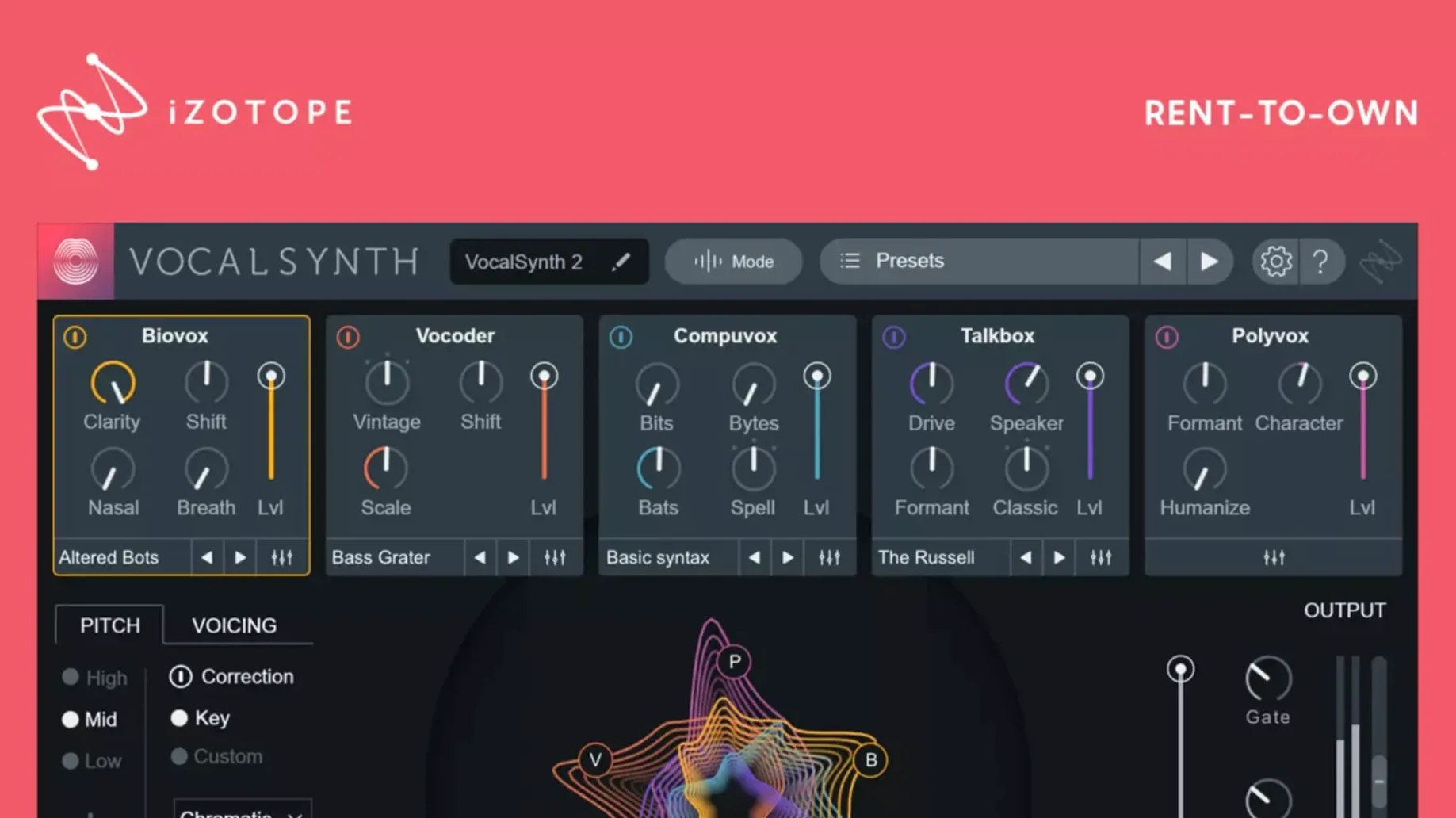
VocalSynth 2 runs on Apple silicon and Intel Macs—version 2.5.0 brought native ARM support, and the current 2.6.1 build keeps it current across both architectures. It loads as an AU, VST3, or AAX plug-in, so it drops straight into Logic Pro, Ableton Live, Pro Tools, or whatever DAW you call home.
Stompbox Suite for Pushing Vocals into Synth Territory
Think of it as a vocal coloring box. It’s not a subtle channel strip—it’s a stompbox-style suite for pushing a vocal into vocoder territory, synth pads, or chopped, talkbox-like textures. Three processing modes define the workflow. Auto mode tracks pitch and dynamics on its own and applies effects. MIDI mode lets you play harmonies and melodies from a keyboard, forcing the vocal to follow your notes. Sidechain mode uses another track’s audio to modulate the effect, which gets wild fast on drum loops or synth stabs. The modules stack and blend; you dial in parallel wet/dry to keep the original voice anchored underneath the processing.
What the Fix Changes
The 2.6.1 update is a maintenance release. It resolves a particular authorization hiccup where users who updated from 2.5.0 found their existing license suddenly unrecognized. If you were locked out after the last update, this build recognizes your authorization correctly.
Turning a Plain Dry Tenor into a Track’s Hook
Picture a beatmaker in a home studio in Austin. The instrumental is finished—warm keys, a bass line that sits just right, drums that knock without crowding the midrange. The vocal take is solid but plain, a dry tenor that needs more than reverb and a slap delay. It needs a character shift.
They pull up VocalSynth 2 on an insert, flip to MIDI mode, and play a three-note chord from a controller. The vocal bends into harmony instantly. A touch of the Polyvox module adds a synthetic choir wash, and the Vocoder module, fed by the sidechain from a muted shaker track, introduces a rhythmic flutter that wasn't there before. Within fifteen minutes, a straightforward pop vocal turns into something that sounds like a hybrid of a talkbox and a digital ensemble. The render bar finishes. The client gets a WIP bounce that makes them ask "what did you do to that voice?" That's the slot VocalSynth 2 fills—not a polish tool, a re-sculpting tool.
Will the Authorization Vanish After an Update?
Will it run natively on my M1 or M2 Mac?
Yes. Native ARM support arrived in version 2.5.0, so Apple silicon Macs run the plug-in without Rosetta overhead. Intel Macs are still fully supported. The current 2.6.1 build is a universal binary, meaning one installer covers both architectures. If your DAW loads AU, VST3, or AAX, you're set.
Is it a full-on vocoder or something looser?
It can be either. Move the Vocoder module's band count up and tighten the formant tracking, and you get classic vocoder articulation. Pull the mix back, layer in the Compuvox module for bit-crushed digital artifacts, and it's a texture box. You control how literal or abstract the effect gets.
Do I need other iZotope plug-ins to make it useful?
No. VocalSynth 2 works as a standalone plug-in. The inter-plug-in communication with Neutron, Ozone, and Tonal Balance Control is a convenience—it lets those tools see VocalSynth 2's output in their metering and masking views. Helpful for a full iZotope mix chain, but not required.
Authorization Not Sticking After an Update
One common stumble: the authorization not sticking after an update. The 2.6.1 release specifically targets that issue—some users who moved from 2.5.0 saw a "not authorized" message despite a valid license. Running the updated installer and following the included activation steps clears it.
Another snag involves MIDI routing. If you're in MIDI mode and the vocal isn't responding to your keyboard, check that your DAW's track is set to receive MIDI from the correct port and that the plug-in's MIDI input is armed. Some hosts require you to create a separate MIDI track routed to the audio track holding VocalSynth 2. It's a host-level routing thing, not a plug-in bug.
Sidechain mode can also trip people up when the sidechain source is a stereo track with heavy low-end. VocalSynth 2's spectral display reacts to the full signal, so a kick drum or bass-heavy loop can swamp the modulator. Try a high-pass filter on the sidechain send, or use a percussive element with more transient snap—shakers, hi-hats, or a snare rim—to get cleaner modulation.
Little Things That Pay Off
The enhanced spectral display does more than look pretty. It color-codes vowel sounds in real time, so as a vocalist sustains an "ah" or "ee," you can literally see the formant shift. Use that feedback to fine-tune the Biovox module's vowel target—drag the on-screen indicator toward the formant shape you want, and the module re-synthesizes the vocal toward that sound.
The stompbox-style effects row—distortion, delay, chorus, ring mod, filter—sits below the five main modules. Each one has a single knob by default, but right-clicking or control-clicking reveals secondary parameters. The delay, for instance, has a hidden high-cut control that pulls the repeats back into a lo-fi smear.
A workflow shortcut: saving a module blend as a preset isn't the only way to recall a sound. You can drag the preset file from Finder straight onto the plug-in window, which is faster than stepping through the browser if you keep a folder of your own go-to patches. And if you're deep in a session with an iZotope chain, VocalSynth 2 talks to Tonal Balance Control without any extra routing—TBC sees the processed vocal automatically, so you can check the overall tonal balance against genre targets while you tweak the synthesizer modules.
- Apple silicon or Intel 64-bit processor
- AU, VST3, or AAX host
Questions I actually get
Does VocalSynth 2 work on Apple silicon?
Yes, native Apple silicon support arrived in version 2.5.0, and version 2.6.1 runs natively on both ARM and Intel 64-bit Macs.
What plug-in formats does it use?
It supports AU, VST3, and AAX formats, so it works in Logic Pro, Ableton Live, Pro Tools, and most other major DAWs.
How does the Sidechain mode work?
Sidechain mode uses the audio signal from another track in your session to modulate the vocal effect, letting a drum loop or synth part shape the processing rhythmically.
Notes from the edit bay · 0
Sign in or get an edit-bay pass to leave a note.
No notes from the edit bay yet. They go up after I read them.