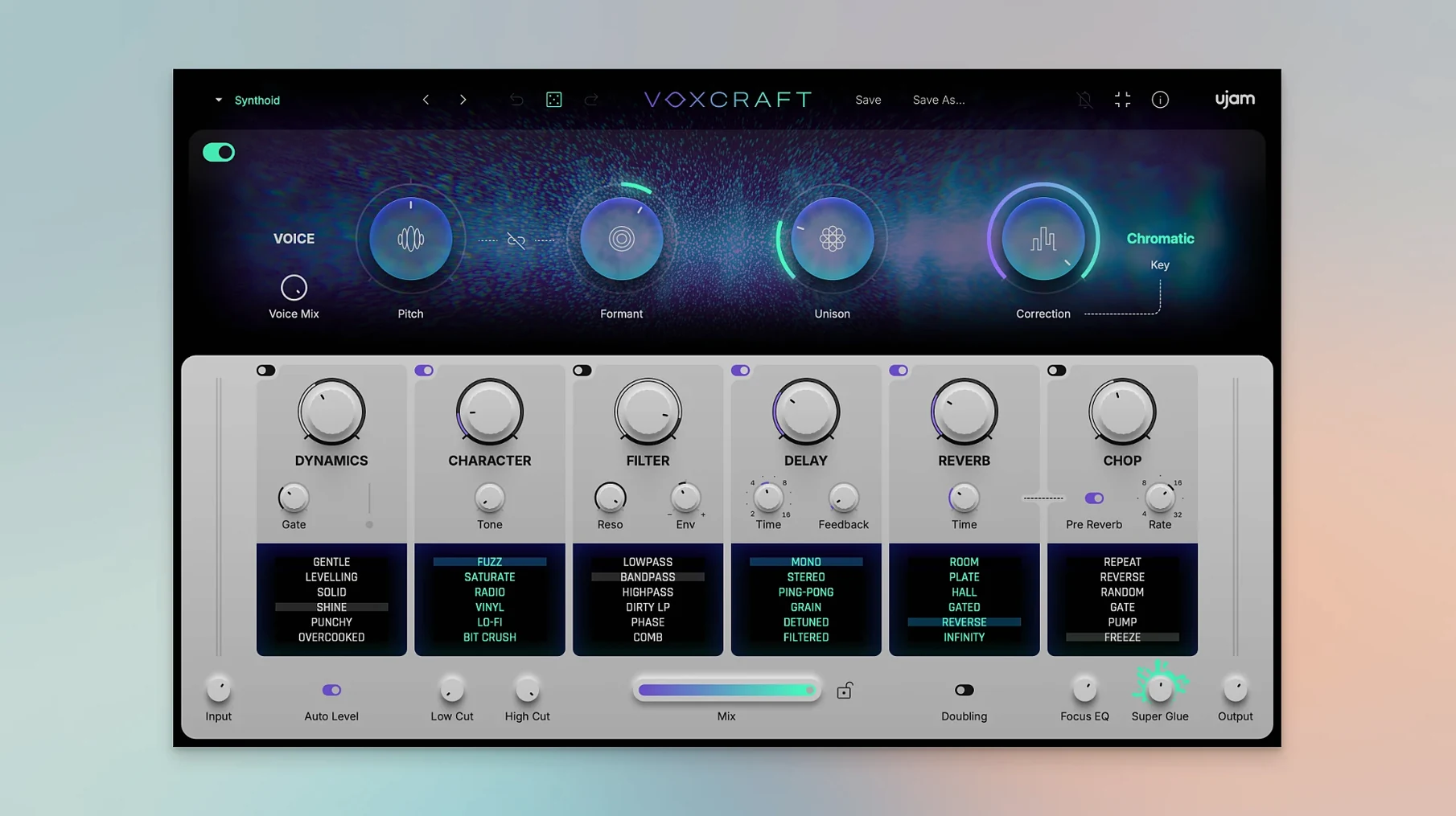
VOXCRAFT runs on any Mac that boots macOS 10.13 or later, native on Intel and Apple Silicon, and drops into your DAW as VST2, VST3, AU2 or AAX. It is UJAM's first tool built entirely around the voice—not for fixing a bad take, but for twisting a clean vocal loop into something jagged, glassy, doubled or synthetic. The engine hangs on six FX modules, each with six vocal-processing modes, so a single knob turn can pitch a snippet up a fifth, smother it in telephone saturation, and glue it into a stereo spread that sits behind your lead without touching a fader. Everything reacts in real time, which makes it dangerous for a deadline: you open it to nudge a chop, and thirty minutes later you have a completely different hook.
- Six FX modules, each offering six distinct vocal-processing modes that stack in series.
- One-click random preset generator pulls combinations you would not dial in manually.
- Designed specifically for vocal loops, samples, and chops—not for corrective editing.
- 100 factory presets give you starting points for pitched doubles, distorted layers, and wide backgrounds.
- AU2, VST2, VST3, and AAX formats cover every major DAW from Logic to Pro Tools to Bitwig.
Where it fits: drop it on a vocal bus after you have cleaned up timing and noise. Pull up a preset, hit the randomizer if nothing sticks, then drag the macro faders until the layer wraps around the lead without stepping on it. It is a color box for the voice, and it earns its slot on an editor's template because it solves a recurring problem—dry vocals that need texture fast—without sending you into a chain of six stock plugins.
Questions You’ll Ask Before Installing
Does it work on vocal recordings, or just samples? Both. Feed it a sung phrase, a spoken loop, or a one-shot you pulled from a pack. The processing chain reacts the same way. If the source is in tune and dry, VOXCRAFT has an easier time, but slightly pitchy material gets pulled into line by the correction engine without you babysitting a tuner. The real sweet spot is short loops and chops—material you can double, pitch-shift, and layer without worrying about breath noise stacking into mud.
Will it replace a dedicated pitch-correction plugin? Not if you need surgical control over every syllable. The pitch module inside VOXCRAFT is a creative shaper, not a transparency tool. It snaps a voice to scale and pushes it toward a synthetic or doubled character. If you want invisible tuning, use something else first, then feed the result into VOXCRAFT for color.
What happens when I hit the random button mid-session? The plugin scrambles module settings and mode selections across all six slots, often landing on combinations that break a sound in useful ways. You might get a gated, formant-shifted whisper layered under a quarter-note delay. Not every roll lands, but you can lock the keepers and keep clicking. Producers hunting for a hook texture find it addictive; editors on a clock learn to stop after three or four hits and tweak from there.
Preset Recall Now Survives Tuesday-to-Friday Sessions
Version 1.1.1 tightened the behavior that matters most when you are stacking vocal layers: preset recall is more consistent across sessions, so the sound you saved on Tuesday actually sounds the same on Friday. The randomizer engine got a smarter weighting system—fewer mushy results, more rhythmic and pitched variations that sit in a mix without heavy EQ afterward. Also fixed: a bug where the delay module would lose sync after a tempo change in certain hosts, which stopped a nasty surprise when a client asked to bump the BPM mid-session. For anyone who dragged VOXCRAFT into a Logic or Ableton project and watched it hiccup on playback start, that stutter is gone now.
Feed It One Voice, Not a Finished Arrangement
The number one trap is feeding it a full vocal arrangement and expecting it to behave. VOXCRAFT wants a focused source—one voice, one loop, one phrase. Drop it on a stereo bounce with ad-libs, harmonies, and room bleed, and the pitch engine chases too many targets at once. You end up with a washy, over-processed smear. Keep the input clean and singular.
Another classic: stacking all six modules on the first preset and wondering why the vocal vanished. The dynamics and character modules can squash a signal fast. Start with one or two active slots, dial in a sound, then add reverb or delay last. The filtering module sits well early in the chain; rhythmic chopping works better late, once the tone is locked. And if you are pulling the UJAM VoxCraft Mac torrent for a quick vocal idea, resist the urge to randomize endlessly—grab a preset close to what you hear in your head, tweak two macro faders, and commit. The render bar does not care about option paralysis.
- macOS 10.13 or later
- Intel or Apple Silicon Mac
- Host that supports VST2, VST3, AU2, or AAX
- Interface language: English
Questions I actually get
What is VOXCRAFT meant for?
It is built for creative vocal shaping on loops, samples and chops, not for repairing recording errors. Think of it as a color box for vocal texture.
Can I generate random presets?
Yes, the official product page confirms a one-click random preset generator that pulls combinations across the six FX modules.
Which DAWs does it support?
It works in any host that loads VST2, VST3, AU2 or AAX—that includes Ableton Live, Logic Pro, Pro Tools, FL Studio, Cubase, Studio One, Bitwig, Reaper and Reason.
Notes from the edit bay · 0
Sign in or get an edit-bay pass to leave a note.
No notes from the edit bay yet. They go up after I read them.