You just finished editing a tight-turnaround corporate spot. The voiceover sits well, but the background music needs to gel instead of compete. You drop EZmix on the music bus, scroll to a mastering-style preset, and the low end tightens up before the client even walks back in with coffee. That's the whole pitch: a single plugin slot, a single click, and a chain of effects dialed in by engineers who mix records for a living.
| What | Detail |
|---|---|
| Version | 3.2.2 |
| macOS | 10.13 or later |
| Architecture | Apple Silicon & Intel |
| Plug-in formats | VST, AU, AAX |
| Interface | English |
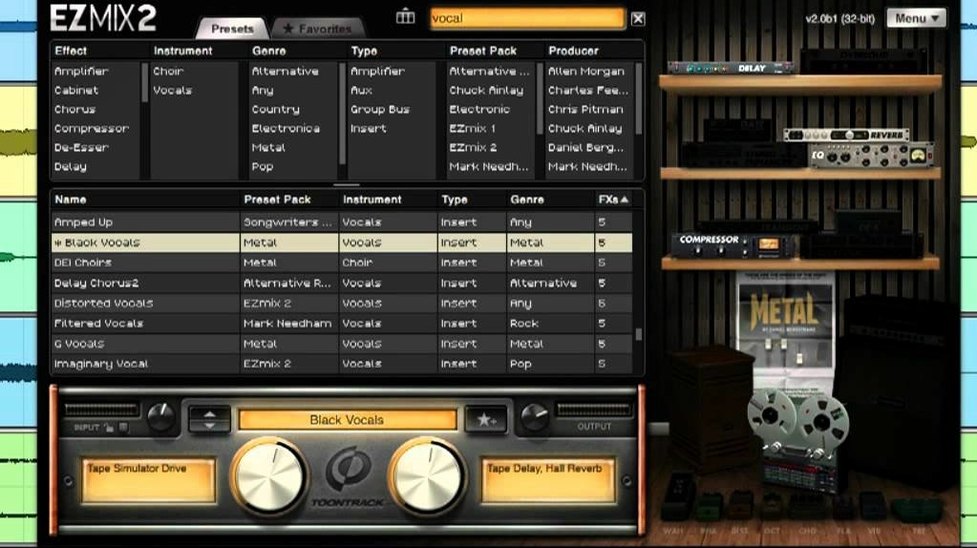
Beneath that dead-simple preset browser, EZmix packs a full guitar and bass amp simulator alongside mastering-grade reverb algorithms that arrived with EZmix 2. The whole EZmix 1 library comes along for the ride, so you're not losing old favorites. Drums, vocals, keys, bass — every category has chains built from the ground up for that source, and the redesigned interface in version 2 keeps the preset hunt fast instead of fiddly. If your host spits out VST, AU, or AAX, you're covered. On an M-series Mac, it runs native; on an older Intel cheese grater, it still chugs along from 10.13 upward.
Tracking a Bass Tone in Seconds, Not an Hour
Songwriters tracking in Logic late at night pull more from this than anyone. They need a bass tone that sits in the verse now, not after forty minutes of compressor tweaking. EZmix gives them an amp and cabinet chain for the DI track, a vocal polish preset on the scratch take, and a drum bus treatment that glues the Superior Drummer output without opening four other plugins. The creative flow doesn't stall.
Podcast and voiceover editors are a close second. A single instance on the dialogue bus can apply EQ, de-essing, light saturation, and leveling in one go. When you're cutting three episodes before lunch, that's the difference between finishing early and staring at a gain reduction meter. Corporate video editors who rarely touch a mixer channel outside of Final Cut's inspector get predictable, broadcast-ready voice chains without learning the difference between a 2:1 and 4:1 ratio.
Guitarists who practice at the desk rather than in front of a combo amp find the standalone host indispensable. Fire it up outside the DAW, pick an amp preset, and play along with a reference track. No loading a session, no setting up a channel strip, no decisions beyond "which amp flavor feels right tonight."
Why It Belongs After Your Preamp and Pro-Q
EZmix doesn't replace your full-featured channel strip or a surgical EQ. It sits downstream from the heavy lifting. Picture a vocal chain: you track through a hardware preamp, apply gentle corrective EQ in FabFilter Pro-Q, then drop EZmix on the insert after it. The preset handles the character work — saturation, compression flavor, a touch of widening, maybe a slap delay baked into the reverb tail. Suddenly your clean-but-boring vocal sounds like it belongs on a record.
On the mix bus, it works as a sanity check. After balancing levels across the session, slap a mastering-style EZmix preset on the stereo output and listen. Does the low end fold under pressure? Is the midrange poking through where it shouldn't? The preset reveals problems you missed on individual channels, and sometimes it is the fix, especially for quick-turnaround demos and web content.
macOS integration is straightforward. As an AU plugin, it shows up in Logic's mixer without ceremony; as VST, it slots into Ableton Live or Cubase. The standalone host lives in your Applications folder and pulls from the same preset library. There's no separate installer, no iLok dance — mount the disk image, run the installer, and your DAW finds it on the next launch.
Type “Vox Comp” and Load Instantly
The preset browser search field accepts shorthand. Type "vox comp" and it narrows to vocal compression chains instantly, no dropdown menus required. Double-clicking a preset bypasses the audition button — it loads straight to the chain. Scroll-wheel over the preset list flies through categories faster than the arrow keys, which sounds trivial until you're hunting through three hundred options at 1 AM.
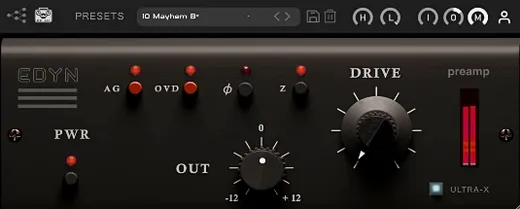
The gain stage indicator, easy to overlook next to the main knob, tells you whether the incoming signal hits the sweet spot before the chain engages. If you're feeding it a whisper, the preset can't do its job. A quick trim at the source and the whole chain opens up. The output level control is oversized for a reason: you ride it constantly to match levels between presets when auditioning, and the throw is long enough for fine adjustments without modifier keys.
Guitar and bass presets respond to your instrument's volume knob the way a hardware amp does. Roll back for clean edge-of-breakup tones without switching presets. It's not modeled per-component like a Kemper profile, but the gain staging inside the chain reacts dynamically enough that a volume roll-off feels musical, not like you're just attenuating a static signal.
Curated Static Presets vs. a Mixing Assistant That Analyzes Audio
EZmix vs. iZotope Neutron. Neutron is a mixing assistant that analyzes audio and builds custom chains with surgical intent. EZmix is a curated library of static presets. Neutron gives you a visual mixer and masking meters; EZmix gives you a single window with a dropdown and a knob. For a mix engineer who wants to learn why a vocal cut is happening, Neutron reveals every move. For someone who needs the vocal to sound finished before the client arrives, EZmix is faster. They don't compete so much as occupy different points on the speed-versus-control line.
EZmix vs. Waves OneKnob Series. OneKnob plugins do exactly what the name implies: one parameter per plugin. Louder, brighter, phatter — turn the knob and it applies a fixed effect chain. EZmix wraps a dozen OneKnob-style chains into a single plugin with source-specific starting points. Where Waves requires six insert slots to process a vocal bus with compression, EQ, saturation, reverb, delay, and widening, EZmix does it in one slot with a preset that already balances those elements against each other.
EZmix vs. Native Instruments Guitar Rig. Guitar Rig is a modular guitar and bass amp environment with drag-and-drop component routing and deep editing. EZmix's amp section offers curated, non-editable chains built by Toontrack's preset designers. Guitar Rig wins on flexibility — build any signal path you can imagine. EZmix wins on immediacy — three clicks from silence to a record-ready tone. If you're building a signature sound from scratch, Guitar Rig gives you the parts. If you're tracking rhythm guitars for a demo that needs to sound mixed by dinner, EZmix is the shorter path.
Version 3.2.2 adds compatibility for EZmix expansion packs released from Q4 2025 onward. If you grab a newer pack, you'll need this update for it to show up.
- macOS 10.13 or newer
- Apple Silicon or Intel processor
- Host that loads VST, AU, or AAX plug-ins
Questions I actually get
Does EZmix 3 work as a guitar amp sim?
Yes, EZmix includes guitar and bass amplifier and cabinet simulation alongside its mixing and mastering presets, so you can load a full amp chain on a DI track without leaving the plugin.
Notes from the edit bay · 0
Sign in or get an edit-bay pass to leave a note.
No notes from the edit bay yet. They go up after I read them.