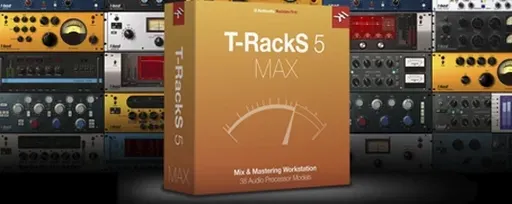
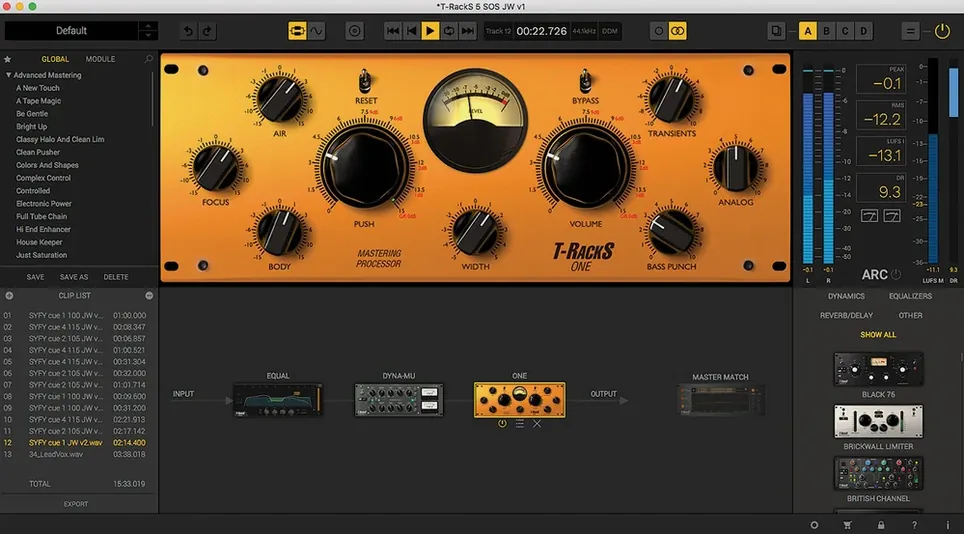
Five. That's how many plugin formats this single package spans once you count the standalone Mastering Console. T-RackS 6.3.2 opens as its own self-contained app, or as a suite of Audio Units, VST 3, and AAX plug-ins you pull up inside a DAW. It's a 64-bit mixing and mastering toolkit from IK Multimedia, built to live wherever your session does.
Consistent Processors Across Logic, Live, and Pro Tools
- Format-agnostic studios. Whether the session is in Logic Pro, Ableton Live, or Pro Tools, the same processors appear with consistent controls.
- Standalone mastering. The Mastering Console loads outside any DAW, so you can assemble a chain, process stereo files, and export multi-format renders without opening a timeline.
- Module-level curation. The new Module Manager keeps the rack tidy. Hide the processors you don't reach for, so the ones you do are right at the surface.
- Broad dynamics shaping. Four new modules — Master Match, Dyna-Mu, EQual, and ONE — push the processing palette well beyond the classic T-RackS compressors and EQs.
Catalina Minimum and English-Only Labels
- macOS Catalina minimum. You need 10.15 or later on a 64-bit Intel or Apple Silicon machine. There's no backward bridge to older Macs.
- English-only interface. Menus, labels, and tooltips appear in a single language.
Blank Window Fix in Privacy & Security Settings
A blank plug-in window after installation is almost always a permissions hiccup. On Apple Silicon, macOS sometimes blocks the component until you approve it in System Settings > Privacy & Security. A quick reboot after the first scan usually sorts it, but I've had to manually drag a stray Audio Unit into ~/Library/Audio/Plug-Ins/Components once when the installer placed it one folder too deep.
The Module Manager can hide processors so well you forget they exist. If a module you swear you installed doesn't appear in the rack, open the Manager and check the visibility toggle. It's the first place I look when something's missing.
DAW timing offsets crop up when you stack latency-heavy modules like Master Match X on a live input. The standalone console handles this internally, but inside a DAW you'll want to engage plugin delay compensation on the track. Without it, a parallel chain with Dyna-Mu on one lane and a dry signal on another can phase-smear the low end in a way that's hard to pinpoint until you solo each path.
Visual Signal Flow with Faster Meters and Module Manager
Versions 6.x landed with a redesigned GUI that made the rack feel less like a gear list and more like a signal flow. The meters respond faster, the chain view shows parallel routing visually, and the Module Manager arrived with version 6 — no more scrolling past processors you never touch. The Master Match X module, added in the 6.0 cycle, pulls EQ curve matching directly into the mastering chain rather than requiring an external reference tool. In practice, that means you can drop it on a bus, capture the tonal balance of a reference track, and apply it as a starting point without leaving the window.
Version 6.3.2 kept the focus on stability. Apple Silicon native support is reliable here, and the 64-bit floating-point engine handles sample rates up to 192 kHz across all modules. The four dithering options — user-selectable per export — haven't changed, but they're now exposed more clearly in the export dialog rather than buried in a preferences pane.
Empty Rack vs. Ozone’s Assistant-Driven Chain
Against iZotope Ozone. Ozone centers on an assistant-driven workflow: it listens, suggests a chain, and builds the signal path. T-RackS gives you an empty rack and a list of processors. That's a philosophical split. If I'm mixing for a client who wants a specific compressor character — something with the grab of a vari-mu — I reach for Dyna-Mu inside T-RackS because it's one click from the module list. Ozone's modules are excellent, but the palette leans toward surgical precision, while T-RackS keeps one foot in analog-modeled color.
Against FabFilter Pro-L 2 plus Pro-Q 3. This isn't a one-to-one matchup. A pair of FabFilter plug-ins won't give you a standalone mastering console, album assembly tools, or the breadth of nine dedicated dynamics and EQ processors. What FabFilter does deliver is a deeper feature set per plug-in — Pro-Q 3's dynamic EQ bands and spectrum grab are more flexible than EQual's fixed topology. T-RackS trades per-module depth for an integrated environment where you sequence tracks, adjust spacing, embed metadata, and export multiple formats from one screen. Two different jobs.
Against Logic Pro's built-in Mastering Assistant. Logic's tool is fast and requires zero setup, but it's a black box. You can't swap the compressor model or add a parallel saturation lane. T-RackS is the opposite: you build the path, choose every processor, and split the signal into parallel chains when the track needs it. More time, more control.
Right-Click a Slot for Hidden Parallel Routing
- Right-click a module slot for parallel routing. The option isn't labeled in the main UI — it lives in the context menu. A 50% wet Dyna-Mu on a parallel lane can glue a drum bus without squashing the transients.
- Command-drag to reorder modules. The chain view accepts drag-and-drop, but holding Command while dragging locks the move to horizontal only, so you don't accidentally nudge a module into a parallel lane.
- Album assembly handles gapless playback. Set the gap to zero on the sequencing page, and the export respects it. Useful for live recordings or concept albums where tracks bleed into each other.
- Metering module presets are underrated. The metering section — included in the full suite — has loudness presets for streaming platforms. Switching from a CD master to a LUFS target for Spotify takes two clicks and the meter re-scales accordingly.
- The export dialog remembers your last format layout. If you regularly bounce a 24-bit WAV plus a 320 kbps MP3 with embedded artwork, set it once and it sticks as the default until you change it.
- macOS 10.15 Catalina or later
- 64-bit Intel or Apple Silicon processor
- 64-bit operating system
Questions I actually get
Does T-RackS 6 work as a standalone app?
Yes. The Mastering Console runs independently of any DAW, so you can build a processing chain and export finished files directly.
Notes from the edit bay · 0
Sign in or get an edit-bay pass to leave a note.
No notes from the edit bay yet. They go up after I read them.