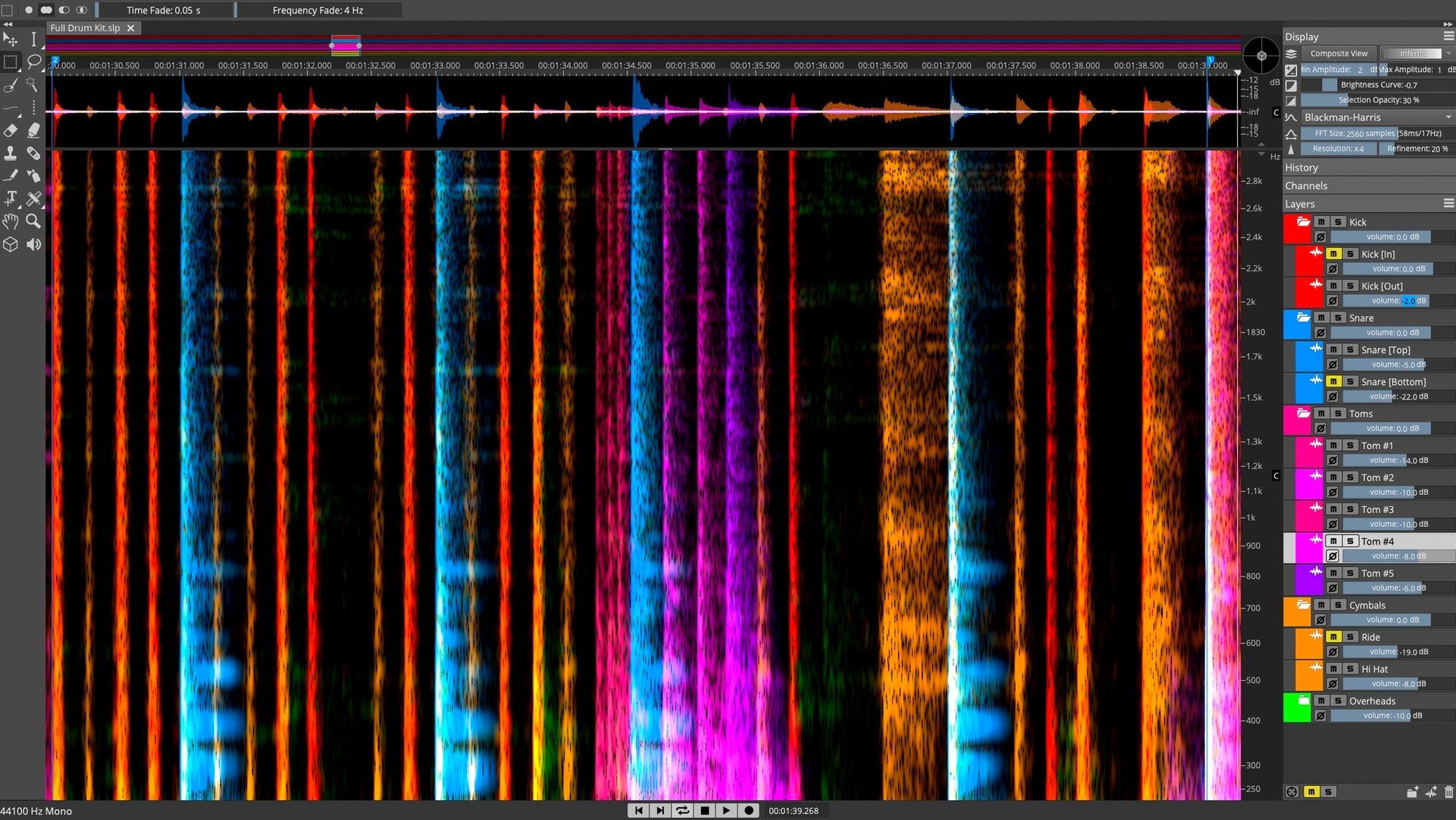
It runs on any Mac with macOS 12 or later, native on both Intel and Apple Silicon. That means the spectral rendering is swift, even when you're staring at a dense, rainbow-colored FFT map of a full mix.
1. Spot the mess
You're looking at a spectrogram, not a waveform. A chair squeak during a quiet piano passage shows up as a bright, wispy smear. Click it. The time/frequency selection tools let you isolate just that squeak, leaving the harmonics above and below untouched.
2. Unmix the layers
Dragging a selection across a drum bus isn't a simple mute. The Unmix module reads the spectral content and pulls kick, snare, and hi-hats onto separate layers. You can rebalance a live room recording by lowering the cymbal layer—a move that's pure wizardry on a two-track stereo file.
3. Find every cough
One loud cough ruins a live set. Select it, then let the Pattern Finder scan the entire file for similar spectral signatures. It returns every throat-clear and glass clink in the venue, ready for batch attenuation. The Voice Denoiser handles broadband HVAC hum without turning the vocal into a watery mess.
It plugs into Cubase or Nuendo via ARA 2, so your layers appear as clips in the timeline. No new windows, no bouncing stems back and forth. The spectral view becomes just another angle on your session.
I loaded a live acoustic recording last Thursday — one vocal, one guitar, captured in a room with a fridge that kicked on halfway through. The spectrogram painted the low-frequency hum as a solid orange bar right around 120 Hz, steady as a bassline nobody asked for.
First step: I lassoed a clean sample of the hum between guitar phrases. A four-second stretch where the vocalist paused and the fridge motor sang solo. Right-click, Learn Noise Profile. The spectral noise print appeared as a sidebar snapshot — amplitude curves across the frequency bins, ready to subtract.
I switched to the Denoise module and pulled the reduction curve down about 9 dB, watching the preview waveform thin out below 200 Hz. The guitar's body resonance lived down there too, so I drew a soft knee around 180 Hz to keep the wood character intact. Applied. The hum vanished without chewing into the warmth of the fingerpicking.
Next trouble: the vocalist popped a plosive on "please" at 1:24. In waveform view it looked like a fat transient. In spectral view it was a vertical column of energy from 60 Hz up to about 400 Hz, bleeding into the guitar bleed. I grabbed the Frequency Selection tool, set a feather of 12 pixels, and drew a rectangle around the plosive's low-end burst. Gain reduction: -6 dB. The "p" softened into something a pop filter should've caught on the day.
Last move: the outro had a string squeak that didn't bother me until I heard it soloed. Pattern Finder located three more across the timeline. I selected all four and applied a gentle high-shelf dip above 4 kHz — fast, surgical, no automation lanes drawn.
A post mixer's Monday morning
Picture a dialogue editor staring at a feature film turnover. The location sound has an actor who kept bumping the lav mic against a necklace. Every time she turns her head, a sharp metallic tick lands like a snare drum ghost note.
The ticks are easy to see — short vertical lines in the 6 kHz to 12 kHz range, bright yellow against the darker purple of the voice harmonics. In a traditional DAW you'd be drawing clip gain envelopes for three hours. Here, the Pattern Finder scans one tick, then returns all 47 instances across the reel. A batch gain reduction of -14 dB on the selection set, and the necklace disappears. The dialogue stays natural because the attenuation only hits the narrow frequency band where metal meets lav.
Same session, different problem: the interview segment was shot near a server room. Broadband fan noise, constant and fatiguing. The Voice Denoiser learns the noise floor from a pause between sentences and pulls it down across the entire spectrum. Dialogue clarity jumps without the phasey artifacts you'd get from heavy broadband gating.
ARA 2 Bridges to Cubase While Standalone Handles Any DAW’s Stems
The ARA 2 bridge to Cubase and Nuendo is the obvious handshake, but the standalone app earns its keep in translation duties. You can drag a stereo mix from Finder straight into the waveform display, process it, and export stems that drop into Logic, Ableton Live, or Pro Tools without a single proprietary session file.
It also listens to macOS's audio routing. Core Audio sees SpectraLayers as a playback device, so you can monitor through the same interface that feeds your monitors. The selection tools respect the system's scroll direction and trackpad gestures — pinch to zoom the frequency axis, two-finger swipe to scroll the timeline. It feels like a native Mac app, not a port wearing a coat.
For sound designers who build libraries in IINA or Audacity and finish in a DAW, SpectraLayers sits in the middle as the cleanup stage. Extract a rain recording from a video file, strip the camera motor whine in the spectral editor, save a clean 24-bit WAV, and only then import into the session. No real-time plugins eating CPU on a track that just plays ambience.
Stem extraction for a remix — end to end
A producer gets sent a stereo MP3 of a track from ten years ago. No multis, no stems, just a bounced master. The brief: create a dance remix with the original vocal intact.
1. Import and analyze. Drag the file into SpectraLayers. The waveform draws, then the spectrogram calculation kicks in — faster on an M-series chip, but clean on Intel too. Hit Unmix > Stems and choose the four-stem model: vocals, drums, bass, other.
2. Wait a beat. The AI processes the entire file and populates four layers beneath the spectrogram. The vocal layer sounds slightly grainy in the reverb tail — that's normal. The drum layer has a little hi-hat bleed into "other," but the kick and snare are isolated well enough for a remix backbone.
3. Solo and refine the vocal. Mute the other three layers, listen through. There's a faint snare ghost at 2:15 where the original mix had the vocal sitting right on top of a fill. Switch to the Components unmix model on just that vocal layer, separate tonal from noise, and drop the noise component by -3 dB. The snare ghost recedes.
4. Export the layers. Drag each layer to the export queue. Choose 48 kHz, 24-bit WAV. Name them clearly: "Vox_Lead.wav," "Drums.wav," "Bass.wav," "Music.wav." Hit export and watch four progress bars zip through.
5. Rebuild in the DAW. Drop the stems into Ableton Live. Time-stretch the drums to match the new tempo. Sidechain the bass to the new kick. The vocal floats on top, full and present, and nobody can tell it came from a single MP3.
The whole extraction took under four minutes. A decade ago you'd need an a cappella leaked online or a very cooperative artist with old hard drives.
- macOS 12 or later
- Intel or Apple Silicon processor
Questions I actually get
What's the difference between SpectraLayers Pro and Elements?
Pro adds advanced tools like the full Unmix module for stem separation, Pattern Finder for locating similar sounds, and ARA 2 support for deeper DAW integration.
Notes from the edit bay · 0
Sign in or get an edit-bay pass to leave a note.
No notes from the edit bay yet. They go up after I read them.