Version 1.1.1 refined the core engine that started with the Nicky Romero edition, tightening the low-end punch and making the three distortion algorithms respond more musically at higher drive settings. It still loads as a 64-bit Intel plugin, sitting comfortably on a dedicated drum bus or directly on an instrument track in any AU or VST host that hasn't moved to Apple Silicon-only builds.
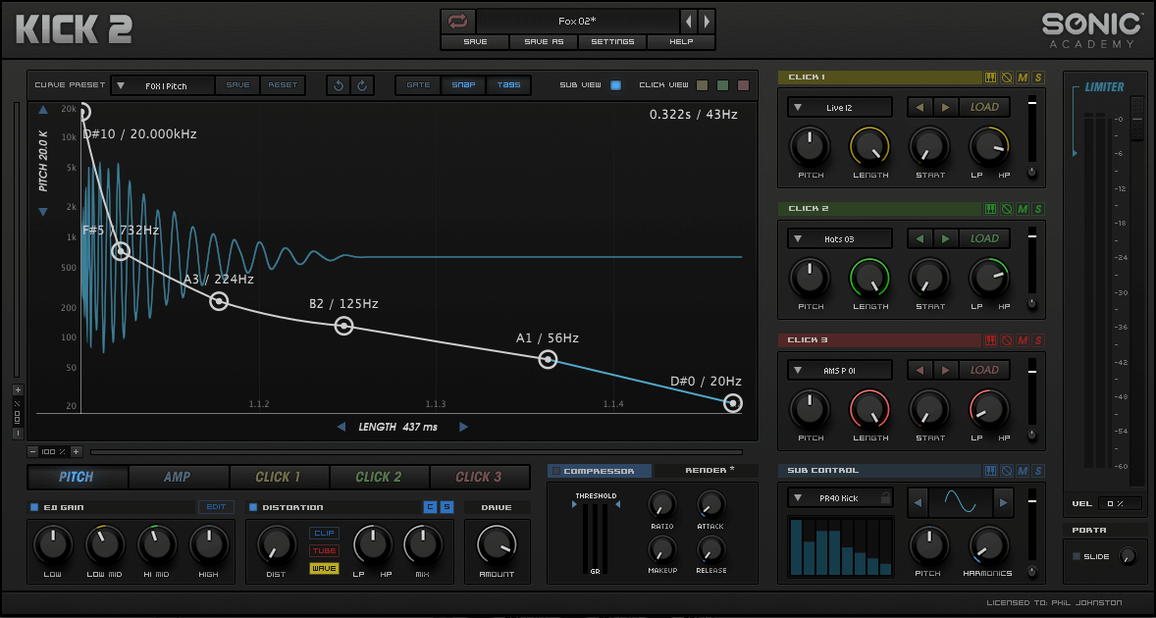
Where it fits: I drop KICK onto a software instrument slot before I reach for samples. The oscillator gives me a clean fundamental I can tune to the key of the track, and the single LFO lets me bend pitch for that classic thump attack. From there it's a quick trip through the amp envelope and into the distortion section — subtle saturation for a house thud, or harder clipping for a techno transient that cuts through a mix.
It works as a sound design scratchpad too. Mute the low end, crank the distortion, and layer the result behind an acoustic kick for a hybrid texture. The plugin doesn't try to model acoustic drums; it's built for synthesized weight, and it delivers that without a pile of hidden samples.
On a bus, I'll sometimes send a snare or a perc loop through KICK's distortion stage alone, bypassing the oscillator entirely. It's not the intended use, but the algorithms are aggressive enough to make it worth the routing. Straightforward, unapologetic, and fast when a deadline is blinking.
Phase Cancellation When Layering External Subs
The most frequent headache I see is phase cancellation when layering KICK's output with an external sub sample. The synthesized sine fundamental can drift slightly depending on the pitch-bend amount and amp envelope speed. Fix it by printing the kick to audio, zooming in on the waveform, and nudging the clip until the zero-crossings align. Or just commit early — route KICK to its own bus, slap a utility with a polarity flip on the duplicate layer, and toggle it while the kick hits. One position usually locks the low end in place.
Another snag: the plugin window opens blank in some hosts after a project recall. It's an Intel-only build, so Logic running in native Apple Silicon mode wraps it through Rosetta. If the UI doesn't draw, toggle the plugin window closed and open again. If that fails, save the preset as an .aupreset or .fxp, reload the plugin, and pull the preset back in. Annoying, but it takes ten seconds.
CPU spikes from the distortion algorithms catch people off guard too. Algorithm 3, the most aggressive one, can tax a single core when the drive is past 70%. Freeze the track or bounce in place before piling on other processing. KICK isn't designed to run sixteen instances in a live session — it's a surgical tool you commit to audio once the tone is right.
Beginner Mistakes That Undermine the Low End
The biggest one: ignoring the sub oscillator's waveform selector. It defaults to a sine wave, which is the correct starting point for most genres. But new producers sometimes flip it to a triangle or square wave without a high-pass filter downstream, and suddenly the mix has harmonic content clashing with the bassline. The sub should occupy one narrow frequency band. If the waveform has overtones, use the onboard EQ to shave them off before they leave the plugin.
Another classic: setting the pitch envelope range too wide and wondering why the kick disappears on smaller speakers. A rapid pitch drop from +24 semitones sounds dramatic on headphones, but on a Bluetooth speaker the transient vanishes because the fundamental hasn't stabilized by the time the amp envelope opens. Keep the pitch modulation to 3–7 semitones for most styles, and tighten the decay so the oscillator settles within the first 30 milliseconds. The thump comes from that quick snap back to the root pitch, not from the extreme sweep.
Overloading the click section is the third trap. Three click-shaping bands stacked at high volume create a papery attack that fights the hi-hats and shakers. Start with one click band, shape its envelope until it punches through, and only add a second if the transient needs more body. Less click often translates to more perceived weight, because the ear latches onto the contrast between silence and the sub boom.
Back Off the Compressor Ratio Before You Start
Before you touch anything creative, open the compressor section and back off the ratio. The factory default applies a fairly aggressive squeeze that works for preset demos but can choke a kick that already has a tight amp envelope. Drop the ratio to 2:1, set the threshold so the gain reduction needle barely moves on the hardest hit, and let the limiter handle any overs. This preserves the dynamic snap that makes a synthesized kick feel alive instead of static.
Next, flip the EQ into mid-side mode if your host supports routing the side signal separately. A gentle cut around 200 Hz on the mid channel clears room for the snare body, while a slight boost at 4 kHz on the side channel gives the click width without pushing the center image. KICK's EQ is surgical enough for this if you keep the Q values moderate — broad strokes only.
Finally, save a template preset with the distortion bypassed and the output gain set to -6 dB. Headroom is your friend. You can always push it harder later in the chain, but a hot signal out of KICK leaves no room for bus processing without clipping your master fader. The limiter at the end of the signal path is a safety net, not a mixing target.
How KICK Stacks Up Against Similar Tools
Kick 2 versus Nicky Romero Kick (the original): This is the direct lineage, so the comparison matters. The original Kick by Nicky Romero had a narrower sub-oscillator section and a single distortion character that leaned toward EDM aggression. Version 1.1.1 adds two extra distortion algorithms — one with a softer saturation curve that suits hip-hop and downtempo, and a third that borders on fuzz for industrial textures. The click-shaping section also gained finer envelope controls, so you can dial in transient length in milliseconds instead of relying on a single knob sweep. If you grabbed the original years ago and found it too genre-locked, the update opens the palette considerably. Both share the same Intel architecture, so there's no performance penalty for the upgrade.
Kick 2 versus Big Kick (Plugin Boutique): Big Kick leans heavily on sample layering with some synthesis on top. KICK reverses that model — the oscillator generates the fundamental, and the click samples serve as garnish. In practice, Big Kick is faster if you want to scroll through 200 kicks and pick one that fits. KICK is faster if you know the exact pitch, decay time, and distortion character you need and you want to build it from scratch without browsing. For sound design sessions where the kick needs to follow a chord progression's root notes, KICK's tunable oscillator is the clear advantage. For pure one-shot browsing, Big Kick's workflow wins.
Kick 2 versus PunchBox (D16 Group): PunchBox brings four sound engines — three sample-based and one synthesized — plus a more elaborate effects rack. It's a deeper toolkit for layering complex, evolving kicks with multiple transient sources. The trade-off is time. KICK gives you one sub oscillator, three click bands, and a streamlined signal path that goes from envelope to distortion to limiter in a straight line. On a deadline, that linear flow means you make three decisions — pitch, decay, drive — and bounce. PunchBox invites experimentation, which is fantastic when the schedule allows it. When it doesn't, KICK's constraints become its strength.
Kick 3 1.1.8 lands with a fresh round of stability fixes and under-the-hood improvements.
- macOS 10.13 or later
- Apple Silicon & Intel 64-bit
Questions I actually get
Is this the same plugin as Kick by Nicky Romero?
Yes, Sonic Academy KICK is the updated version of the earlier Nicky Romero-branded plugin, now under Sonic Academy's own drum line.
Does KICK use samples or is it a true synthesizer?
It's a dedicated kick drum synthesizer — it generates sound from an oscillator and shapes it with envelopes, distortion, and an LFO, rather than playing back samples.
What distortion types are available?
The plugin provides three distinct distortion algorithms for saturating and clipping the kick, ranging from warm drive to harder, more aggressive textures.
Notes from the edit bay · 0
Sign in or get an edit-bay pass to leave a note.
No notes from the edit bay yet. They go up after I read them.