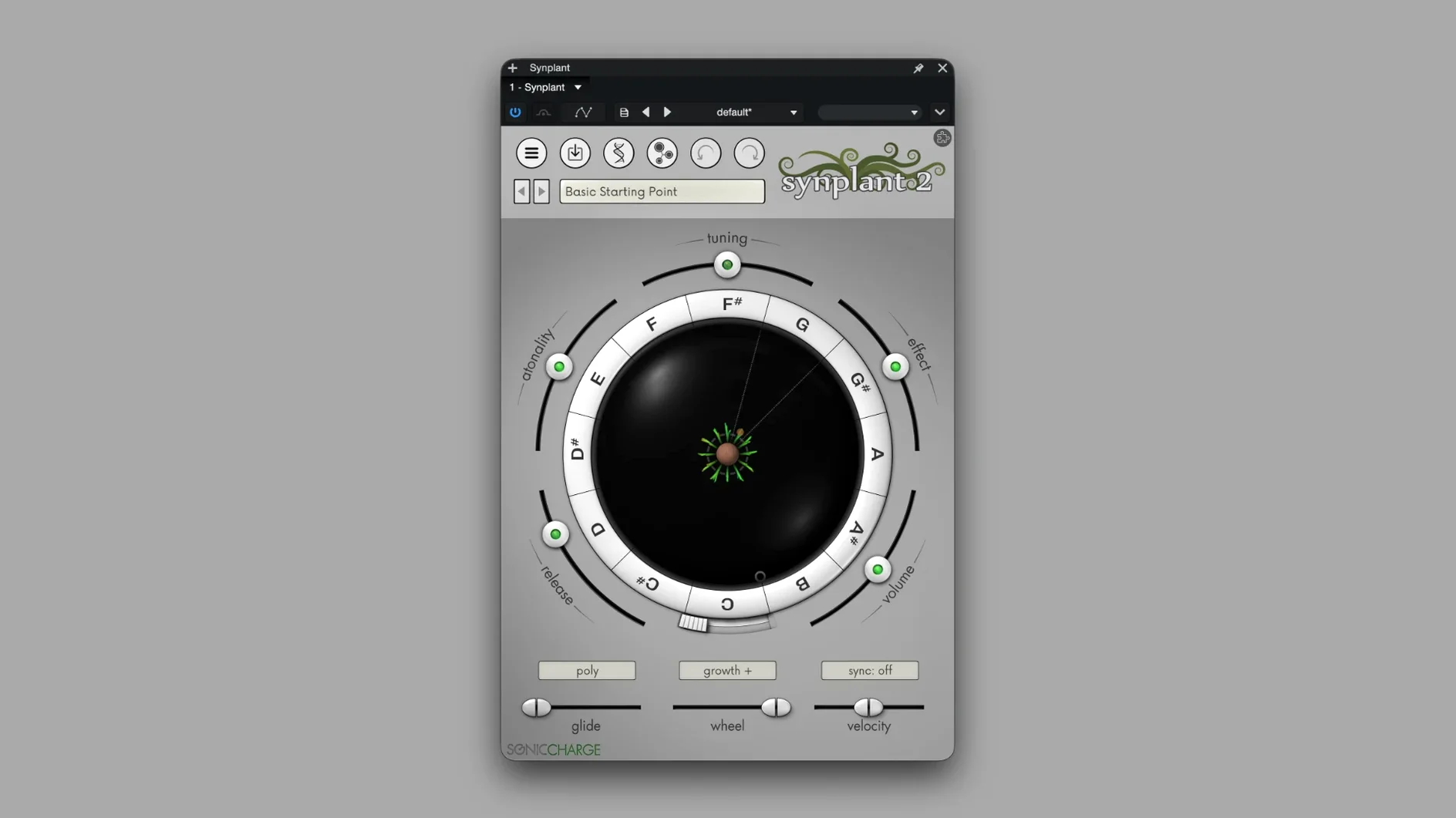
Synplant 2 is a software synth that abandons traditional knob layouts for a genetic approach to sound design.
Drag a Branch, Grow a Mutant, Ditch the Knobs
- Turning a short sample into a playable patch with Genopatch, which runs locally on your Mac.
- Exploring sounds by ear — you drag branches on a plant-like interface and listen to mutations, not parameter names.
- Building pads and leads with real polyphony and portamento when a line needs to slide.
- Running it as a standalone app or inside a DAW via AU, VST2.4, or VST3 on Apple Silicon or Intel Macs.
English-Only Interface and a Modest Factory Library
- Needs macOS 10.13 or newer — fine on High Sierra, better on anything modern.
- The interface is English only, so patch names and tooltips stay in one language.
- The factory library runs into the hundreds of presets, but the real pull is growing your own from source audio.
- A 64-bit host is required for the plug-in formats.
Unicode Paths No Longer Lock the File Browser
Version 2.0.2 is tiny on paper. The single patch note covers a bug where loading a WAV from a folder with Unicode characters—think accent marks, Cyrillic, or Japanese kanji in the path—would lock the file browser. You'd drop a sample on Genopatch, get your result, then find the browser refused to open again until you restarted the plug-in. If your sample library has artist names with diacritics or track titles pulled from international releases, that friction added up. 2.0.2 clears it. The browser opens, every time, no matter what the folder is named.
The fix is small, but it signals something about the development pace. Sonic Charge doesn't push feature-bloat updates. They trace a specific thread, pull it clean, and ship. For a deadline editor who just wants a synth to behave the same way at 2 a.m. as it did at 10 a.m., that is the kind of update you actually notice.
Five-to-Fifteen-Second Genopatch Analysis on Apple Silicon
Genopatch runs locally. You feed it a snare hit, a vocal chop, or a field recording, and it crunches the analysis on your own CPU. On an Apple Silicon Mac, the process typically lands in the five-to-fifteen-second range for a short sample. Intel machines take longer, especially older quad-core i7s, but the synthesizer itself stays playable while the analysis ticks in the background. There is no cloud round-trip, no upload progress bar—just local processing and a result that lands in the patch list.
Once a patch is grown, the synth engine is lean. A single instance barely nudges the CPU meter in Logic or Ableton Live. Stack eight or ten instances with long release tails and unison, and you'll see the meter climb, but the engine handles voice allocation without sudden spikes. Memory use is modest, usually under 200 MB even with several instances loaded.
Stability has been uneventful on the current build. It passes AU validation cleanly, and it has survived long sessions with heavy automation and tempo-sync modulation without crashing or dropping its sound bank. If your host supports VST3 on Apple Silicon natively, run that format—it sidesteps the translation layer and keeps timing tighter under load.
Beginner Stumbles Worth Skipping
Most early confusion comes from expecting Synplant to act like a subtractive synth. The DNA Editor shows envelopes, oscillator types, and filters, but the rest of the interface hides parameter names behind a branching visual metaphor. Here is where new users trip:
- Dragging seeds too far, too fast. The plant responds to small movements. A tiny nudge of a branch changes the timbre; a big yank turns the patch into noise. Start with quarter-inch drags and listen before pulling farther.
- Feeding Genopatch long, busy audio. A thirty-second stereo mix confuses the analysis and returns a muddy patch. Short, monophonic clips—a single piano note, a clean bass pluck, a vocal "ooh"—give the algorithm a clear target. Trim your source in the DAW first, then bounce it in.
- Ignoring the velocity and note response settings. Out of the box, patches can feel static. Mapping branch morphing to key velocity or note number turns a flat preset into a sound that changes as you play harder or move up the keyboard. The controls sit in the modulation section, and skipping them leaves half the synth's personality on the table.
- Forgetting the standalone app exists. If your DAW is busy rendering stems or bouncing a video mix, open the standalone to audition seeds and save new patches without taxing the session. It shares the same preset folder, so anything you grow lands in the plug-in next time you load it.
Give yourself an afternoon of dragging branches without a track deadline. The reward isn't just a folder of your own patches—it is muscle memory for a synth that reads your ears instead of your calculator.
Version 2.0.2 fixes a file browser lockup that happened after loading a WAV from a folder with Unicode characters in its name.
- macOS 10.13 High Sierra or later
- Apple Silicon or Intel 64-bit
- 64-bit host for AU 2, VST 2.4, or VST3
Notes from the edit bay · 0
Sign in or get an edit-bay pass to leave a note.
No notes from the edit bay yet. They go up after I read them.