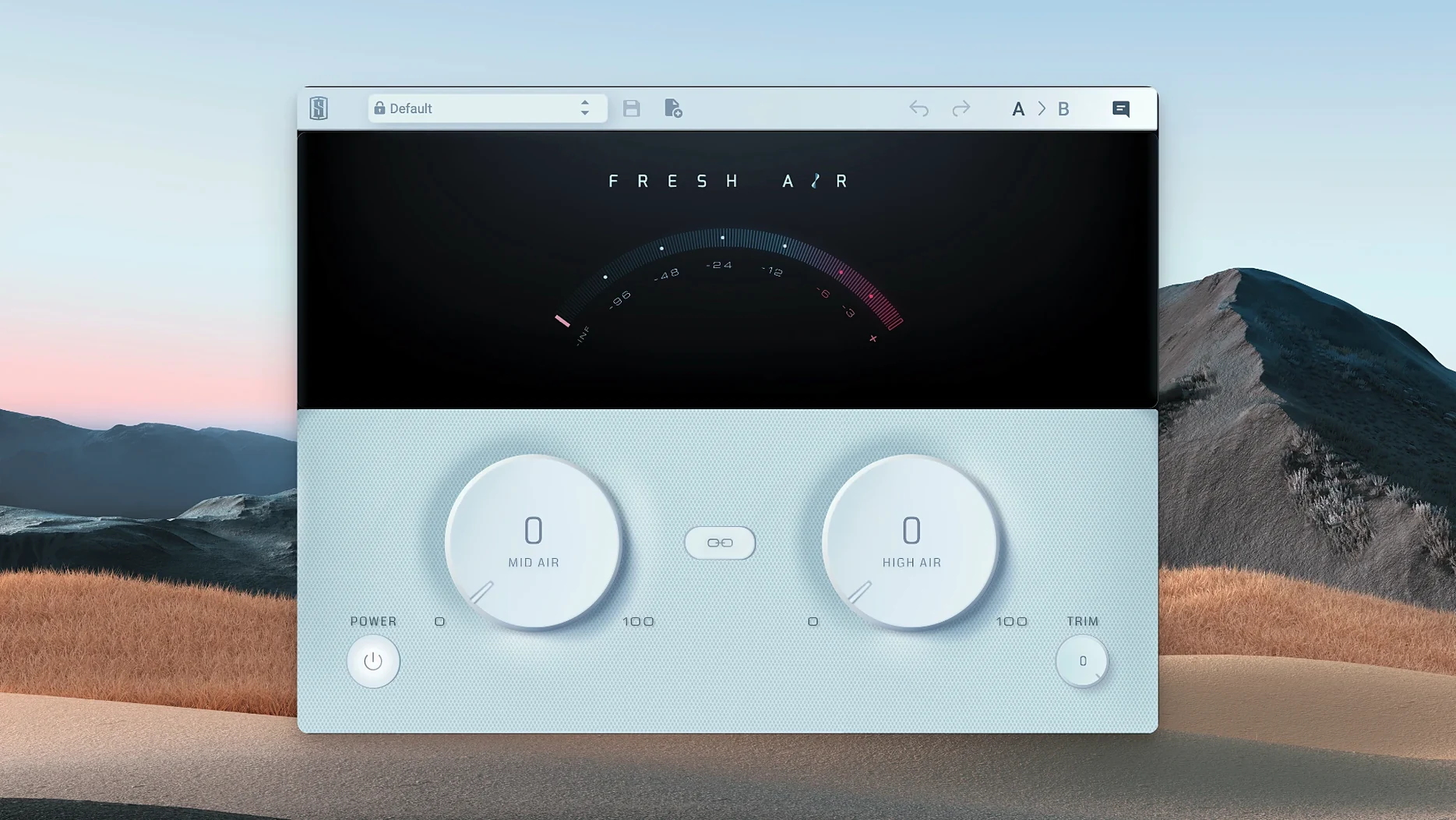
Think of it as a trusty exciter circuit reimagined with modern dynamics processing — Slate Digital Fresh Air grabs that classic hardware vibe and makes it a simple two-knob affair. No menus, no fuss.
Runs Natively on Apple Silicon From macOS 11
Fresh Air runs as a VST, AU, or AAX plugin on Apple Silicon Macs running macOS 11 or newer. Grab the standard installer and your DAW picks it up right away.
Dial In Presence and Shine
Mid Air pushes upper-mid frequencies forward for vocal presence and instrument bite. High Air opens the very top end, delivering genuine shimmer without the brittle artifacts that cheap exciters leave behind.
Link the Knobs When It Works
Hit the Link button to move both controls together, keeping the tonal balance you dialed in while driving more of the effect into a mix bus or synth group.
Snap a Vocal Into the Pocket
A tracking session wrapped at 2 a.m. and the lead vocal feels tucked behind a dense synth arrangement. Drop Fresh Air onto the vocal channel. Push Mid Air to about 3 o’clock — suddenly the consonants cut through without the upper mids turning nasal. Nudge High Air just past noon and the breathiness opens up, making the performance feel closer to the listener. The Trim knob pulls the output back a couple dB so the channel fader stays put. Three moves, maybe forty seconds, and the vocal sits where it belongs.
Feed a Cleaner Signal Into Your Bus Compressor
Fresh Air slots into a gain-staging chain without stepping on anything else. Before it hits a bus compressor, it feeds a cleaner, more present signal — the compressor grabs transients that actually register. After a surgical EQ that tamed a muddy low-mid buildup, Fresh Air restores the top-end energy the EQ shaved off. On a drum bus, it follows a tape saturation plugin; the saturation rounds off peaks, then Fresh Air lifts the cymbals and snare crack back into focus. macOS Audio Units routing in Logic or Ableton Live means you can sandwich it anywhere and the latency stays negligible on Apple Silicon.
Users hunting a slate digital fresh air mac setup often pair it with Slate’s virtual console emulations — the console gives the weight, Fresh Air gives the ceiling. It also complements the built-in macOS audio tools nicely. Bounce a rough mix with Fresh Air on the master bus, then use Quick Look in Finder to audition the file instantly. The plugin doesn’t fight the system; it just sits in the chain.
Skipping Ozone’s Analysis Paralysis
Compared to iZotope Ozone’s Exciter module, Fresh Air strips away the analysis paralysis. Ozone gives you multiple saturation modes, band-soloing, and a detailed GUI — useful if you want to sculpt every harmonic, overkill when the deadline says “make it brighter, now.” Fresh Air’s two knobs and output trim get the same job done before Ozone finishes its spectrum analysis.
Waves Aphex Vintage Aural Exciter models the original hardware with dedicated mix and drive controls. It sounds great on bass and synths but leans into a grittier midrange texture. Fresh Air stays cleaner up top, which makes it a safer pick for master bus work where you don’t want the exciter’s character calling attention to itself. If the mix already has density, Fresh Air lifts the air without adding more grit.
Logic Pro’s stock Exciter plugin, tucked inside the multi-effect, offers a single frequency control and some harmonic color options. It works, but the top end can feel synthetic when pushed. Fresh Air’s dynamic processing keeps the highs responsive to the source — loud transients don’t turn into ice picks. Anyone who grabbed a fresh air crack mac installer expecting a one-trick exciter probably stuck around because it doesn’t punish heavy-handed moves the way simpler exciters do.
From Flat Mix to Finished Bounce: A Master Bus Workflow
A rock mix feels finished except the high end reads as polite. The snare’s attack doesn’t slice through, and the overheads sound like they’re behind a curtain. Here’s the rescue path:
- Insert Fresh Air as the final plugin on the stereo bus. Everything before it — compression, limiting, EQ — stays untouched. Fresh Air processes whatever the chain delivers.
- Set High Air to 2.5 and Mid Air to 1.8 with the Link button off. High Air grabs the cymbal shimmer and room ambience. Mid Air tightens the snare crack and vocal presence without pulling the guitars forward too aggressively.
- Play the loudest chorus section and watch the Trim meter. Both bands add perceived level. Drop Trim by 1.5 dB to keep the peak level identical to the bypassed signal — no louder, just brighter.
- Toggle the plugin bypass (Cmd-click in Logic, or your DAW’s equivalent). Flip between processed and unprocessed across different playback systems. The mix should open up, not change shape.
- Bounce the master. On Apple Silicon, the render flies. Quick Look the bounced file with the spacebar, then AirDrop it to a phone for a car-test reference. If the top end translates clean on a Bluetooth speaker, you’re done.
This same chain works for a slate digital fresh air mac instance on vocal buses, acoustic guitar groups, even podcast dialogue stems. The plugin becomes a set-and-forget stage in the template.
- macOS 11 or later
- Apple Silicon Mac
- VST, AU, or AAX host
Questions I actually get
What does Fresh Air actually do to the sound?
It's a dynamic high-frequency processor that adds brightness and air using principles from vintage exciter circuits, but it ducks artifacts so the top end stays smooth.
Which frequencies do the Mid Air and High Air knobs target?
Mid Air targets upper-mid frequencies to add presence, while High Air reaches into the highest frequencies for added shine and openness.
Notes from the edit bay · 0
Sign in or get an edit-bay pass to leave a note.
No notes from the edit bay yet. They go up after I read them.