A producer drops a dusty soul loop into Ableton, taps Find Samples, and the phrase locks to the grid instantly. Thirty seconds later she’s pulled the acapella onto its own pad, pitched it down three semitones, and laid a kick pattern against it — all without leaving the plugin window. That’s the job Serato Sample was built for.
Why Serato Sample Isn't a Clip Launcher
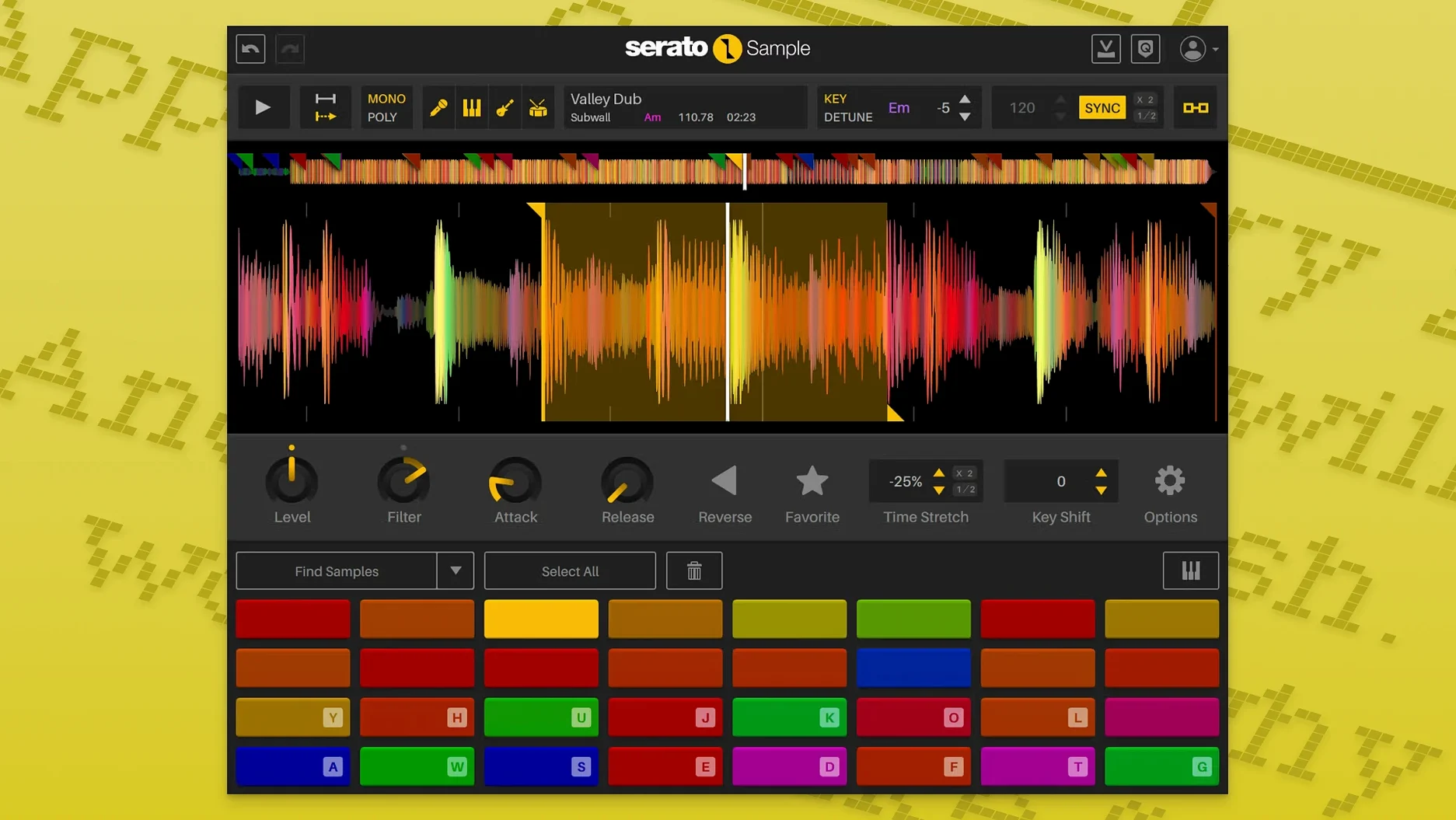
Serato Sample lives on an instrument track or a MIDI-triggered insert. It isn’t a clip launcher or a linear editor — it’s a pad sampler that thinks like a DJ. You feed it audio directly or drag from the timeline, and it maps slices to 16 pads. Playback comes from a MIDI keyboard, the computer keyboard, mouse clicks, or a piano roll. Beatgrids keep unquantized breaks locked tight, and Pitch ’n Time handles tempo changes without wrecking transients. When I’m building a beat around a sample, I usually bus the plugin’s outputs to separate aux tracks for kick, snare, and vocal so I can treat each stem with its own chain.
Stems as a Workflow Step
The stem separation is the part that changes how sessions unfold. One click isolates acapella, instrument, bass, and drum stems — no external RX window, no round-tripping. In version 2.2.0, each stem level becomes a host automation parameter, which means you can ride the bass stem out of a chorus or fade the vocal into a drop from arrangement view. On a recent corporate video score I had a dense library track where the vocals fought the voiceover; automating the acapella stem level across the timeline solved it without a mix revision. The plugin runs native on Apple Silicon, so a loaded project with multiple instances doesn’t choke on a deadline render.
Who Builds Around a Central Loop
Beatmakers who build around a central loop are the obvious fit. They drag in a break, let the BPM detection snap it to the project tempo, and start tapping out variations on a MIDI controller. The 16-pad layout feels immediate — no mapping gymnastics required. Hip-hop producers chasing that MPC-style flow inside a DAW will find the cue-point workflow clicks fast, especially when they're flipping a two-bar phrase into eight different chops across the pads.
Electronic producers working with vocal stems get a different kind of win. Drop a full track in, isolate the acapella with Stem Separation, and suddenly you have a playable instrument spread across the keyboard. Keyboard Mode makes this feel like a polysynth built from someone's voice — pitch it up for chipmunk textures, down for a low-mo growl, and the Pitch ’n Time algorithm keeps formants from going plastic. I've watched house producers pull usable hooks out of tracks where the vocal was buried under a wall of synths.
Post-production editors working to picture are the sleeper audience. When a temp track's drums clash with sound design, isolating the melody or bass stem and dropping the drum stem level saves a last-minute music edit. The automation support means you can write fades directly into the timeline — no offline rendering, no alternate mixes requested from the composer. Score composers building cues from library samples also benefit; they can strip a reference track to its bones and keep only the texture they need.
Less obvious: podcast producers who sample archival audio. Feed in a crackly speech recording, chop it into phrases, and assign each to a pad for stinger drops and transitions. The beatgrid keeps rhythmic speech locked even if the original recording drifted. It's niche, but for the right workflow it replaces three separate utilities.
Why Kai Starts at 11pm with a Wandering Jazz-Funk Break
Kai opens a session at 11pm with a jazz-funk loop his friend sent from a vinyl rip. The drums wander — the original drummer sped up into the chorus — so he drops the file onto Serato Sample's waveform and hits Find Samples. The plugin marks eight cue points across the transients and tightens them to the project's 92 BPM grid. He triggers a few pads from his MPK Mini, lands on a sequence he likes, and records the MIDI into Logic's piano roll.
Now he wants the bassline isolated. One click on Stem Separation, and the plugin splits the loop into four layers. He solos the bass stem, transposes it up an octave for a lead hook, and assigns it to pads 9-12. The original vocal — a two-word shout buried in the mix — becomes a rhythmic stab on pad 13. Within fifteen minutes he's built an eight-bar verse section, a four-bar chorus, and a bridge that drops the drums out entirely. He hasn't opened a single other plugin, and the stems are already routed to separate aux tracks for EQ and compression when the mix stage arrives.
Why Stem Separation Sounds Phasey on Mastered Tracks
Stem Separation sounds phasey or incomplete. This usually happens with dense, heavily compressed material. If the source is a low-bitrate MP3 or a track that's already been mastered hard, the algorithm has less frequency information to work with. Try a WAV or AIFF source first — lossless files give the separation engine more to grab onto. If you're stuck with the file you have, roll off the low end below 30Hz before feeding it in; sub-bass rumble can confuse the bass stem extraction.
Find Samples places cue points in weird spots. The auto-detection defaults to transient sensitivity that works for drum hits but misfires on legato phrases or ambient pads. When the algorithm overshoots and marks a dozen points you don't need, right-click the waveform and drop the sensitivity slider. For material with soft attacks — string swells, reversed samples — manual cue placement by clicking the waveform is faster than fighting the auto-detect. I usually set four to six cues by hand for melodic content.
MIDI triggering feels laggy. Check your DAW's plugin latency compensation. Serato Sample reports its latency to the host, but if you're running it inside a chain with high-latency plugins downstream, the cumulative delay can make pad hits feel soft. Route the plugin to a direct output first, then process downstream on the aux track. On Apple Silicon Macs, the native version adds negligible latency; if you're still running Rosetta, switching to the ARM build resolves most timing complaints.
Beatgrid sync drifts on unquantized recordings. The grid assumes a steady tempo, so a live drummer who rushes the fills will confuse it. Mark the downbeats manually by dragging the grid markers in the waveform view — two or three corrections across the phrase usually lock everything in. For extreme tempo fluctuations, chop the sample into smaller regions and sync each section separately across different pads.
Why Gate Mode Stops Playback Before You Build Anything
Open the plugin, load a random sample, and make these changes before you build anything real. They stick with your session and shape every chop that follows.
Switch the default trigger mode from Gate to Trigger. Gate mode stops playback when you release the pad or key, which makes sense for sustained vocals but kills drum hits that need to ring out. Trigger mode plays the full slice regardless of release time, and you can still use the envelope decay to shorten tails when you need them tight. I keep Trigger as the default and switch to Gate only for melodic pads.
Set the key detection to match your project key. Serato Sample can detect the sample's key and display it, but it doesn't auto-correct unless you tell it to. In the pitch section, lock the target key to your project key before you start transposing. This keeps every pad shift musically coherent — pitch a horn stab up five semitones and it stays in scale rather than going sour. For atonal material like drum breaks, disable key correction entirely so transposition is pure semitone shifting.
Map Stem On and Stem Levels to hardware controls. Since version 2.2.0 exposed these as host automation parameters, you can assign the acapella stem level to a fader or knob on your MIDI controller. During arrangement, recording a slow fade of the vocal stem into a verse creates builds that would take ten minutes to draw manually. I map the four stem levels to four faders on a control surface and treat them like a mini stem mixer during playback.
Adjust the cue point crossfade. The default crossfade between adjacent slices is tight — great for drums, less great for pads where you want smooth overlaps. Increase the crossfade in the settings panel for ambient material, and drop it to zero for staccato chops. This single setting changes whether your performance feels like an MPC or a mellotron.
Which DAWs Host Serato Sample Without Friction
Serato Sample runs inside any DAW that hosts AU, VST3, VST, or AAX — that covers Logic Pro, Ableton Live, FL Studio, Cubase, Pro Tools, Bitwig, and Studio One. The plugin doesn't care which host you use, but the automation workflow differs. In Ableton Live, right-click the Stem On parameter and hit "Show Automation" to draw stem mutes directly in arrangement view. In Logic, the automation lanes appear under the track header as soon as you wiggle a stem level knob.
With macOS Monterey and later, the plugin benefits from system-wide audio improvements in Core Audio — lower round-trip latency and better multi-core distribution. On Ventura and Sonoma, the AUHostingService handles the ARM-native binary efficiently, so multiple instances spread across CPU cores without one hogging a single thread. If you run an M-series Mac with efficiency cores, the plugin's threading model respects the scheduler; a session with eight Serato Sample instances on a MacBook Air M2 stays responsive even with other instruments loaded.
It pairs well with Serato Studio, naturally — the cue-point and beatgrid conventions are shared, so a set prepped in Sample drops into Studio's timeline without re-chop work. But the less obvious pairing is with iZotope RX. Feed a sample through RX for noise reduction first, render it clean, then bring it into Serato Sample for chopping and stem extraction. Clean source material produces dramatically better stem separation, and RX's de-click and de-noise modules handle vinyl crackle that would otherwise confuse the transient detection.
For live performance, the plugin works inside MainStage as an AU instrument. Load it on a channel strip, map the 16 pads to a pad controller, and you can trigger stems and chops on stage while MainStage handles keyboard splits and effects. This setup appears in a lot of Ableton-less live rigs — keyboardists who want sampling without leaving the Apple ecosystem.
macOS VoiceOver integration is limited — the waveform and pad grid aren't navigable with screen readers — but the parameter list exposes every control as a standard accessibility element. If you rely on automation lanes and hardware control, you can operate the plugin without touching the GUI once it's set up. I know a producer who builds entire cue maps with Logic's automation lanes and never looks at the plugin window after the initial sample load.
The Stem Separation feature writes no temporary files to disk — everything happens in RAM. This means you won't find stray audio files cluttering your project folder, but it also means a session with many stem-separated samples benefits from 16GB of RAM or more. On 8GB machines, freezing tracks that use Serato Sample keeps memory pressure in check during mixdown.
Individual stem levels are finally here — pull back the bass without touching the drums. Stem On and Stem Levels show up as host automation parameters, so you can ride them from arrangement view. Also fixed: AlphaTheta SLAB support, mouse wheel scrolling on hovered knobs, and macOS Tahoe compatibility.
- macOS 11 Big Sur or later
- Apple Silicon or Intel, 64-bit only
- DAW host supporting AU, VST3, or AAX
Notes from the edit bay · 0
Sign in or get an edit-bay pass to leave a note.
No notes from the edit bay yet. They go up after I read them.