Submerge runs on Apple Silicon Macs under macOS 11 and up. If you cut vocals against a bass line or need a kick drum to shove a pad out of the way, this plug-in removes the routing headache entirely. You drop it on the track you want to duck, pick a trigger source, and the mix bends around it.
How It Drives a Mix
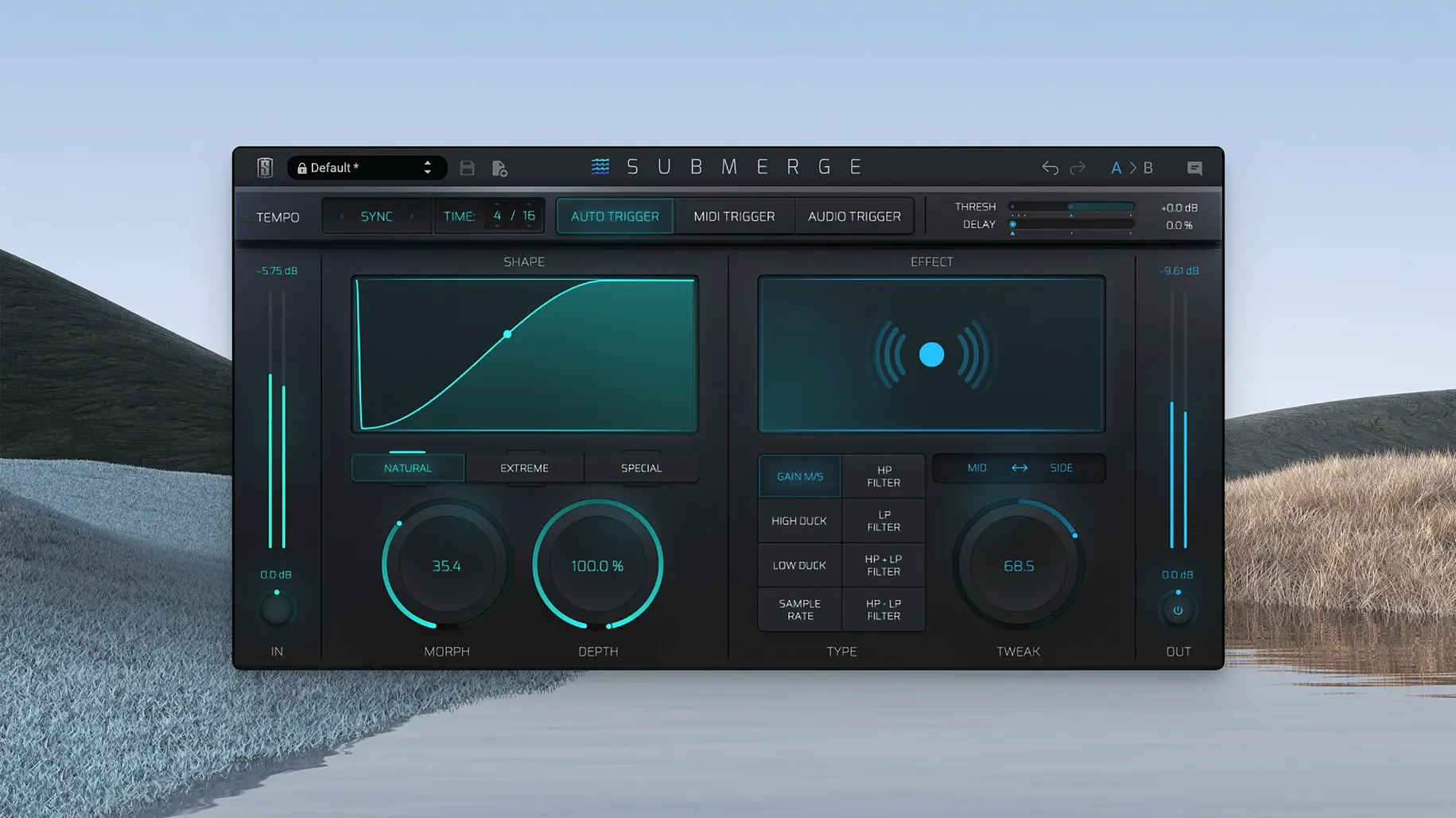
The top row of Submerge is where you set the trigger type: Auto pulls from the channel itself, Audio sidechains an external source, and MIDI lets a keyboard or pattern decide when the ducking happens. Threshold and Speed behave exactly as you expect — the first sets how hot the signal needs to be to clamp down, the second controls how fast the attenuation snaps in and releases. The real character comes from three curve shapes. Natural gives you a smooth, almost transparent dip that works on sustained pads. Extreme slams the volume hard and brings it back with a sharp contour, which is what you want when a four-on-the-floor kick needs to punch through a bass group. Custom lets you draw your own shape for oddball rhythmic ducking that doesn't fit the presets.
Filtering and Mid/Side Moves
Below the dynamics section sits an eight-effect chain. High-pass and low-pass filtering let you duck only the part of the spectrum that clashes — pull low end out of a synth when the kick hits, leave the air intact. The Mid/Side processing goes a step further: you can attenuate the center image while leaving stereo width alone, or duck the sides to tighten a busy chorus. Morph blends between two states of the effects, and Depth pushes the overall intensity of the processing. A single Tweak knob acts like a macro that re-scales several parameters at once, so a small adjustment changes the feel without hunting through four dials. For anyone who builds drum-heavy mixes and hates drawing volume automation, Submerge turns a five-minute routing puzzle into a thirty-second insert.
Thirty-Two Tracks Deep and the CPU Stays Flat
I've tossed Submerge onto thirty-two tracks in a Logic session running at 48 kHz, and the CPU hit stayed surprisingly flat. Your mileage depends on how many effects you stack inside the chain, but with just the ducking engine and a high-pass active, the plug-in barely registers on an M1 or M2 Mac. The interface never lags when you drag a curve point, and the metering for the trigger signal updates fast enough to trust what you're seeing. RAM usage stays low — this isn't a convolution reverb loading giant impulse responses. Stability has been solid through version 1.0.5; I haven't hit a single crash when switching trigger modes mid-playback, which used to trip up earlier sidechain tools I've tried. If you're hunting for a slate digital torrent to test before committing, you'll find Submerge behaves like a mature 1.x plug-in, not a shaky debut. The only quirk I've noticed is that the custom curve editor occasionally needs a second click to register a node when the transport is flying, but that's a tiny gripe for a tool that otherwise feels baked.
A Kick-and-Bass Ducking Run
Here's a real workflow I ran yesterday on a dense indie-rock mix. The problem: a woolly bass guitar and a punchy kick drum fighting between 60 and 90 Hz, making the low end feel choked instead of powerful. I grabbed Submerge from a Slate Digital Mac torrent pack a few weeks back and it's been sitting on my master template ever since. The fix took under a minute.
I inserted Submerge on the bass track, not the drum bus. Trigger mode went to Audio, and I pointed the sidechain input at the kick mic channel. Threshold got pulled down until the kick's transient reliably crossed it — about -18 dB in this session. Speed sat at 8 o'clock for a fast attack and a release quick enough to let the bass tail bloom between hits. Curve shape: Natural. I wanted the bass to duck gently, not disappear, so the groove still breathed. Then I enabled the high-pass filter in the effects chain and set it to 120 Hz. That meant only the subby part of the bass dipped; the grit and pick attack above stayed intact, which kept the part's articulation alive. A final small nudge on the Tweak knob deepened the duck by maybe 2 dB more, and the low end cleared up without anyone ever knowing a plug-in was doing the work.
MIDI Triggers Finally Grab That First Note
Slate's changelogs are sparse, but spending daily hours with Submerge makes the refinements in 1.0.5 clear. The MIDI trigger mode got tighter — earlier builds could miss the first note after a long pause if your buffer size was above 512 samples, and that's gone now. Audio trigger detection feels more consistent on low-frequency sources; a bass guitar sidechain used to flutter a bit when the player slid between notes, but 1.0.5 locks on more cleanly. The custom curve drawing also smoothed out. Previously, holding Shift to invert a curve could introduce a tiny click at the inversion point; now the transition stays clean even with Extreme curves pushed hard. If you've been sitting on a slate digital crack mac version from the initial release, the jump to 1.0.5 is worth it for the MIDI fixes alone, especially in sessions where you're firing off quick stabs from a sampler. The core sound engine didn't change — Submerge already sounded right at 1.0 — but the edges got polished in ways that matter when you're on a deadline and can't babysit a plug-in.
- macOS 11 or later
- Apple Silicon processor
Questions I actually get
What trigger sources can Submerge use?
Submerge offers three trigger modes: Auto reads the channel directly, Audio accepts an external sidechain signal, and MIDI responds to note or pattern data.
Does Submerge process the stereo field separately?
Yes, it supports Mid/Side processing so you can duck the center or the sides independently without affecting the other.
Notes from the edit bay · 0
Sign in or get an edit-bay pass to leave a note.
No notes from the edit bay yet. They go up after I read them.