Flat mixes that fall apart on different playback systems are the enemy. You need a mastering environment where every EQ move and dynamics tweak translates exactly as intended, whether it's on club speakers or earbuds.
Who’s Listening Through Your Ears?
The standout in this build is HRTF support for binaural monitoring in Dolby Atmos. Instead of a generic spatial approximation, you can load a personal head-related transfer function profile. It means the phantom center and object placements you dial in while mixing on headphones hold up when you bounce the final master.
What’s Happening Under the Spectrogram?
Forensic analysis tools aren't just for restoration work. When you're chasing a resonant frequency in a master, the visual feedback lets you see the ringing before your ears get fatigued. Combined with sample-accurate editing, you can surgically remove a breath or a string squeak without nuking the transient that follows.
How Wide Can a Master Go?
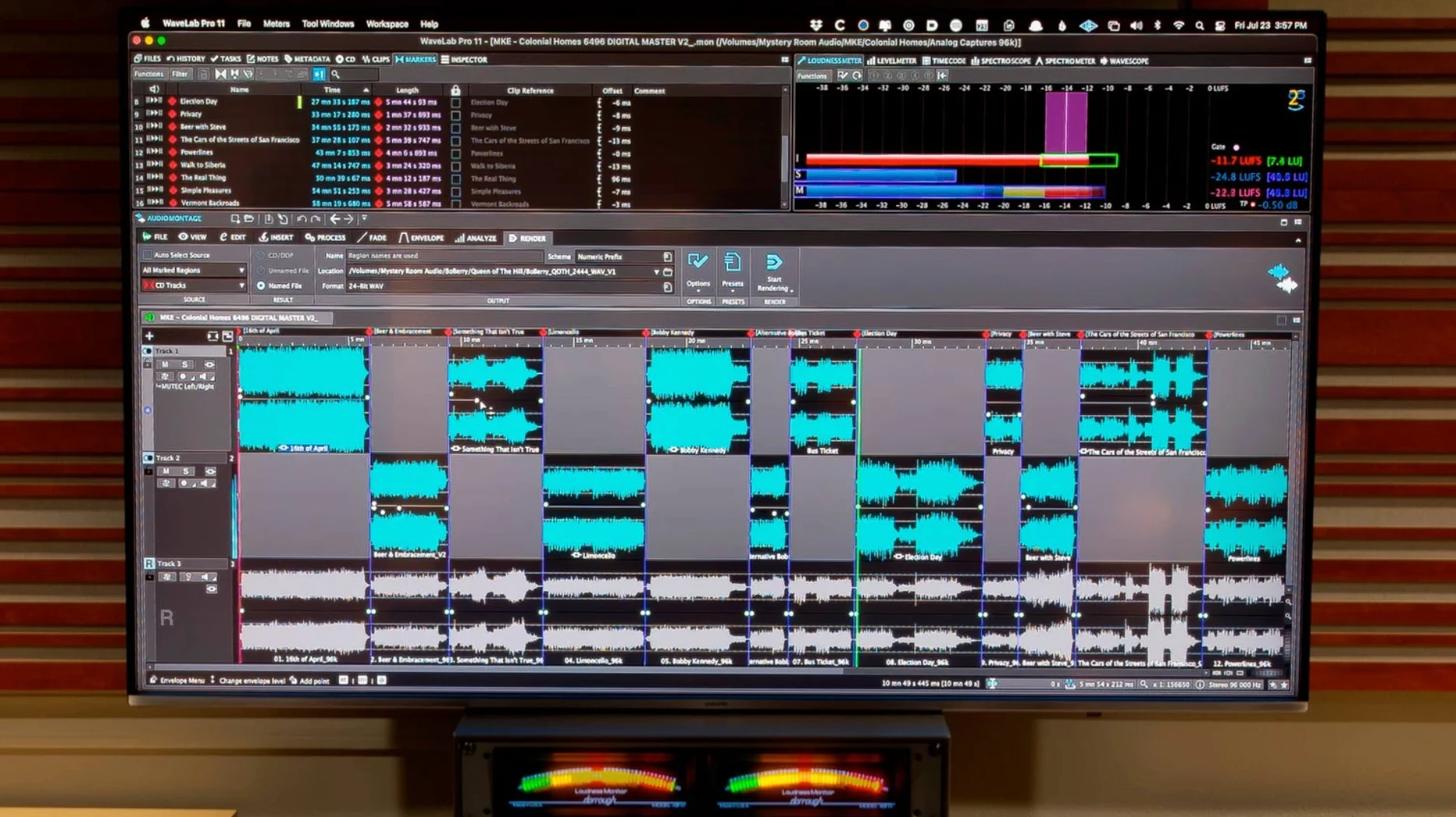
Channel-based surround files now slot directly into Dolby Atmos master montages. You aren't stuck upmixing stereo stems; you can sequence multichannel beds and object tracks inside a single montage, with synchronized file and montage navigation keeping your edit cursor locked across views.
Where Does the Plug-In Fit?
You can pull up the full mastering toolset inside Cubase 13, Nuendo 13, Reaper 7, or Studio One 6.5 as a plug-in. It turns your DAW into a mastering console without a separate round-trip export, so you can A/B your limiter against the mix bus instantly.
Mistakes That Send You Back to the Render Queue
New users often treat the montage like a stereo editor. It's not. Dragging a single file into the montage and hitting render without setting track lanes is the fastest way to discover your fades don't land where you thought they would. The clip-based effects rack is your friend—use it before you touch the master section.
Another trap: ignoring the global loudness compliance meter until the very end. You finish what sounds like a punchy master, bounce it, then check the LUFS numbers and realize you're 3 dB over the spec. WaveLab's loudness metering sits right in the main workspace, but beginners minimize it. Don't. Leave it visible from the first playback pass.
The ARA plug-in trips people up too. You insert it in a DAW, tweak a spectral edit, close the window, and expect it to render automatically. It won't. You have to commit the ARA edits to the clip in your host before the changes stick in the final bounce. Forgetting that step means exporting the unprocessed original.
A Session From First Import to Final Limiter
You pull a 24-bit stereo mix out of Logic and drop it into the audio editor. First stop is the global analysis tab—you run the spectrum analyzer and spot a buildup around 250 Hz that the mix engineer missed on small speakers. A narrow, dynamic EQ cut cleans it up without thinning out the body of the kick.
Switch to the montage. You've got three versions of the track: main, instrumental, and a radio edit with a shorter intro. Each lands on its own track lane. You turn on synchronized navigation so scrubbing in the montage window moves the file view in the editor alongside it. The vocal up-cut at bar nine needs a click removed—you open the spectral edit, highlight the transient, and process just that slice without touching the sustain underneath.
Time for loudness. You enable the EBU R128 meter and let the main mix play through. Integrated loudness settles at -13.8 LUFS, a little hot for the streaming target. You ease back the limiter threshold by half a decibel. The short-term peaks still breathe because the true peak ceiling stays at -1 dBTP. The instrumental and radio edit snapshots inherit the same master chain, so you don't have to redo the moves.
Before bouncing, you load a personal HRTF profile into the Dolby Atmos monitor section and check the binaural fold-down on headphones. The center-channel vocal sits forward but not isolated—exactly the phantom image you dialed in. You render the three versions as a batch, then drag the masters back into Finder for client delivery. Session done.
Where WaveLab Sits in the Tool Stack
Think of it as the endpoint. You mix in your DAW, maybe route stems through a channel strip plug-in, but the final polish—the limiter, the dither, the track sequencing, the metadata—belongs in a dedicated mastering environment. WaveLab doesn't replace your DAW; it finishes what the DAW started.
On the macOS side, drag-and-drop works both ways. You pull audio out of Finder, drop it into the montage window. A rendered master can be dropped straight into a Mail message or an AirDrop to your phone for a quick car test. The undo history survives the bounce, so if the car speakers reveal a harsh 3 kHz spike, you adjust the EQ and bounce again in seconds.
The ARA plug-in flips the hierarchy. Instead of exporting out of your DAW, you bring the mastering tools into the mix session. In Cubase or Reaper, that means opening WaveLab's spectral editor on a vocal track while still hearing the full arrangement. It's not a replacement for the standalone workflow—montages handle full albums with track markers and CD text better than any DAW timeline—but it's a quick alternative for single-track fixes.
Questions Before the Install
Does it need a dongle? No. Activation is handled through the Steinberg licensing system included in the package, and it runs on both Intel and Apple Silicon Macs without a physical key.
Will it open my old WAV masters without converting them? Yes. The audio editor reads PCM files up to 384 kHz and 32-bit float directly. No import dialog, no project file wrapper required—just open and start editing.
Can I use it alongside another mastering suite? Sure. You can chain WaveLab's processors with third-party VST plug-ins inside the master section, or send audio through an external analog loop using the hardware insert plug-in. The routing handles latency compensation automatically.
Does the torrent version support the ARA plug-in? The wavelab torrent package includes the same ARA integration as the standard build, so you can open it inside any compatible host that recognizes ARA2 extensions. The same goes for the wavelab mac torrent—the plug-in scans and validates inside your DAW just like the standalone application.
Is it ready for Atmos right away? Yes. The wavelab 13 torrent includes the Dolby Atmos renderer configuration panel and binaural monitoring with HRTF loading. You don't need a separate spatial audio utility to build channel-based surround montages. If you've been hunting a wavelab free download torrent for mac that includes the full mastering chain without feature restrictions, this build covers the entire toolset from spectral editing to multichannel export.
Version 13.0.30 adds the ability to load a personal HRTF profile for Dolby Atmos binaural monitoring — a tweak that fundamentally changes how spatial decisions translate over headphones. Also fixed: Dolby Atmos master montages can now include channel-based surround files directly in the sequence.
- macOS 13 or later
- Apple silicon or Intel 64-bit processor
Questions I actually get
Can I use WaveLab Pro as a plug-in inside other DAWs?
Yes. You can open it inside Cubase 13, Nuendo 13, Reaper 7, and Studio One 6.5, among others.
Does WaveLab Pro run natively on Apple silicon Macs?
It does. The current build supports both Apple silicon and Intel 64-bit Macs running macOS 13 or later.
Notes from the edit bay · 0
Sign in or get an edit-bay pass to leave a note.
No notes from the edit bay yet. They go up after I read them.