
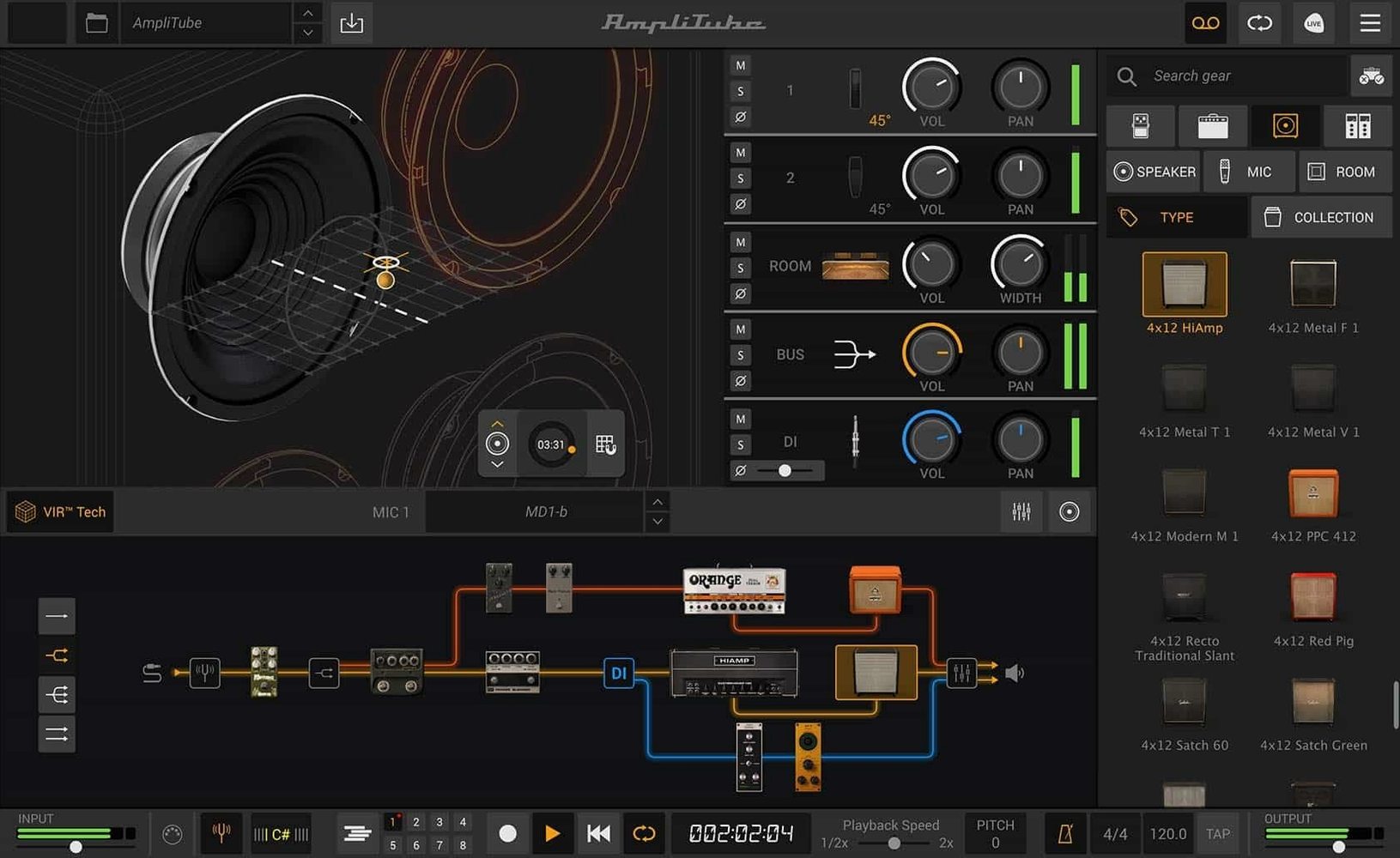
Why You Can Now Drag a DI Signal Back Into the Chain
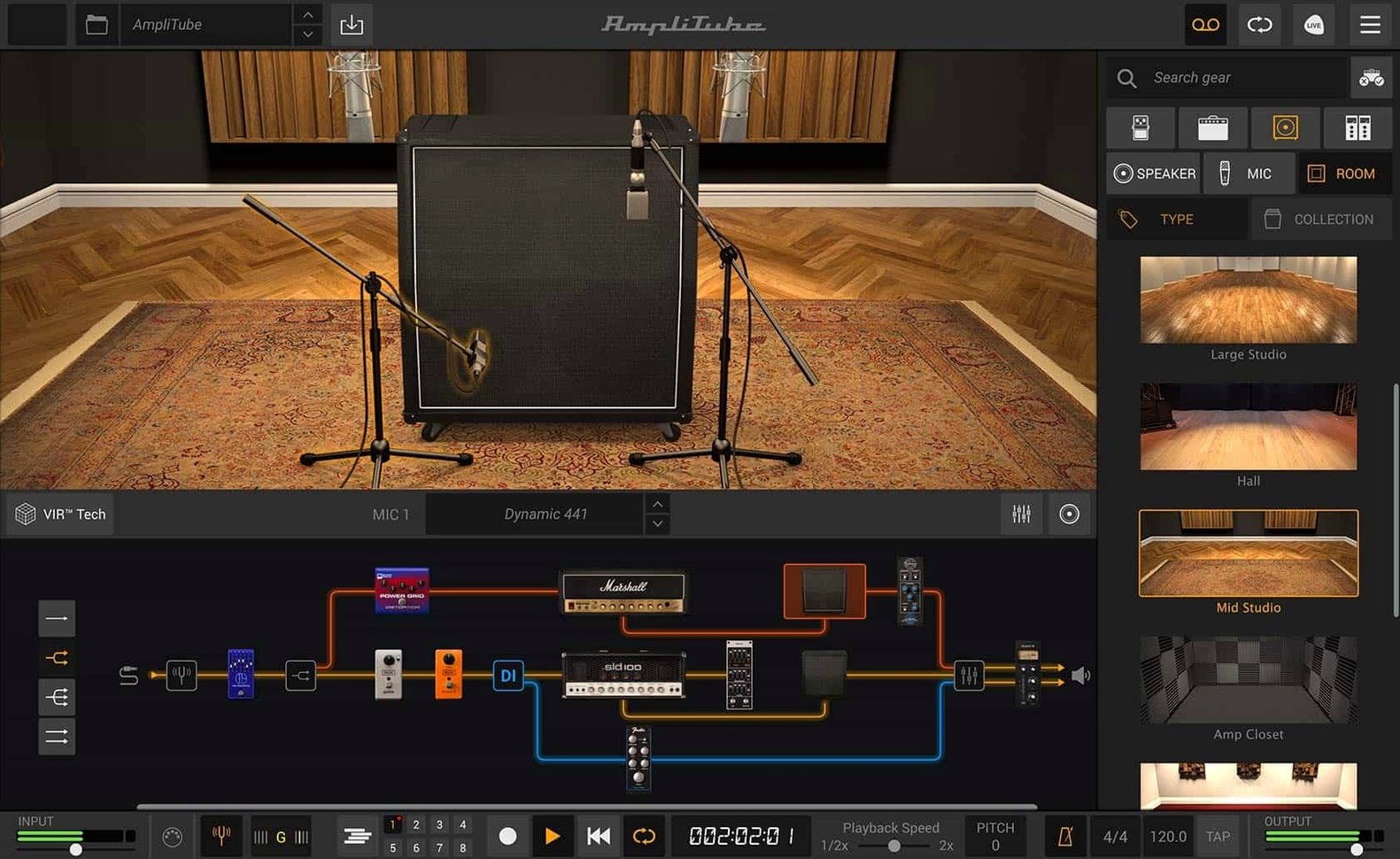
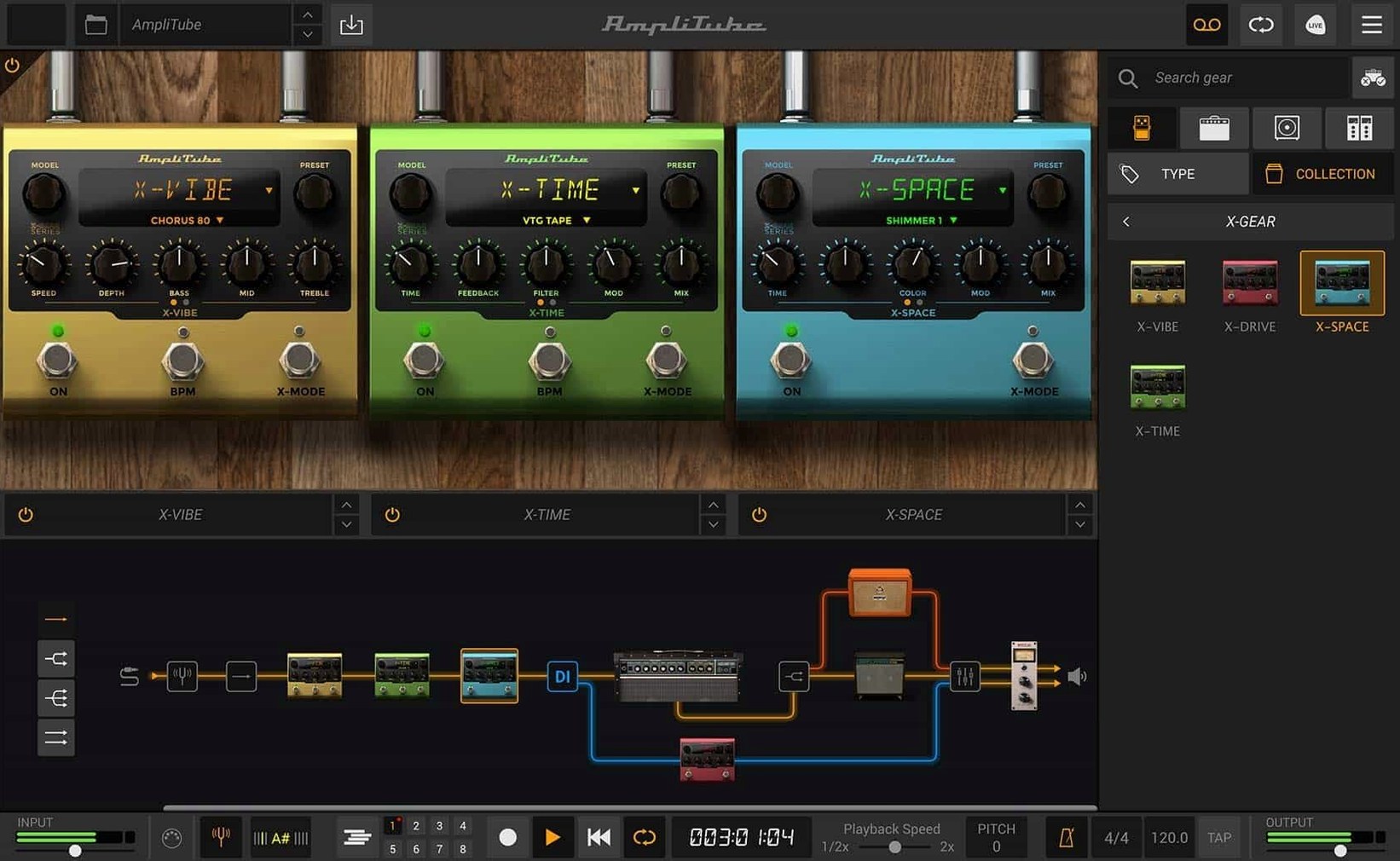
Routing gets a proper rethink with a drag-and-drop signal chain that lets you mix a dry DI signal back in wherever you want. The cabinet section now runs on IK's VIR tech, and the built-in mixer has been rebuilt with effects you'll actually use on a session.
How Much Gear Is Inside?
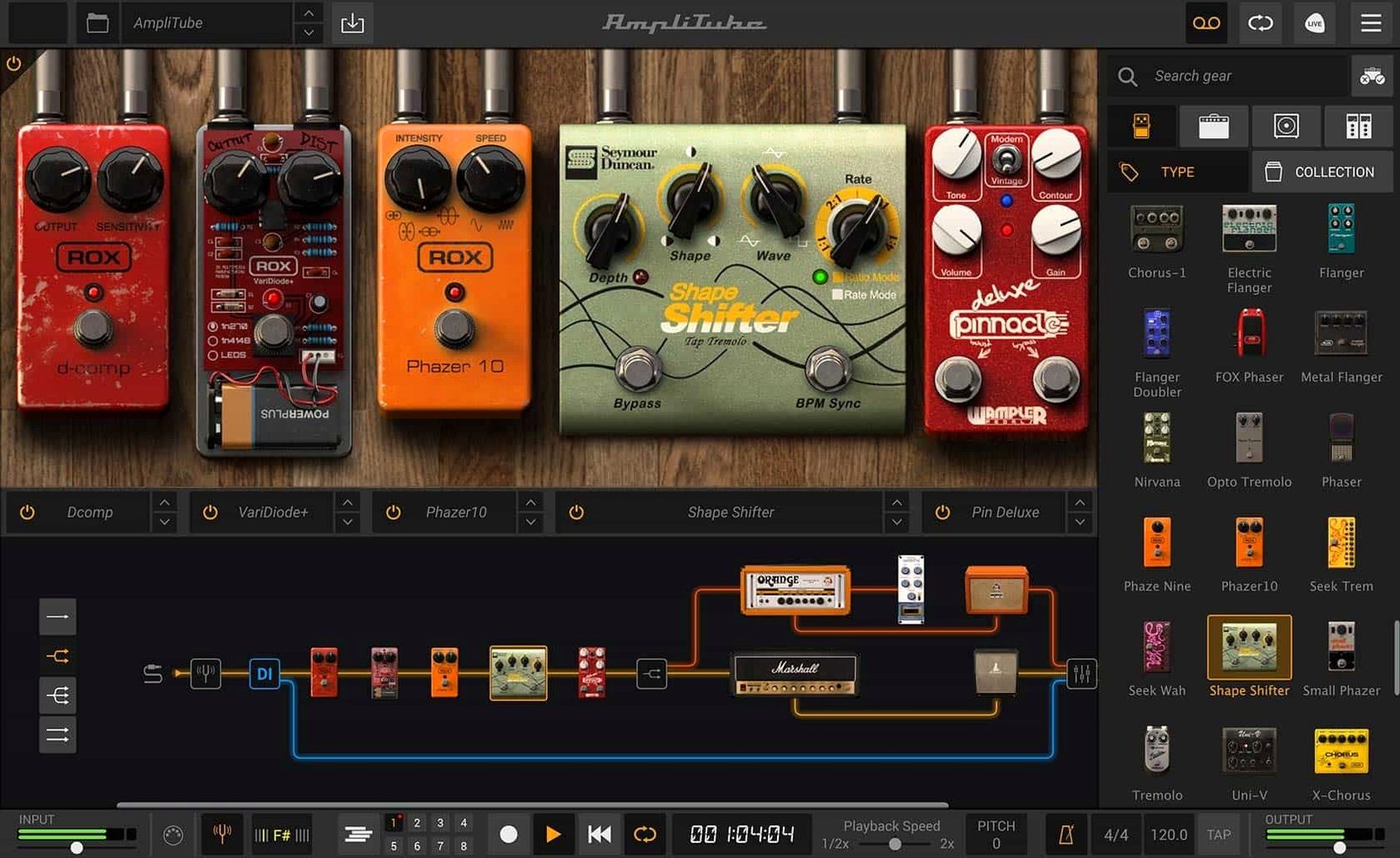
Version 5 adds more than 130 new models: 5 amp models, 2 new pedals, 2 new rooms and 23 new rack effects. You can run up to 57 models at once in series or parallel, which is plenty when you're pulling up a different tone for every overdub.
At What Point in Your Session Does It Sit?
This sits before your tape emulation and after your DI split. Run it standalone to grab a sound without opening a full Logic or Ableton session, or drop the plug-in version (AU, VST and AAX are all covered) on an insert when you want to re-amp a clean take that's already cut.
What Do the Cabs Bring to the Table?
Over 100 redesigned cabinets and support for custom IR files mean you're not locked into a stock sound. Drag your own impulse responses in, pair them with the two new pedals, and you have a rig that bends to the room, not the other way around.
Turning a Calculator DI Into a Pushed Deluxe Reverb
Picture a Tuesday afternoon. A client sent over a clean DI guitar track—played on a Telecaster, bridge pickup, slightly too much pick attack. It sounds like a calculator. The brief says "warm but articulate, like a pushed Deluxe Reverb in a small room."
I drop AmpliTube on the insert. The window opens to a blank rack, which is exactly how I want it. First move: drag an amp model into the signal chain. I pick one of the Fender-style combos—the new VIR cab section loads automatically, and the room mic blend is already giving me air around the notes. I pull the master volume up until the virtual power tubes start to sweat, then back the gain off half a notch. The attack softens. The calculator is gone.
Next, a pedal before the amp. One of the two new overdrives sits there with the gain at 9 o'clock and the tone rolled back—just enough to knock the transients down and add a little chewy compression. I'm not playing the pedal; the pedal is playing the amp. That's the chain doing its job.
The DI signal still feels a little sterile in the lows, so I split the path. A drag of the mouse creates a parallel chain with a bass amp model and a low-pass filter from the redesigned rack effects section. I blend the two chains in the built-in mixer, adding a touch of plate reverb from the mixer's own effects to glue them together. The client hears it back and asks if I re-recorded the part. I didn't. That's a typical working session: five minutes of routing and tone-shaping that sounds like an afternoon in a treated room.
The Input Calibration That Makes It Feel Like a Real Amp
Out of the box, AmpliTube loads with sensible defaults, but a few tweaks make it feel less like software and more like an amp in the control room.
Input calibration first. Open the audio settings and match the input level to your interface. A DI that's too hot will push every amp model into fizzy breakup before you've touched a knob. Back it off until your hardest strum peaks around -12 dB. The models respond to gain staging the way hardware does—feed them right and the mids open up.
Disable the cab room if you're using an external reverb. The new VIR technology is excellent, but when I'm sending the track to a dedicated reverb bus in the DAW, I kill the room mic in the cab section entirely. It prevents that hollow, double-room sound that makes a guitar sit weirdly in a dense mix.
Lock the output level. The mixer section has a limiter tucked into its built-in effects. I engage it with a conservative threshold. Swapping between a crystal-clean Jazz Chorus model and a dimed high-gain head will swing the output by 15 dB without it. The limiter keeps my monitor levels sane and my ears intact.
Set the oversampling once. AmpliTube defaults to a standard processing quality. For tracking, leave it there—low latency matters more than aliasing artifacts you won't hear through headphones. For a final render, bump it to high. The top end on distorted models cleans up noticeably, especially on cymbal-heavy sections where guitar fizz fights the overheads.
Where Guitar Rig Leans Into Effects and AmpliTube Digs Into Signal Flow
Three names always come up when guitarists talk amp sims on Mac: Neural DSP's Quad Cortex desktop software, Native Instruments Guitar Rig, and IK's own AmpliTube. They don't do the same job.
AmpliTube versus Guitar Rig. Guitar Rig leans into creative sound design—its modifiers, split routing and modulation toys make it a playground for textures that don't sound like a guitar. The amps are good, but the cabinet section in Guitar Rig feels like a solved problem from five years ago. AmpliTube's VIR cabs and the ability to load custom IRs give it an edge when you're chasing a specific recorded tone. If I'm building a shimmer pad from a guitar signal, I reach for Guitar Rig. If I need the guitar to sound like a guitar player in a room, AmpliTube gets the nod.
AmpliTube versus Neural DSP plugins. Neural's standalone plugins—like the Archetype series or the Quad Cortex ecosystem—model one amp and a handful of effects to an almost obsessive degree. The gain staging and power-amp sag feel uncannily real on a single amp. But they don't do the kitchen-sink thing. AmpliTube's strength is breadth: 57 simultaneous models, parallel chains, a full mixer. On a session where I'm bouncing between a clean verse tone, a crunch chorus and a wet lead sound without opening three different plugins, AmpliTube wins on speed. Neural wins if you have all day to dial in one perfect sound.
The free starting point. AmpliTube CS ships with 42 gear models. That's a functional rig out of the gate—enough to track a demo, sketch an idea or re-amp a part without reaching for anything else. Guitar Rig's free Player edition caps the routing and holds back some of its best cabinets. Neural doesn't offer a free tier that covers this much ground. For someone building a Mac recording setup from scratch, the CS version makes the decision easier.
When a Session Player Needs Exact Recall on a Laptop
The obvious answer is guitarists. But the more specific answer involves what kind of guitar work they do.
Session players who need recall. A hired guitarist walking into a studio with a laptop can pull up the exact signal chain from last week's overdub session, down to the mic position on the cab. No outboard gear, no re-dialing an amp from memory. The standalone app means they can hand a processed tone to the engineer without touching the studio's DAW template. That speed matters when the clock is running.
Producers who re-amp after the fact. A DI track is insurance. AmpliTube's AU and VST support means dropping it on a recorded part, flipping through cabs and room settings, and committing a tone that fits the mix after the drums and bass have settled in. The drag-and-drop routing makes parallel processing—clean blend, dual-amp setups, wet/dry splits—a matter of seconds, not a patchbay puzzle.
Live performers running a MacBook. A single instance of AmpliTube in standalone mode can replace a pedalboard and an amp. The mixer's built-in effects handle reverb and delay for the room, and the low-latency performance at standard oversampling keeps the feel immediate. Switching between a clean Fender model and a high-gain setup with a MIDI controller turns a laptop into a fly rig that weighs nothing.
Bass players with a DI habit. The parallel routing is a gift for bass. Run a clean DI chain alongside a gritty amp model, high-pass the grit and low-pass the clean, blend to taste. The new rack effects include compression and EQ options that sit naturally on both paths. It's a studio bass sound without three tracks and a reamp box.
If your world is a single amp, a single cab and one perfect take, AmpliTube might feel oversized. But for the rest of us—the ones juggling revisions, genres and deadlines—the breadth is the point. The amplitube 5 mac installer lands with enough gear to cover a session, and the routing tools keep you moving when the arrangement shifts under your feet.
A revamped signal chain now supports drag-and-drop routing and lets you blend a dry DI signal. The cabinet section steps up with VIR technology, and the mixer gets a full redesign with built-in effects.
- macOS 10.15 or later
- Intel or Apple Silicon Mac
- 64-bit application
Questions I actually get
Does AmpliTube 5 work on Apple Silicon Macs?
Yes, it runs on both Intel and Apple Silicon Macs with macOS 10.15 or later.
Which plug-in formats does it support?
AU, VST and AAX, plus a standalone app.
Can I use my own cabinet impulse responses?
Yes — custom IR loading is built in, so you can swap the cab flavor with files you already own.
Notes from the edit bay · 0
Sign in or get an edit-bay pass to leave a note.
No notes from the edit bay yet. They go up after I read them.