
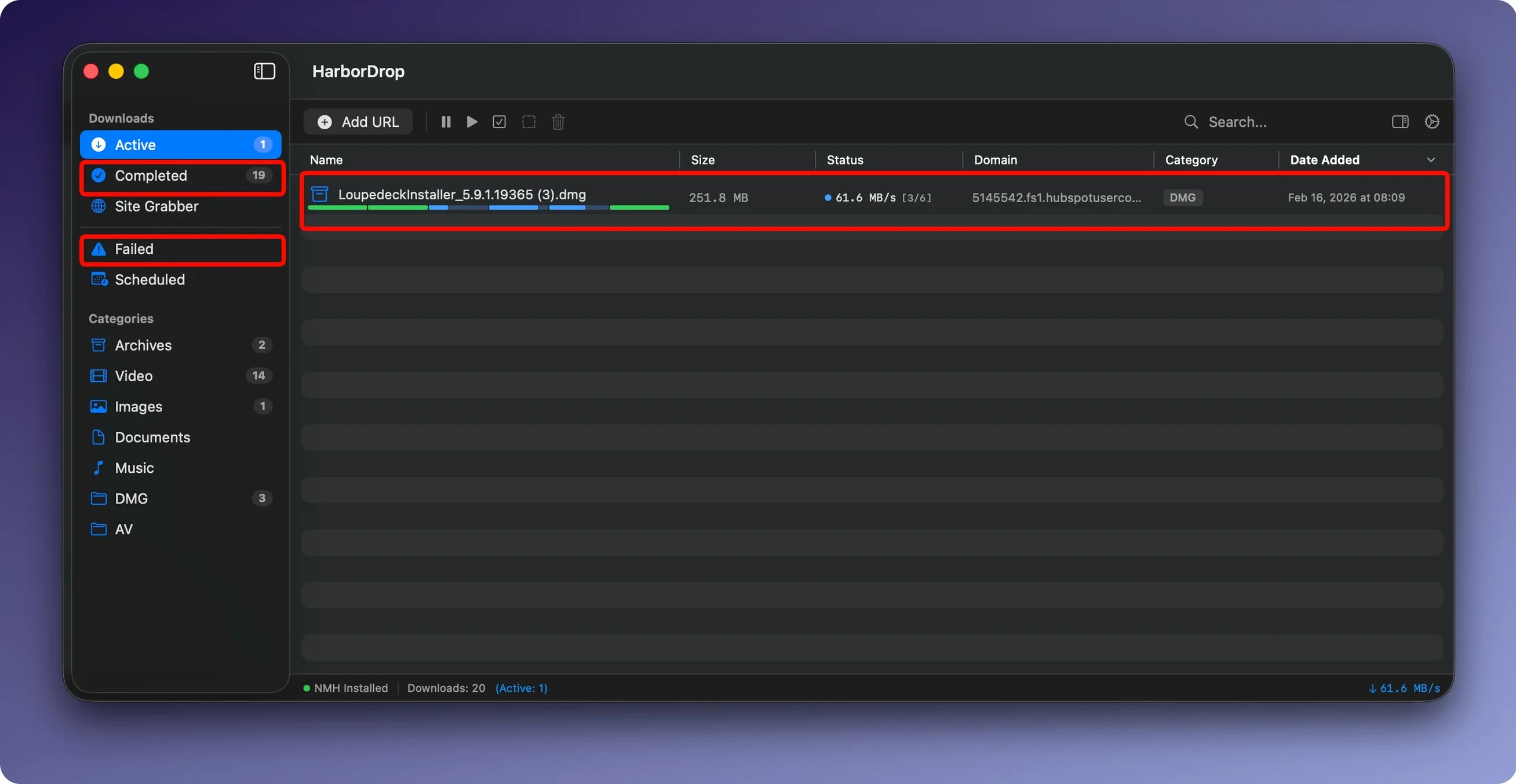
Six segments by default. HarborDrop splits each file into parallel parts — the count is configurable — which is the whole point of moving past your browser's default download shelf. Think of it as an Internet Download Manager alternative built for the Mac.
macOS — macOS 12 or later, native on Apple Silicon and Intel
Browser extensions — Chrome, Edge, Brave, Firefox and Chromium-based Arc; intercepts file links on a page and sends media links straight to the app
Streams — downloads HLS streams and m3u8 playlists, plus non-DRM video from supported sites for offline viewing
Site Grabber — collects links in bulk with a crawl depth you set
Auto-sorting — files land in folders based on site domain or file type
Post-download actions — reveal the file in Finder, or run an AppleScript, shell script or JavaScript when the download finishes
It's built for the editor who queues raw footage from a dozen cloud links, the archivist pulling media from a sprawling site, or anyone who wants a download to split, sort and hand itself off to the next step without babysitting.
Snags That Stop You Cold
Every download manager hits a wall with certain servers, and HarborDrop is no different. The most common complaint: a download sits at zero percent with no error message. Nine times out of ten that's a server that refuses segmented connections. Flip the segment count down to one in preferences before you grab that file. Some hosts see six parallel requests and slam the door — a single stream slides right through.
Browser extension gone silent? Chrome and its cousins ship an update and occasionally yank the extension's permissions without a peep. Click the HarborDrop icon in your toolbar, and if it shows a grayed-out state, visit the extensions manager and toggle it off and on. That re-presents the permission prompt, and the link interception kicks back in. Firefox users sometimes need the same nudge after a major browser version bump.
HLS streams occasionally refuse to rebuild. If you get a finished download that won't play, the stream likely used a token that expired mid-grab. The fix is fast: delete the stalled file, refresh the page that hosts the stream so a fresh token is issued, and start the capture again immediately. HarborDrop pulls the m3u8 while the token is hot, and a few seconds make the difference.
Dropping Client Footage Into Domain-Named Subfolders
HarborDrop earns its keep between the browser and your working folders. I drop a batch of client footage from a cloud gallery, and the auto-sorter splits each file into a domain-named subfolder inside my Incoming directory. From there, Hazel watches that folder and tags anything with a .mov extension, while a shell script HarborDrop fires after the last file lands renames the batch with the shoot date. The app doesn't try to be a file manager — it hands off to the tools that already own those tasks.
For video editors, the post-download AppleScript integration connects directly to Final Cut. A short script checks the file type, and if it's ProRes or MXF, triggers an import dialog. Another approach: pair HarborDrop's sort-by-type feature with a Final Cut Pro watch folder. Download a batch of MP4 reference files from a remote editor, let HarborDrop funnel them into the watch folder by extension, and Final Cut pulls them into the library without a single drag-and-drop.
The shell script hook is where things get interesting for the Terminal-inclined. I've seen setups where a finished download triggers ffmpeg to strip an audio track, or md5 to verify checksums against a manifest pulled earlier. That kind of chain turns a one-click download into a verified, processed asset sitting in the right bin before you finish your coffee.
Servers Can Block You If You Max Out Segments
The biggest early mistake is treating HarborDrop like a browser download shelf and ignoring the segments setting entirely. Cranking it to the maximum on every server doesn't make things faster — it makes some servers block you. Start with four segments, not the default six, and nudge up only for hosts you know handle parallel connections gracefully. Your ISP's throttle patterns matter too; a saturated pipe with too many segments can actually slow the total throughput.
Another classic stumble: enabling the Site Grabber with infinite crawl depth on a page that links to itself recursively. One minute you're collecting a few MP3s, the next you've got three thousand duplicate entries queueing. Set the crawl depth to one, test the scope, then inch it up. The grabber respects the limit you give it — it won't save you from your own ambition.
People also ignore the auto-sorting rules until the downloads folder becomes a junkyard. Two minutes setting up a rule for *.zip files and another for a handful of regular domains keeps things tidy from day one. Retroactive sorting is a chore, and HarborDrop applies rules at download time, not after.
First Days That Pay Off
Day one: install the browser extension in your main browser, not all of them. Pick where you download most — for me that's the Chromium-based Arc — and get the interception working there before spreading to Firefox or Edge. The extension behavior is identical across browsers, but your muscle memory for right-clicking a link and choosing "Download with HarborDrop" needs to settle in one place first.
Next, build exactly one auto-sort rule. Point it at the domain you hit most often — a cloud storage host, a stock media site, wherever your files live. Set the destination to a folder you already use for active projects, not some deep archive. You want to see the sort working immediately, because visible results are what make the habit stick.
Spend ten minutes on a post-download action that solves a real annoyance. If you regularly unzip archives, a shell script that runs unzip on the finished file and trashes the archive saves clicks every single time. If you work in Logic or Ableton, an AppleScript that opens the Finder to the downloaded sample pack folder means you're auditioning sounds seconds after the transfer completes. The script doesn't need to be clever — it just needs to remove one step you repeat a hundred times a week.
By day three, you'll know whether HarborDrop replaces your browser's download manager entirely or sits alongside it for the heavy lifts. For large media files, HLS captures, and anything that benefits from segmented grabbing, it's a dedicated tool that earns its dock space. For a quick PDF from an email link, the browser still wins. Let each tool do what it's good at.
- macOS 12 or later
- Apple Silicon and Intel native
- Interface in English, German and Korean
Questions I actually get
Can HarborDrop grab every downloadable link on a web page?
Yes, the Site Grabber collects links in bulk and you can set a crawl depth to follow pages beyond the one you're on.
Notes from the edit bay · 0
Sign in or get an edit-bay pass to leave a note.
No notes from the edit bay yet. They go up after I read them.