
Folx runs on any Mac with macOS 10.13 or newer, and it's happy on both Apple Silicon and older Intel machines. It earns its place by smashing together two things people usually juggle in separate apps: a threaded download manager and a proper torrent client. The interface doesn't scream at you — it's quiet, functional, and stays out of the way while a render is eating your CPU in the background.
| What it handles | Key detail |
|---|---|
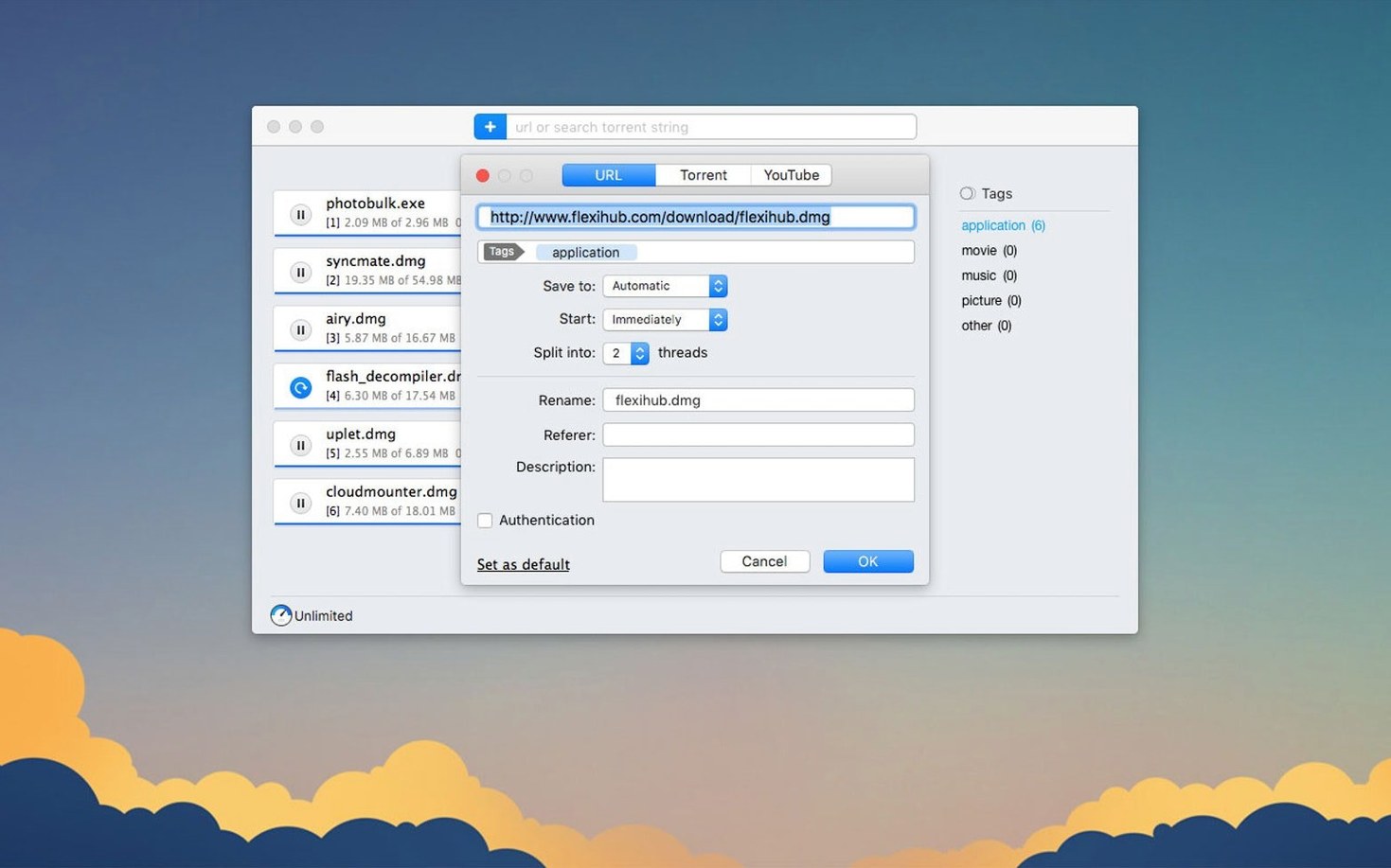
| Direct downloads | Splits into up to 20 threads |
| Torrents & magnet links | Built-in search with seed sorting |
| YouTube | Choose save quality when available |
| Scheduling | Set downloads for off-peak hours |
The torrent side is where Folx stands out. The built-in search lets you sort results by seeds right inside the app — no browser detour needed. It remembers logins for sites that require authorization, so you're not re-entering them every time. Queue a few video assets and schedule them to start when your network is quiet. For direct links, the 20-thread splitting is the real time-saver; it pulls large video files noticeably faster than a browser alone. It's not a flashy tool, but it's one that respects a deadline.
Point Its Default Folder Away from the Desktop
Install it, drag in a few links, and the app makes sense within ten minutes. The real payoff comes from two habits you build early.
Set your default download folder to something that won't clutter the desktop. I point mine straight at a _Incoming directory on an external drive I use for media. That way, proxy files and reference videos land somewhere predictable and a Final Cut library never accidentally links back to a temporary location.
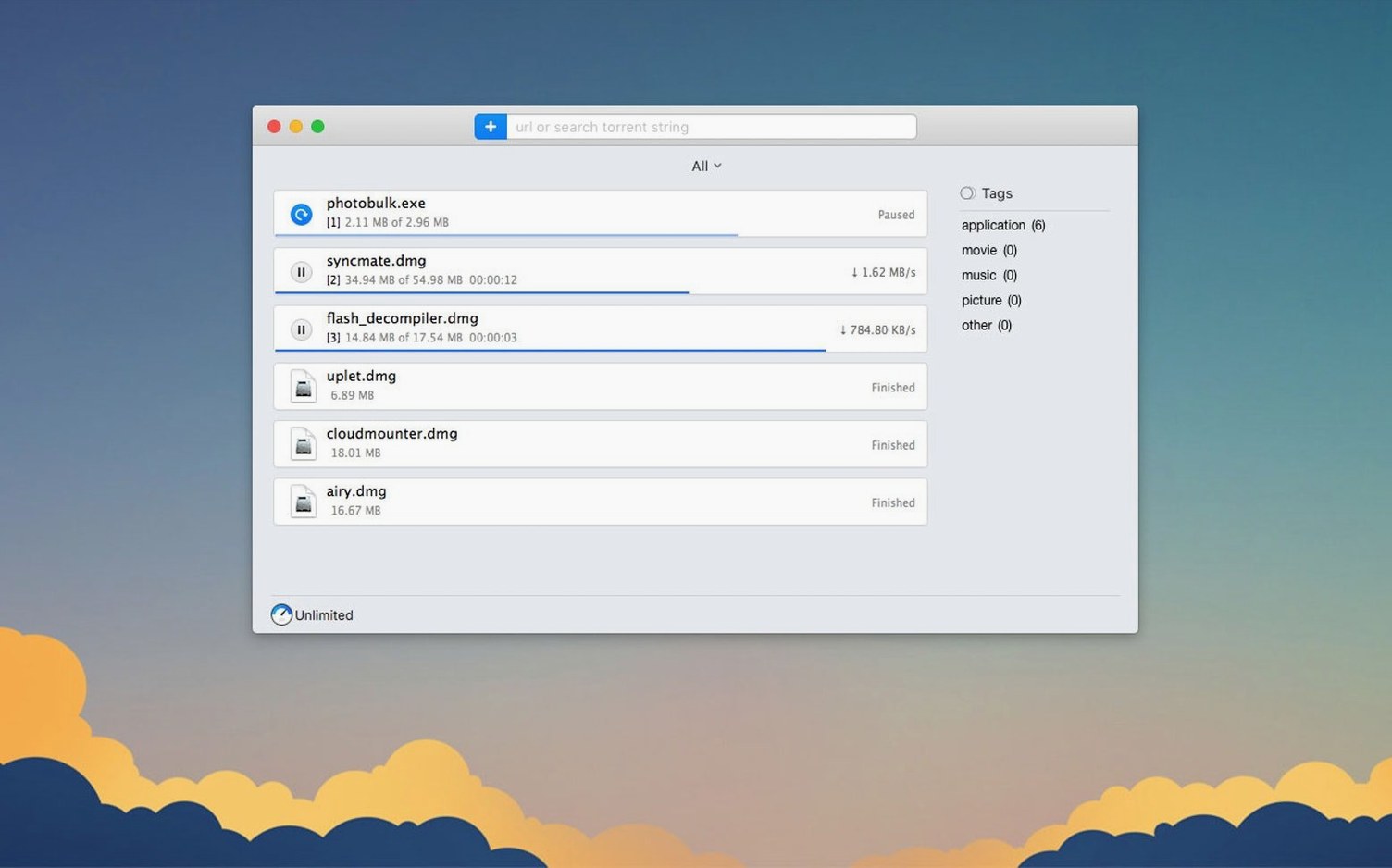
The second habit: tag your downloads. Folx lets you assign tags to tasks as they queue up. A tag like "client-footage" or "sound-effects" pays off when you're hunting for that one file three weeks later and the download history has ballooned. It's a small thing, but it stops the download manager from becoming a graveyard of forgotten filenames.
For torrents, set the seeding ratio limit on day one. The default infinite seeding can eat bandwidth during an afternoon edit session, and nothing kills a render-upload overlap faster than a torrent client quietly sharing at full speed. I cap seeds at a 2.0 ratio and schedule heavy torrent work for 2 a.m.
FDM vs. Transmission vs. Neat Download Manager for Bulk Fetching
Folx isn't the only download tool on macOS, but it occupies a specific middle ground that its alternatives don't quite match.
Versus Free Download Manager (FDM): FDM is cross-platform and open-source, which earns it a loyal crowd. It splits downloads and handles torrents too. Where Folx pulls ahead is the native Mac feel. FDM's macOS port feels like a visitor; Folx behaves like a resident. The built-in torrent search with seed sorting inside Folx also removes the step of opening a browser tab altogether. For a video editor who lives in the Apple ecosystem and wants a tool that respects dark mode and drag-and-drop without hesitation, Folx fits more naturally.
Versus Transmission: Transmission is a lightweight, focused torrent client. It does one job and does it well, but it doesn't touch direct downloads or YouTube. If all you ever need is a magnet link handler, Transmission is fine. Folx replaces it and gives you threaded direct downloads in the same window. That consolidation matters when your Dock is already crammed with creative tools.
Versus Neat Download Manager: Neat is a browser extension that catches downloads. It's clever and free, but it lives inside Safari or Chrome and doesn't understand torrents. Folx exists outside the browser — it catches links you paste, drag, or click, and it handles torrents natively. For anyone grabbing video assets from multiple sources, including torrent-based stock footage, the browser-only approach cracks quickly.
Pulling a 4K Pack, Selective Torrent Clips, and a YouTube Spot at 9 a.m.
Tuesday, 9 a.m. A motion designer needs a 4K grain overlay pack from a direct link, three stock clips from a torrent with selective files inside, and a reference spot pulled from YouTube. Without Folx, that's three different tools: a browser download that might stall, a separate torrent client for the selective files, and a sketchy website for the YouTube rip.
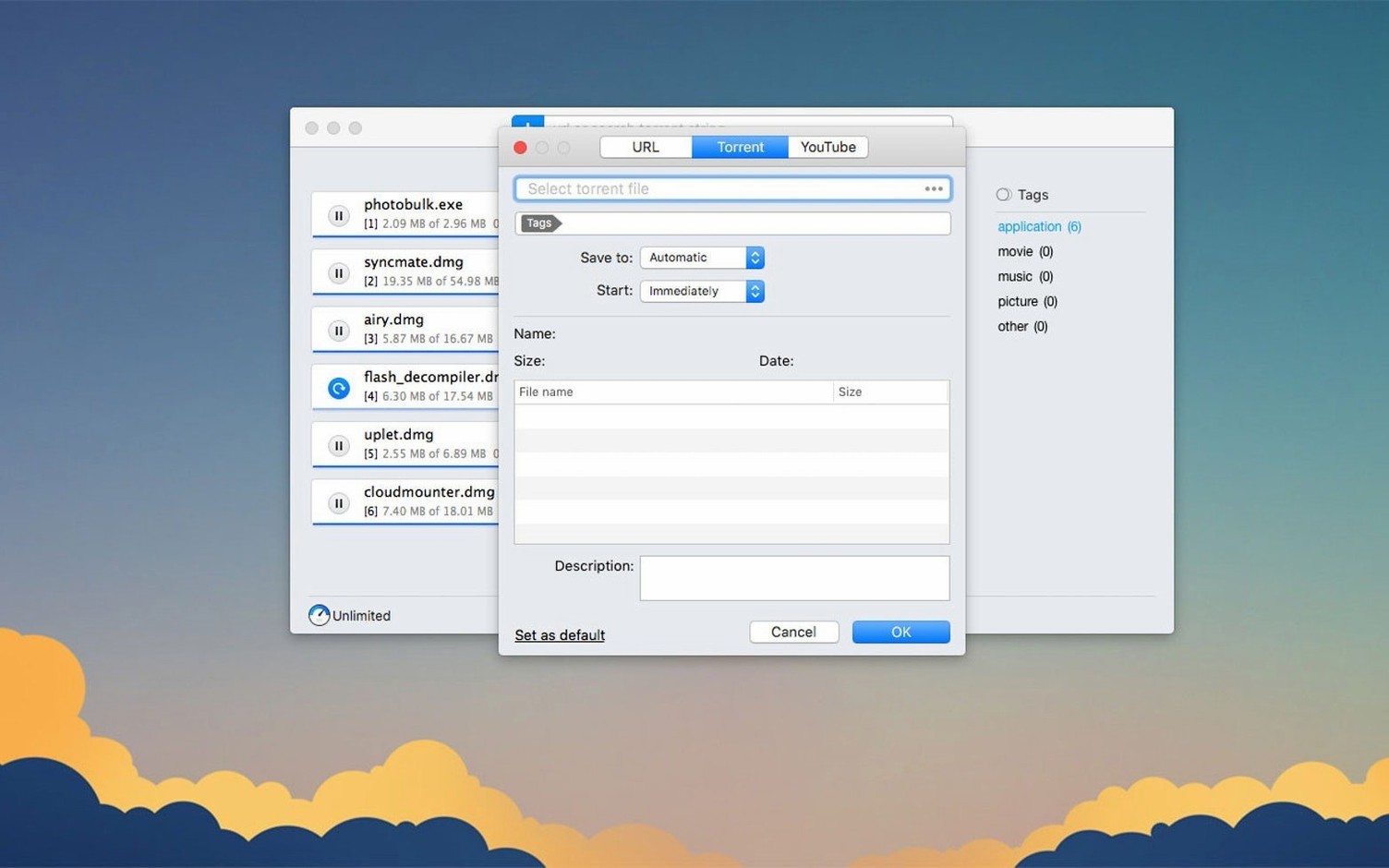
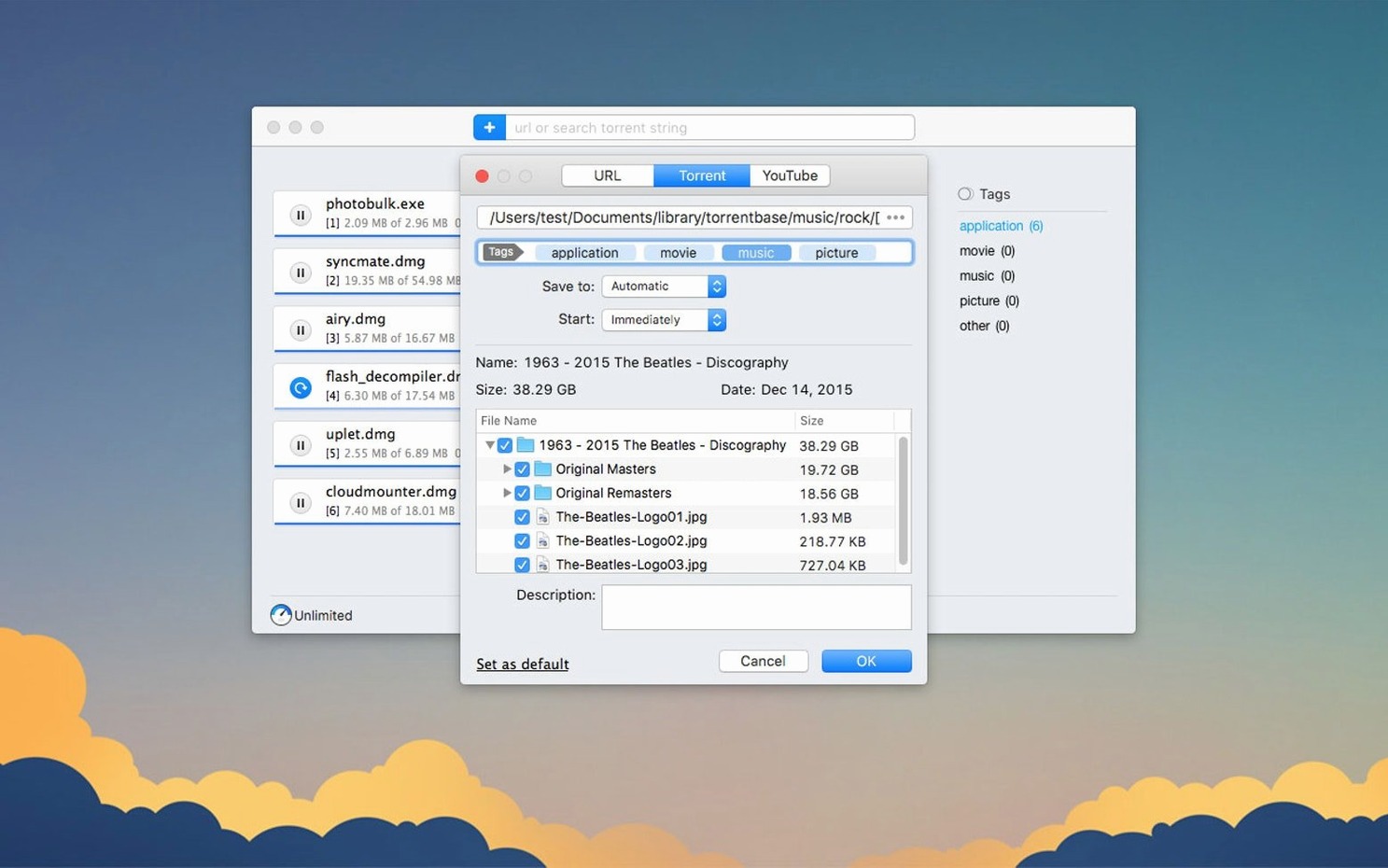
She pastes the direct link into Folx, which splits it across multiple threads and starts pulling down the 2 GB overlay pack. She drops the torrent file in next, but she unchecks the preview JPEGs and the bonus LUTs — only the ProRes clips matter. The YouTube link goes last; she picks 1080p quality from the dropdown and renames the output to client_ref_spot.mp4 before it even starts. Three tasks, one queue, all running in parallel while After Effects chews on a composition in the foreground. By the time the coffee is cold, the assets are sitting in a tagged folder, ready to import.
Unchecking Sample Files Before a Torrent Starts
Does it handle selective file downloads inside a torrent? Yes, and it was improved in this build. When you drop in a torrent that bundles extras, menus, or sample files, you can uncheck anything you don't want before the download begins. That keeps a 30 GB pack from swallowing your drive when you only need one folder.
Will it break on magnet links? The previous version had a crash with some magnet links — fixed. Magnet handling is now stable, and the app resolves them without kicking you to a browser or freezing the queue.
Can it grab YouTube videos without extra extensions? Straight out of the box. Paste a URL, pick the quality available on the server, rename the output, and go. It's not a batch ripper, but for pulling a single reference or a client spot, it removes the need for separate converter sites.
Does the proxy support actually work? With the improvements in this release, yes. If your network routes through a proxy, Folx now respects that without stalling downloads or losing task progress. Set it once in preferences and forget it.
The latest build tightens up the torrent engine — downloads feel snappier and the app handles stored tasks more reliably. Proxy support also got some attention, and selective file downloading inside torrents works smoother now.
Also fixed: a crash when adding certain magnet links, and a crash that could hit during torrent search. Minimum macOS requirement is now 10.13.
- macOS 10.13 or later
- Apple Silicon & Intel (64-bit)
Questions I actually get
Can Folx handle both direct downloads and torrents?
Yes. Folx Pro acts as a download manager for direct links and a full torrent client, supporting magnet links, torrent files, and built-in torrent search.
Does Folx let me control the quality of video downloads?
When grabbing videos from sites like YouTube, Folx lets you choose the save quality if the source provides multiple resolution options.
Notes from the edit bay · 0
Sign in or get an edit-bay pass to leave a note.
No notes from the edit bay yet. They go up after I read them.