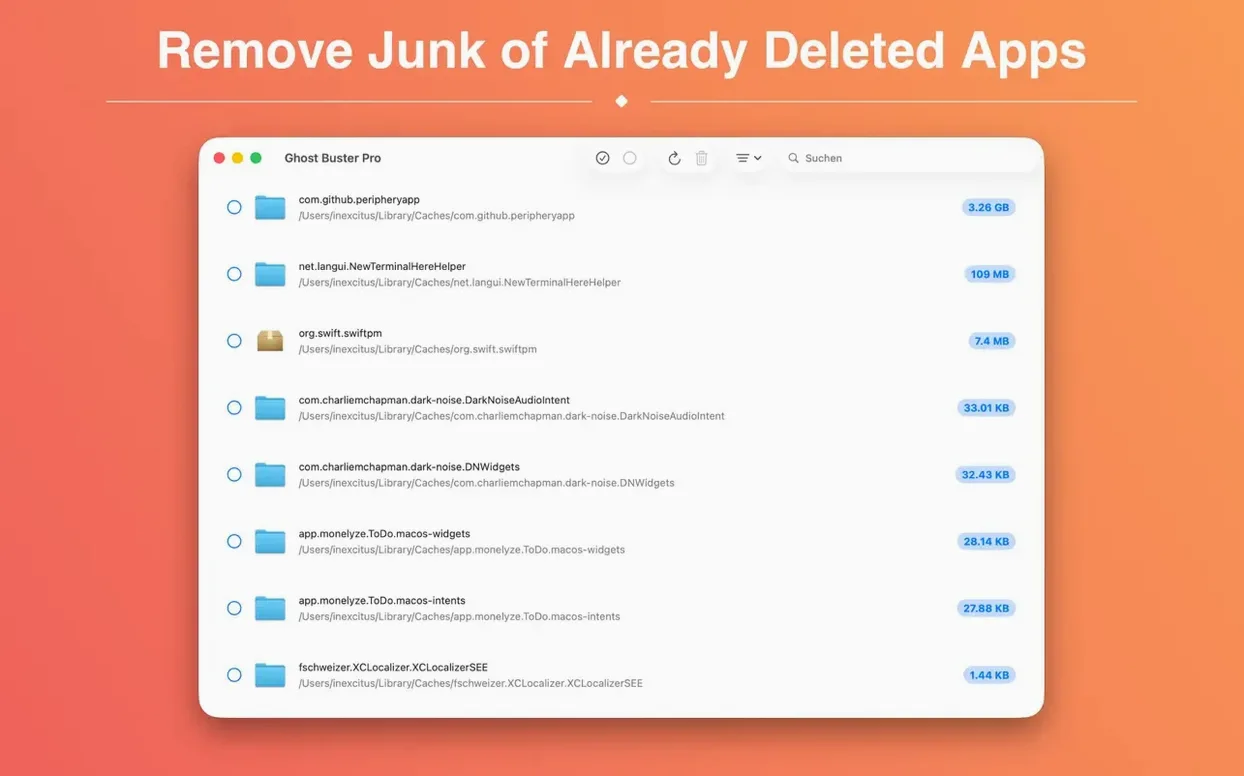
You dragged an app to the Trash weeks ago. Today you stumble across its launch agent still running, or a support folder eating half a gig in Library/Caches. That’s the mess Ghost Buster Pro cleans up.
What Jobs Does It Handle?
- Leftover Detection — Scans for orphaned files from apps that are already gone. Preferences, caches, logs, containers — the stuff a simple drag-to-Trash leaves behind.
- One-Click Deletion — Select the junk, hit delete. No digging through hidden Library folders. The app removes files directly, no staging area, no second pass.
- Native Apple Silicon & Intel Support — Runs clean on both architectures, so it doesn’t matter which Mac you’re tidying up.
The Post-Uninstall Baggage Sweep
This isn’t a system optimizer or a duplicate finder. It’s a focused cleanup tool for the moment after uninstalling — or weeks later, when you realize an old app left baggage. Fire it up, scan, clear the dead weight, and get back to the timeline. Nothing gets deleted until you say so.
No Dashboard, Just an Instant Scan
People fire up Ghost Buster Pro expecting a dashboard with settings and filters. There isn't one — and that's the point. The app scans immediately after launch, no welcome screen, no "analyze" button. First-timers often quit and relaunch, thinking it's frozen. It's not. The progress bar fills as it crawls your drive, and the results table populates the moment it finds something.
Another common stumble: selecting every single result and deleting without reading. Some leftovers belong to apps you still use — a codec pack you installed alongside a video tool, a shared framework several apps depend on. Ghost Buster Pro doesn't know which ones are still needed. It just reports what's orphaned from uninstalled software. Skim the list. If you recognize a file name tied to something you actively run, leave it unchecked.
The biggest misstep is treating it like a weekly cleaner. It's not. You run it after uninstalling something, or when you suspect a long-gone app left cruft behind. Running it daily produces empty scans and wastes time. If you're chasing a specific leftover — say a rogue preference file from a buggy beta — check the results column for the app name or bundle identifier you remember. The search field at the top filters in real time.
Your First Forensic Inventory Pass
Right after installing, don't just scan and delete. Do a dry run first. Let Ghost Buster Pro populate its list, then scroll through without checking any boxes. Treat it like a forensic inventory. You'll see what your past uninstalls actually left behind — often surprising, especially in ~/Library/Application Support and ~/Library/Preferences. Make a mental note of repeat offenders: apps that scatter files across five directories even after removal.
Sort the results by file size. Click the size column header and work from largest to smallest. Old disk images, caches from video converters, leftover render scratch files — these are the space hogs worth deleting immediately. One user found 14 GB of orphaned media cache from a color grading tool they'd removed a year earlier. That's the kind of win that makes the first scan satisfying.
If you're on a Mac with a small internal SSD, pin Ghost Buster Pro to your Dock for the first week and run it after every app you uninstall. Build the habit: remove app, launch cleaner, scan, delete. After that week, you'll have a feel for which apps are messy uninstallers. From then on, you'll know to reach for it only when you need a ghost buster mac cleanup — not out of ritual.
Set up a keyboard shortcut via macOS System Settings if you plan to keep it around. No built-in shortcut exists, but you can assign one through Keyboard > Shortcuts > App Shortcuts. Call it with a quick key combo and the scan starts before you finish your coffee.
It Never Deletes Without Your Checkmarks
"Will it delete anything automatically?" No. Ghost Buster Pro never removes files without you checking them and confirming deletion. There's no background service, no scheduled cleanups, no silent purges. The app scans, shows results, and waits. You decide what goes. That said, the delete action is final — no trash recovery, no undo. If you're unsure about a file, leave it alone or research it first. The app doesn't babysit.
"Does it work alongside CleanMyMac or OnyX?" It does, but they're solving different problems. System cleaners scrub caches, logs, and temporary files globally. Ghost Buster Pro targets only the remains of removed applications. They don't conflict, but running both on the same day is redundant unless you've just uninstalled something. Think of it as a ghost buster pro mac tool with a narrower scope — deeper on app leftovers, silent on system junk.
"Can it find leftovers from apps I deleted months ago?" Yes, and that's exactly where it shines. The scan reads file metadata and bundle identifiers still present on disk, even if the parent app disappeared long ago. Files don't expire. A preference plist from a 2022 uninstall sits there indefinitely until something removes it. Ghost Buster Pro finds it like it was left yesterday.
"Does it work on external drives?" It scans only the current boot volume. If you had apps installed on an external SSD that's no longer connected, those leftovers won't appear. But if the external drive is mounted and contained app support folders, some results may surface depending on how macOS indexed those locations.
A Session, Walked Through
You've just dragged a DJ app off your Mac — something you tried for a weekend set and never touched again. The .app bundle is gone, but you know these audio tools leave samples, preference files, and plugin caches everywhere. Time to run a useful ghost torrent of a cleanup.
You launch Ghost Buster Pro. No splash screen. The window opens and the scan bar starts moving within a second. You watch it tick through directories: first system-level spots, then your user Library. After about 20 seconds, the table fills with 23 entries. The DJ app's name appears next to most of them, but there are also leftovers from a screen recorder you removed three months ago and a game you deleted after finishing it.
You click the size column to sort by largest file first. Top result: a 2.1 GB sample library folder sitting in ~/Music/AppName/. Below it, a 340 MB cache of waveform renders. You check both, then scan the smaller items — a .plist here, a saved state folder there. You uncheck one item: a shared Audio Unit component that another app might use. No reason to gamble.
You hit "Delete Checked." A confirmation dialog asks if you're sure. You confirm. The files vanish instantly — no progress animation, just a clean table. You close the app and check your drive space: 2.4 GB reclaimed. The whole session took under a minute, and the DJ app is now truly gone.
The About window and Help menu got a consistency pass — they now share the same look and feel as the rest of the suite. No new features, just a cleaner fit when you’re jumping between apps mid-project.
Also fixed: nothing else listed for this build.
- macOS 15.6 or later
- Apple Silicon or Intel 64-bit Mac
Questions I actually get
Can Ghost Buster Pro delete files from apps I already removed?
That’s exactly what it’s built for. It finds and removes leftover caches, preferences, and support files from apps no longer on your system.
Notes from the edit bay · 0
Sign in or get an edit-bay pass to leave a note.
No notes from the edit bay yet. They go up after I read them.