What Did Version 2 Change?
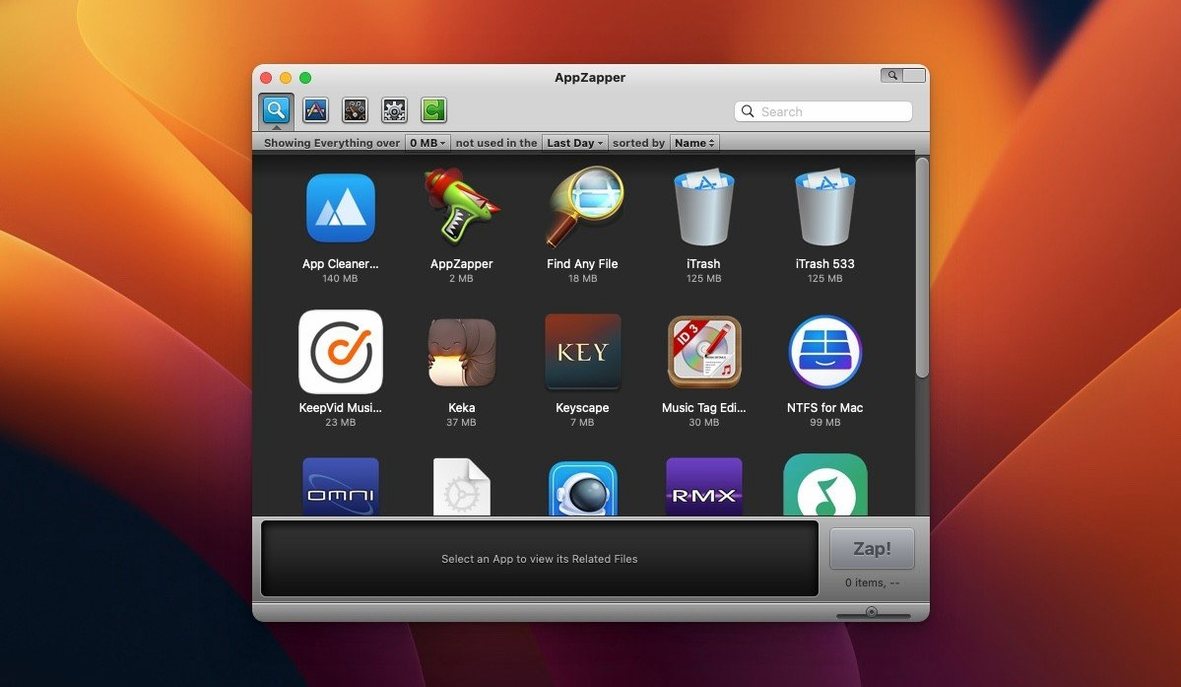
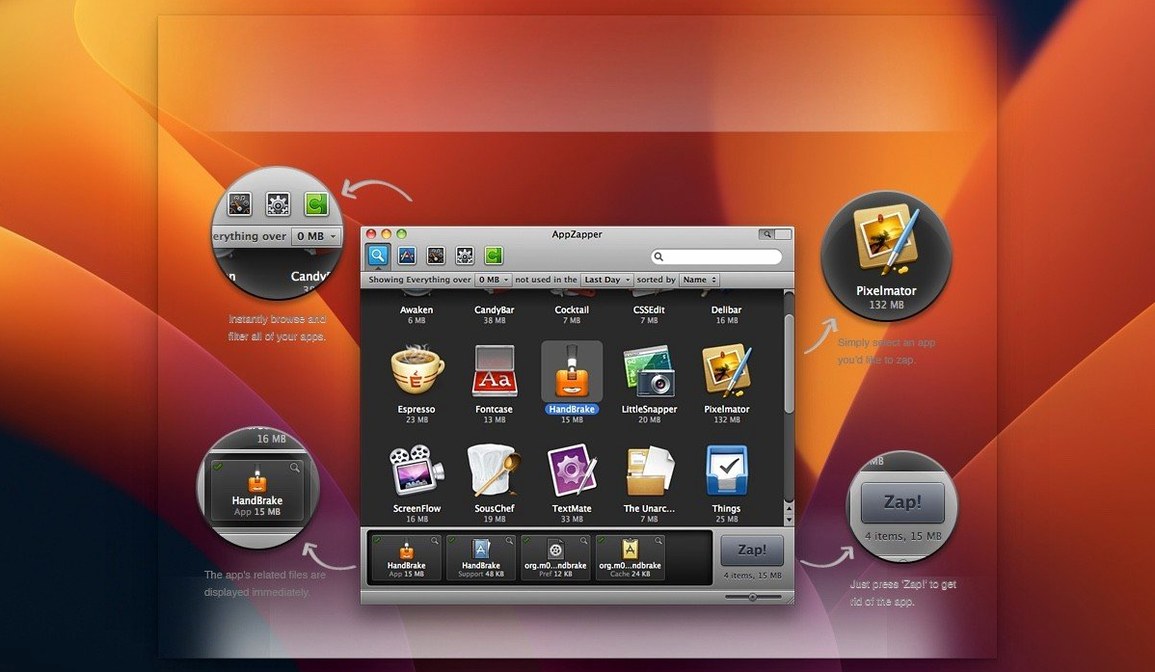
The biggest shift is the new grid-style app browser. Big icons, rows and columns — it feels more like Launchpad than a table of files. If you just grabbed the AppZapper torrent, this is the view that greets you first, and it’s worth a quick spin before anything else.
How Do You Clean Up With It?
- Switch between views. The grid is the headline feature, but the list view is still there. Tap the button in the upper-right corner to flip between them. Grid helps when you’re hunting by memory of an icon; list wins when you want to sort by name or last-used date.
- Trust the ZapGenie. Hit that wand icon. It sorts your installed apps by how recently you touched them. Stuff from two years ago floats to the top. That’s your hit list — apps you forgot you even dragged in for a weekend project.
- Check before you zap. Drag an app into the window, or pick one from the browser. AppZapper shows every related file it can find. Uncheck anything you want to keep, then hit the delete button. Everything goes to the Trash, so a panicked undo means one trip to the Trash to restore it.
The whole point is closing the gap between what macOS throws away and what actually sits on your drive. Apple’s built-in removal leaves preference files and caches behind. AppZapper grabs those loose ends before they pile up into digital dust bunnies.
Why It Won't Scan Your Mac Like a System Cleaner
AppZapper isn’t a system cleaner. It doesn’t scan for log files, language packs, or orphaned launch agents on its own. It’s a precision tool — you pick an app, it finds the associated junk. Think of it as a smarter Command-Delete on the Applications folder.
It plays nicely with other tools in a layered cleanup stack. I run a dedicated space visualizer like DaisyDisk when I need a bird’s-eye view of what’s eating my SSD. Then I switch to the app zapper mac workflow for surgical strikes on individual apps I plan to retire. For the daily dust — browser caches, Xcode derived data — I still lean on system utilities. But none of those other tools handle the uninstall step with this much focus. AppZapper does one job and stays out of the way.
On the macOS integration side, remember that unchecking a file in the list really does protect it. If an app stores custom presets or license keys in Application Support, you can uncheck that folder and zap the rest. The deleted items land in your Trash, not some proprietary quarantine. That means Time Machine sees them, terminal commands see them, and you can restore with a right-click. No black box recovery process.
Skipping the Gatekeeper Dance? Here's the Terminal Step You Missed
The Gatekeeper dance trips up a surprising number of people. Mount the disk image, right-click the Open Gatekeeper friendly file, and hit Enter in Terminal when prompted. That’s it. If you skip that step and just double-click the appzapper full mac package icon, macOS will throw a generic “can’t be opened” error. The fix is always the same: run the Gatekeeper bypass first.
Another hiccup: the grid view can look empty when you first switch to it. Usually that means the app is still building its cache of installed applications. Give it ten seconds. If it stays blank, quit and relaunch. A sluggish first launch on older spinning-disk Macs is normal — it’s reading every .app bundle on the drive.
Occasionally people search for an appzapper serial thinking they need it. The TNT release handles activation so you can skip that rabbit hole entirely. Just install and go.
If a file won’t delete, close the parent app first. AppZapper can’t remove files an active process still holds open. Quit the app you’re zapping, wait a beat, then drag it in. Same rule applies if you’re removing a menubar utility — look for it in Activity Monitor, kill it, then zap.
Start With a Five-Minute Audit, Not a Deep-Clean Binge
Start with a five-minute audit, not a deep clean binge. Open the ZapGenie and sort by date last used. Scroll to the bottom where the dusty stuff lives. Pick three apps you haven’t launched since the previous macOS release. Zap those three. Watch the file list, uncheck anything that looks ambiguous, then delete. That quick hit builds muscle memory for the check-then-zap rhythm without risking anything important.
Next, drag an app you do use regularly — something like a font manager or a plugin host — just to see what related files AppZapper finds. Don’t zap it. Just read the list. That teaches you what kind of debris your real tools leave behind. Knowledge you’ll use later when you actually retire that app.
Set a recurring calendar reminder for three months out. By then you’ll have accumulated a fresh batch of trial apps, one-off utilities, and that screen-sharing tool you grabbed for a single client call. A quarterly sweep with the ZapGenie keeps the Application Support folder from turning into an archaeological dig.
The second version introduced a grid-style app browser with large, tappable icons — a quicker way to spot apps visually instead of scanning a list. Also fixed: a small button in the upper-right corner now toggles between grid and list views.
- macOS 10.9 or newer
- 64-bit Intel processor
Questions I actually get
Does AppZapper work on Apple Silicon Macs?
The current version is built for 64-bit Intel Macs and requires macOS 10.9 or later.
Can I recover something I accidentally deleted?
Yes. AppZapper sends files to the Trash rather than wiping them immediately, so you can restore anything from there.
Notes from the edit bay · 0
Sign in or get an edit-bay pass to leave a note.
No notes from the edit bay yet. They go up after I read them.