I'm staring at a render bar that won't budge and a system drive that's suddenly in the red. That's the five-minute warning before a client call. I don't need a lecture on digital hygiene; I need a folder's worth of junk gone and my RAM back so I can get this export out the door.
The Six Utilities Inside the Bundle
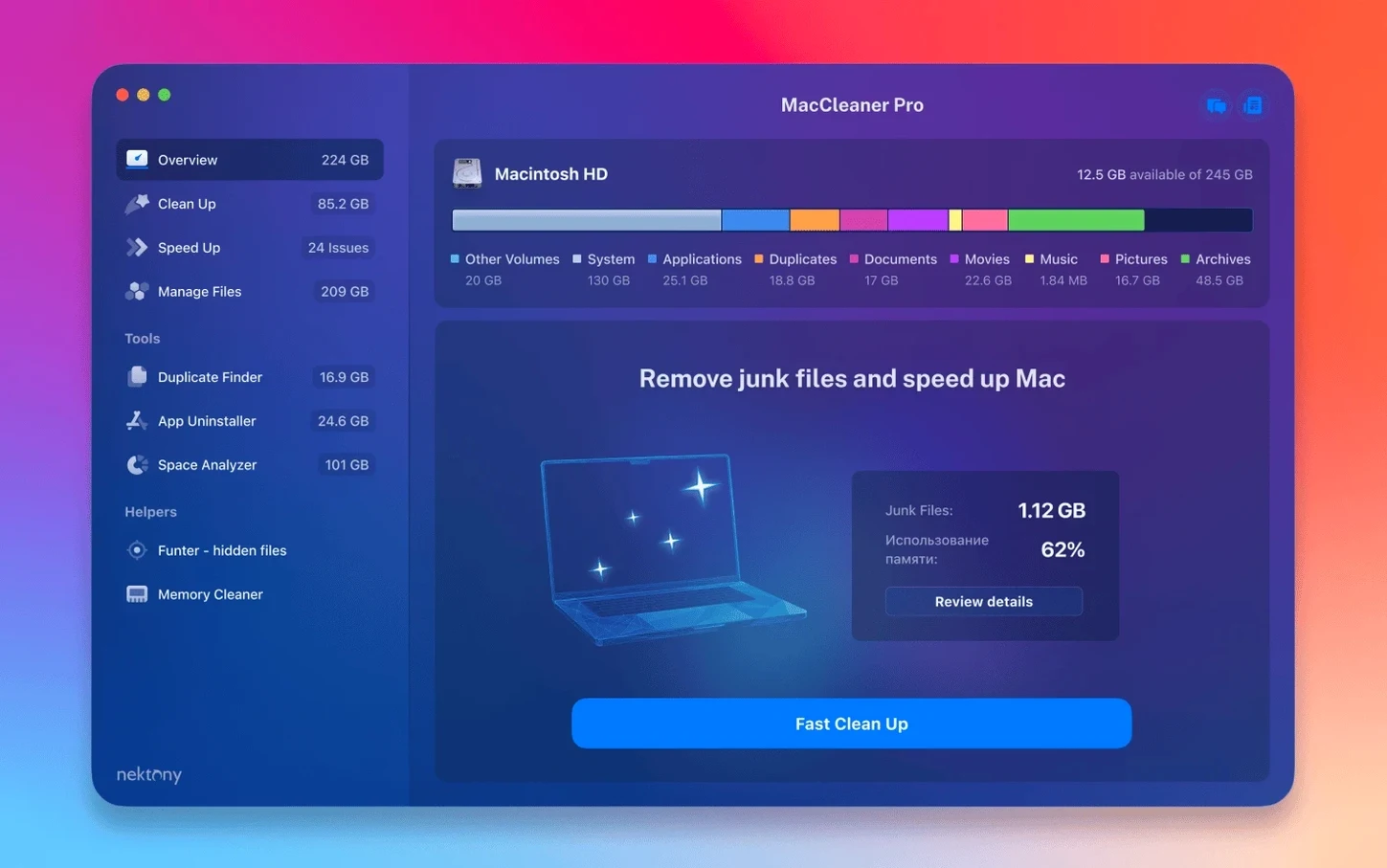
MacCleaner Pro is Nektony's bundle of six utilities. You get App Cleaner & Uninstaller for nuking leftover app files and disabling extensions, Disk Space Analyzer for a visual map of what's eating your drive, and Duplicate File Finder to sweep up cloned media. Funter handles hidden files, and Memory Cleaner frees up inactive RAM when the system feels sluggish.
Where Does the "Pro" Come In?
The bundle doesn't just surface problems—it hands you the pro versions of each tool. That means complete app removal with extension management, not just dragging icons to the Trash. The disk analyzer digs deeper than Finder's "Get Info," and the duplicate finder scans for identical photos and raw footage that can choke a project drive.
iCloud Temp Files Now Show Up
The scan got smarter with iCloud. The update improved detection of items stored in iCloud folders and custom Home folder locations, so you see temp files that previously flew under the radar. Nektony also polished a handful of minor interface glitches that made the previous build feel a touch rough around the edges.
Native on Apple Silicon Back to High Sierra
Yes. The package runs natively on both Intel and Apple Silicon Macs back to macOS 10.13. The Memory Cleaner tab lives in the menu bar when you need a quick pressure release, and the whole thing stays out of your way until a drive hits capacity.
The Little Things That Add Up
After a few weeks of bouncing between projects, you start noticing the small touches. Funter, for instance, doesn't just reveal hidden .DS_Store files—it integrates a quick toggle right into the Finder toolbar. One click flips hidden items on and off per folder, no terminal commands needed. That's the kind of thing I appreciate when I'm hunting a buried cache folder from a plug-in that crashed.
Inside App Cleaner & Uninstaller, the Extension Manager tab deserves more attention than it gets. It lists every login item, launch agent, and system extension in plain English. If a background process from an audio driver you deleted six months ago still loads at startup, this is where you catch it. The same panel lets you disable or remove widgets, Spotlight plug-ins, and even Quick Look generators that are slowing down Finder previews.
A less obvious trick: Duplicate File Finder's scan scope. By default it scans common folders, but you can drag a specific project folder onto its window and limit the hunt to just that tree. When a client sends three rounds of revisions with slightly different filenames, I drop the entire shoot folder in and let it flag the true copies. The preview pane shows a thumbnail of each match, so you're not deleting blind.
What 4.0.2 Changed Day to Day
The iCloud detection fix is subtle but practical. Before the update, items stored in iCloud Drive but not fully downloaded showed up inconsistently in the scan. Now Disk Space Analyzer counts those placeholders correctly, and App Cleaner & Uninstaller sees app support folders that live inside an iCloud-synced Desktop or Documents path. If you've moved your Home folder to a custom location—common on machines with external boot drives—that path is now followed properly instead of generating empty scan results.
The interface fixes are minor but welcome. Button alignment in the dark-mode toolbar no longer drifts after a window resize, and the progress bar during a duplicate scan doesn't flicker when you switch tabs. These aren't headline features, but they remove the little friction that makes a tool feel unpolished after the third coffee of the day.
A Typical Cleanup Session
It usually starts with a notification. The Startup Disk Full warning pops up mid-render, and I've got maybe four minutes before the system beachballs. I open MacCleaner Pro and jump straight to Disk Space Analyzer. The scan takes about thirty seconds on a 500 GB drive—long enough to grab a water bottle, short enough that I don't lose my train of thought.
The treemap view lights up. A purple block the size of a fist represents a single After Effects auto-save folder I forgot to purge—22 GB of incremental backups from last month's animation project. I right-click, choose "Reveal in Finder," and drag the whole folder to the trash. Another chunk of blue shows my Lightroom catalog previews; I leave those alone because rebuilding them costs more time than the space they occupy.
Next I switch to Memory Cleaner. The menu bar gauge sits at 14.2 of 16 GB, pressure in the yellow. One click on "Free Up Memory" drops it to 9.1 GB by flushing inactive allocations. It's not magic—the system would eventually reclaim that RAM—but "eventually" doesn't cut it when the render engine is swapping to disk. The difference is immediately noticeable in timeline responsiveness.
Before closing the lid, I run Duplicate File Finder on my project drive. It flags three copies of the same master audio file, each nested in a different version folder. I select the two older date-stamped copies and delete them. Total time from warning to cleanup: under four minutes. The render finishes without another hiccup.
Culling 4,000-Plus Raw Files After a Shoot
A wedding photographer I work with treats MacCleaner Pro as part of her ingest routine. After transferring a full day's shoot—usually 4,000-plus raw files—she opens Disk Space Analyzer to confirm the session landed where she expects. Then she runs Duplicate File Finder across her working drive, not because she expects clones of the raws, but because she often re-imports edited JPEGs into different Lightroom catalogs and forgets to delete the originals. The tool catches them by file hash, even when the filenames differ.
Once the duplicates are cleared, she opens App Cleaner & Uninstaller's left-over file scanner. Lightroom and Photoshop updates are notorious for leaving old versions behind, each chewing up 2–3 GB of application support data. She scans, selects the outdated Adobe folders, and removes them in one batch. The whole ritual takes ten minutes and frees enough space to carry her through the next wedding weekend without an external drive panic. She told me she hasn't seen the "scratch disk full" error in Photoshop since she started the habit—and for someone delivering galleries on a deadline, that's the metric that matters.
Version 4.0.2 sharpens the scan engine. The headliner is improved detection of items parked in iCloud and custom Home folders—stuff the previous version missed. Also fixed: several minor interface issues that made certain panels feel unpolished.
- macOS 10.13 or newer
- Intel or Apple Silicon Mac
- English interface
Notes from the edit bay · 0
Sign in or get an edit-bay pass to leave a note.
No notes from the edit bay yet. They go up after I read them.