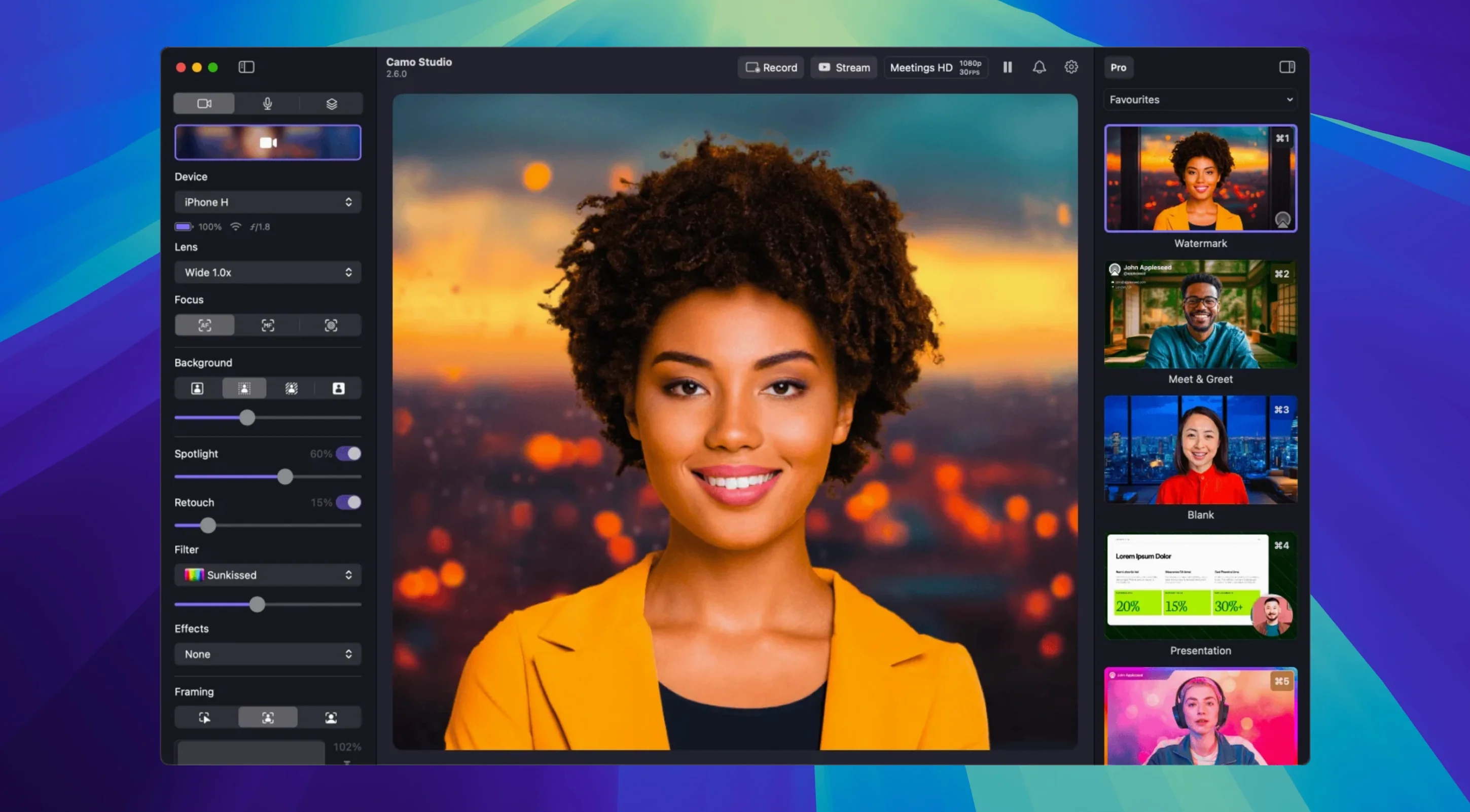
The timeline is locked and the client needs a talking-head pick-up, but your usual shooting space is a mess. You grab your iPhone, open Camo Studio, and drop in the clean background you prepped yesterday. The AI framing follows you as you lean in, the portrait mode kills that ugly office depth, and a LUT you built last month matches the grade to the rest of the cut. You're not just getting a webcam feed—you're running a controllable, layered camera source straight into your session.
1. Build the Source
Forget the auto-everything webcam look. Camo hands you manual control over focus, exposure, white balance, and zoom on the connected phone. Lock it down so the shot doesn't breathe between takes. Digital image stabilization cleans up handheld jitter, and AI face retouching handles harsh shadows without softening the whole frame to mush.
2. Shape the Frame
Automatic framing keeps you centered as you move, which is a lifesaver for tutorial recordings. The virtual green screen does a solid job cutting you out for background replacement, and the portrait mode bokeh adds real depth separation that looks less like a video call and more like a camera.
3. Layer the Look
This is where the editor brain kicks in. Drop LUT files straight onto the feed for instant grading, or pick from the 18 built-in filters for a quick vibe check. The overlays and scenes system lets you stack text, logos, and web elements, so you can cut to a lower-third layout without touching your NLE.
When you need a camera feed that responds to a real production workflow, Camo stops being a utility and starts acting like a source you can actually shape.
From the Streamer's Booth
A Twitch streamer running a charity marathon needs to switch between a wide game-capture shot and a tight face cam without dragging OBS into chaos. They plug in an old Android tablet as a dedicated overhead camera, keep the iPhone on their face, and build two scenes inside Camo—one with a branded overlay and donation tracker, the other a clean close-up. A quick keyboard shortcut flips between them mid-stream, and the audio noise reduction rolled out in 2.9.0 kills the hum of a nearby fan. The whole setup runs off the phone's processing, so the gaming rig never drops a frame.
Before You Hit Install
People usually ask two things before they grab the camo studio pro torrent: whether an older phone can keep up, and whether the app fights with existing camera tools. A 2018 iPhone handles 1080p 30 FPS without breaking a sweat, though 4K 60 FPS wants something newer. Camo doesn't grab the camera until you launch it, so your phone still works as a phone. If you've been hunting a camo crack that doesn't wreck stability, the real thing sits quietly in the menu bar and only spins up the feed when a client app asks for it.
Another common question is about Android support—yes, it works, and the image quality gap between a mid-range Android phone and a built-in laptop webcam is still enormous. The virtual green screen and AI framing are available on both platforms, though LUT support and some of the finer manual controls are iOS-only.
Launch and Forget: The Predictable Daily Rhythm
After a week of daily use across Zoom calls and recording sessions, the app settles into a rhythm that feels predictable. Launch it, plug in the phone, and the feed appears in your meeting app without a dance through settings menus. Memory pressure stays low—around 180 MB on an Apple Silicon Mac with a 1080p feed active. The phone does the heavy video processing, so the Mac's CPU graph barely twitches even with dual-format streaming running. That dual-format feature, new in 2.9.0, records a clean feed and an overlay-burned version simultaneously, which saves a post-session transcode.
The one place you'll feel the weight is disk speed when recording 4K directly to the Mac. An external SSD makes it painless; the internal drive on an older machine can spike write latency. For anyone who grabbed a camo studio 2.7.2 build in the past and found the stabilization a little aggressive, the current version reins it in without making handheld footage feel floaty. Crash count over a month of daily streams: zero. That's better than most NLE plugins.
The 2.9.0 release adds a few heavy-hitters for macOS workflows. Dual-format streaming and recording lets you save a clean feed while streaming a composed one. Isolated recordings split audio and video tracks, and a new noise reduction module cleans up room tone. There's also a hook for control from AI agents.
- macOS 12.3 or later
- Apple Silicon or Intel Mac
- Compatible iPhone or Android device
Notes from the edit bay · 0
Sign in or get an edit-bay pass to leave a note.
No notes from the edit bay yet. They go up after I read them.