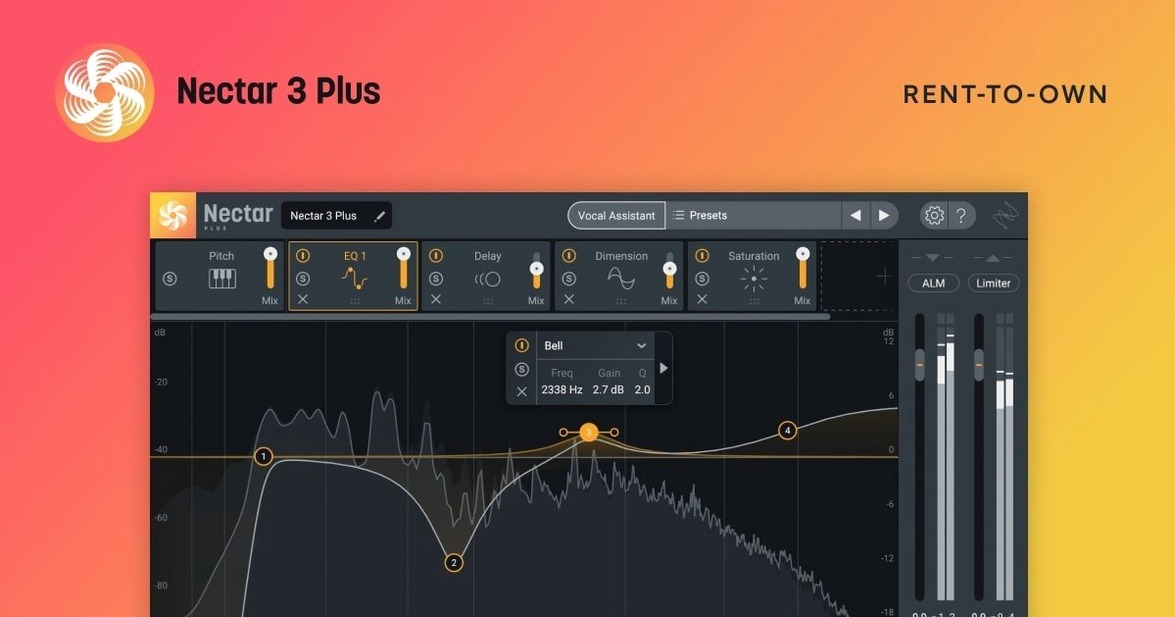
A vocal take that sits wrong in a mix can kill a whole session. iZotope Nectar is built to fix that, giving you one window where tone, dynamics, and space come together.
Plugin format — AU, VST3, AAX. It fits into Logic Pro, Ableton Live, Pro Tools, and basically any modern DAW on a Mac.
Architecture — 64-bit only. Runs native on both Apple Silicon and Intel Macs, so your render bar stays moving.
AI Assistant — Vocal Assistant listens to your track, analyzes the problems, and builds a starting chain. It hears masking, harshness, and uneven levels without you touching a knob.
Modules — The new Auto-Level module (Advanced only) irons out volume jumps before they hit your compressor. Voices adds harmonies and doubles, while Backer layers in background vocals. You also get the usual workhorses for compression, EQ, de-essing, reverb, and delay.
Cleanup — Breath control pulls out sharp inhales. The gate catches noise between phrases. Width tools push a vocal out to the edges or pull it center. It’s a focused tool, not a general channel strip.
macOS Ventura 13.7.4 Became the Hard Floor
The 4.1.0 update wasn’t a headline-grabbing feature drop — it was a maintenance release that tidied up real friction points. For Mac users, the big one was the minimum OS bump to macOS Ventura 13.7.4. If you’d been holding onto an older machine, that stings. But if you’re already on Ventura or Sonoma, the change means iZotope stopped chasing backward compatibility and focused on stability where most people actually work.
The HiDPI support for Windows doesn’t touch your Mac workflow directly, but it matters if you’re collaborating with someone on a PC. Sessions that bounce between studios look consistent now — no more fuzzy plugin windows on a collaborator’s screen.
The iLok authorization fix was overdue. Some Nectar Standard users hit a wall where a valid license just refused to authorize. That’s the kind of bug that kills a deadline. With 4.1.0, the plugin actually sees the license it’s supposed to see, which means fewer frantic restarts at 2 AM.
Also fixed: supported DAW and NLE versions were updated. That’s a quiet change that keeps Nectar from breaking when your DAW updates its plugin scanning rules. Nothing flashy. Just the kind of thing you don’t want to think about.
It Runs as a Focused Vocal Insert, Not a Standalone Editor Like RX
Nectar lives inside your DAW as an insert — usually on a vocal track or bus. It doesn’t try to be a standalone editor like RX, and it doesn’t pretend to be a full mixing console. It’s a focused strip that expects you to have other tools around it.
With Logic Pro: Drop Nectar after your clip gain adjustments and before any sends to reverb or delay. Logic’s stock Compressor and Channel EQ are solid, so you might bypass Nectar’s EQ and compression modules entirely and just use the stuff Logic doesn’t do — Voices, Backer, and the Vocal Assistant. The Assistant’s EQ suggestions still inform what you tweak in Logic’s own EQ.
With Ableton Live: Live’s warp modes and clip-level gain are where you fix timing and broad level shifts. After that, Nectar’s Auto-Level handles micro-dynamics before the compressor hits. Live doesn’t have a built-in vocal harmonizer, so Voices fills a gap that otherwise needs a separate plugin like Waves Harmony.
With Pro Tools: AAX format means Nectar loads natively. Use it after Clip Gain but before any bus routing to aux tracks. Pro Tools’ own de-esser works fine, but Nectar’s module catches sibilance differently — sometimes one grabs what the other misses. Run both in series if the track is fighting you.
With macOS features: Nectar doesn’t tie into VoiceOver or system-wide accessibility tools in a meaningful way, but it does respect AU plugin validation in Logic. It plays nice with Audio Units caching, so your DAW won’t rescan it every time you launch. If you use macOS’s built-in audio routing with BlackHole or Loopback, Nectar processes whatever you pipe through — it doesn’t care if the signal comes from a microphone or a system audio stream.
Workflow: Polishing a Spoken Vocal for Video
This is a voiceover cleanup path I reach for when a talking-head track lands on my timeline. The recording is fine — not terrible, not great — and it needs to sit under music without constant level-riding.
- Strip silence and clip gain first. In Logic or DaVinci Resolve, cut the dead air and pull up quiet sections manually. Nectar works better when the input isn’t fighting extreme swings.
- Insert Nectar and run Vocal Assistant. Let it listen to about ten seconds of the voice. It’ll set an EQ curve, suggest compression, and flag harshness around 3–5 kHz. Accept the chain, then bypass the reverb module — voiceover doesn’t need it.
- Turn on Auto-Level. This is an Advanced-only module, and it’s the reason I reach for Nectar over a generic compressor. It catches the soft syllables that dip below the music bed. Set the target to around -18 LUFS and let it work.
- Check the Breath Control module. Pull the threshold down until sharp inhales soften. Don’t kill them completely — a completely de-breathed voice sounds unnatural. Just take the edge off.
- Gate the noise floor. The room tone between phrases still hums a little. Set the gate threshold just above that hum. Fast attack, medium release — you want it to close between sentences, not mid-word.
- Final EQ tweak. The Assistant often cuts too much low-mid warmth for a voice that needs authority. Push 200 Hz up a couple of dB, wide Q. Done. Export the chain as a preset for the next episode.
Scenario: A Podcast Producer’s Thursday Night
Maya runs a weekly interview podcast. She records remotely — guests send in audio from whatever microphone they own, and the quality is all over the place. Thursday night is her mix session. This week’s guest recorded in a kitchen, and the track is full of hard reflections and sudden volume dips when they lean back from the mic.
She drops the file into Logic, trims the intro ramble, then inserts Nectar 4. Vocal Assistant runs first — it hears the room ring at 1.2 kHz and notches it out. The suggested compressor grabs the loud laughs without pumping. She adds the Backer module at a low mix level, just enough to thicken the voice against her own studio-recorded track. Voices stays off — this isn’t a song.
Auto-Level smooths the volume dips from the guest’s movement. Breath Control catches the sharp inhales before every sentence. By the time she bounces the episode, the kitchen recording sounds like it was done in a treated room. The episode goes out Friday morning, and nobody mentions the audio quality — which is exactly the point.
Vocal Rider Only Does Level; Nectar Wraps That Inside a Full Chain
Nectar 4 vs. Waves Vocal Rider: Vocal Rider’s entire job is automatic level adjustment. It’s simple, transparent, and light on CPU. Nectar’s Auto-Level module covers the same ground in the Advanced edition, but it’s one piece of a larger chain. If all you need is volume smoothing and you already have compression and EQ elsewhere, Vocal Rider is the leaner pick. If you want leveling plus harmonies, breath control, and an assistant that listens to the track, Nectar replaces five plugins with one window.
Nectar 4 vs. Antares Auto-Tune Pro: Auto-Tune does pitch correction as its headline feature; Nectar doesn’t touch pitch at all. The overlap sits in the harmonizer space — Auto-Tune’s Harmony Engine versus Nectar’s Voices module. Auto-Tune gives you tighter control over formant shifting and scale locking. Nectar’s Voices is faster to dial in: pick a key, set the harmony interval, done. For a producer mixing a full track, Nectar’s broader toolkit wins. For a vocal producer who lives in pitch lanes, Auto-Tune stays essential.
Nectar 4 vs. stock DAW plugins (Logic Pro): Logic’s compressor, EQ, de-esser, and pitch correction cover most of Nectar’s territory individually. What’s missing is the integration: Vocal Assistant hearing the whole problem at once, Auto-Level reacting before the compressor, and Voices/Backer adding layers without routing to separate tracks. You can build an equivalent chain with stock plugins and busses, but it takes four times the clicks and a lot more screen real estate. Nectar trades flexibility for speed — and on a deadline, speed wins.
Windows HiDPI support is now here for sharper plugin windows on high-res displays. The authorization hiccup where Nectar Standard would fail with iLok got sorted out.
Also fixed: the minimum supported macOS version now sits at Ventura 13.7.4, and the list of supported DAW and NLE versions was refreshed.
- macOS Ventura 13.7.4 or newer
- Apple Silicon or Intel processor
- 64-bit host (AU, VST3, or AAX)
Questions I actually get
Does the Voices module come with Nectar 4 Standard?
Yes, the Voices module is included in both Nectar 4 Standard and Nectar 4 Advanced.
Notes from the edit bay · 0
Sign in or get an edit-bay pass to leave a note.
No notes from the edit bay yet. They go up after I read them.