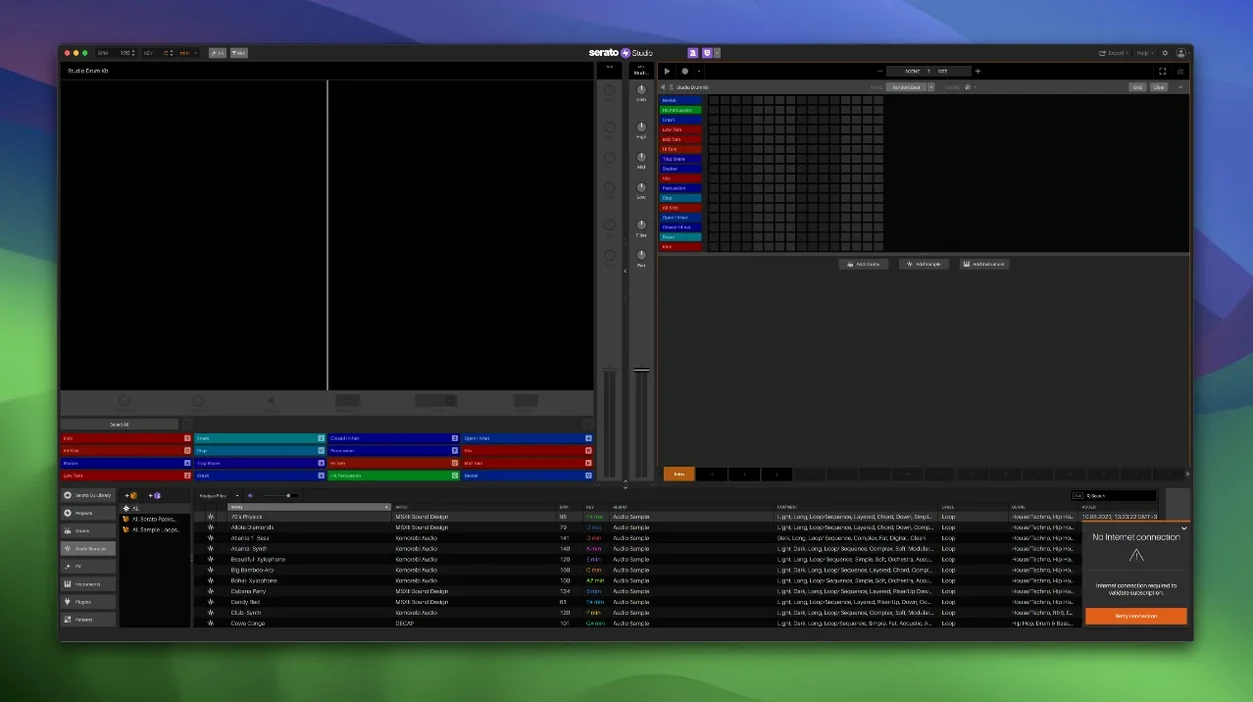
Auto Chord mode is where Serato Studio starts to feel less like a toy and more like a tool you can actually finish a track in. It takes the guesswork out of harmony, but it's the stuff around it that keeps you moving once the loop is rolling. This is a beat maker built by a DJ company, and that background shows in the workflow. Color-coded waveforms, a mixer channel layout, and effects that feel familiar from Serato DJ all mean less time hunting and more time arranging.
Where It Fits for Experienced Users
If you already live in Serato DJ, the shared library is the headline feature. Crates, cues, and now Track Rating, Favorite Crates, and Crate Search — the organizational muscle carries over. You can pull a vocal or a drum break from a DJ set and drop it into a production without rebuilding a library from scratch. Stems deserve a mention too. In version 2.5.0, individual levels for acapella, melody, bassline, and drum stems can be adjusted per Sample Deck, and those levels plus Stems On/Off are automatable. That means you can mute a bassline for four bars, bring it back, and have it all printed into the arrangement instead of riding faders live.
The Deeper Toolset
VST and AU support keeps it honest. You are not locked into the built-in drum kits, instruments, loops, and samples, though those are solid enough for sketching. Ready-made drum patterns with BPM syncing and one-touch key switching make it easy to audition ideas fast. Automation extends beyond stems to the mixer and effects, so a track can breathe on its own. It is not trying to replace a full DAW, and that restraint is the point. It is a fast, simple production environment that leans on the Serato ecosystem instead of fighting it.
A Vocal Chop Workflow, From Crate to Arrangement
Say you want to build a beat around a vocal snippet from an old house track sitting in your Serato library. Start by opening your crates — the new Crate Search in 2.5.0 makes this a two-second job instead of scrolling through folders. Drag the track into a Sample Deck. The color-coded waveform loads instantly, and you can see exactly where the vocal phrase sits without zooming into a tiny editor.
Isolate the vocal using Stems. Right-click the sample, engage Stems, and drag the Acapella level up while pulling Melody, Bassline, and Drums down to zero. Solo it for a moment to check the bleed, then tweak the individual stem levels until only the voice cuts through. Hit the Auto Chord button to snap the sample to the project key, and now you have a usable phrase that sits in the harmony without warping artifacts or manual pitch hunting.
Chop it directly on the Sample Deck pads. Set the play mode to Trigger, dial in a few slices across the phrase, and tap out a rhythm. The BPM syncing means every slice stays locked to the tempo even if you drifted off the grid during the performance. Once the pattern feels right, switch to Scene View, record the pad hits into the arrangement, and automate the Stems On/Off — mute the vocal for eight bars, let the beat breathe, then drop it back in. The whole process, from crate search to a printed arrangement with stem automation, takes less time than bouncing audio between separate apps.
Building Loops It Exports as Stems for a Linear DAW
Serato Studio is not a replacement for a linear DAW, and that is exactly what makes it useful alongside one. I build the core loop — drums, a bassline, a sample or two — inside Studio, then export stems for arrangement and mixing in Logic or Ableton Live. The stem export feature hands you clean WAVs per track, so you are not committing to a stereo mix too early. You could also run Studio as a sound design scratchpad next to Final Cut Pro, pulling loops into a timeline for sync work. The shared library with Serato DJ means a crate you built during a gig is immediately available for production without re-importing or converting files. That library handoff — DJ software to production app, same metadata, same cues — is a shortcut that no other beat maker offers out of the box.
The Reverse Pad Order Toggle That Saves Muscle Memory
A few details in 2.5.0 make everyday use faster. The Reverse Pad Order option in the setup screen is a tiny toggle, but if your muscle memory is wired to a specific pad layout on a controller, flipping it saves retraining your fingers. The Favorite Crates feature works like a bookmark for the folders you hit constantly — open it, drag a sound, keep moving. The Feel control on chord parts deserves more attention than it gets. It adds a slight timing offset to mimic a live keyboard player, and a value of ten to fifteen percent is enough to break the robotic stiffness of quantized chords without sounding sloppy. Automating individual stem levels per Sample Deck means you can write a slow fade on a drum break or a sudden acapella drop directly into Scene View, then forget about it — it is printed, not performed. For anyone who came to Studio through a Serato Mac torrent or a Serato Studio torrent, these are the workflow habits that turn a free experiment into a tool you actually finish music in.
Version 2.5.0 lands with native control for AlphaTheta SLAB and full support for macOS 26 Tahoe. The standout for producers is per-stem control in Sample Decks: you can now set individual levels for acapella, melody, bassline, and drum stems, and automate Stems On/Off and those level changes right in the arrangement.
Also fixed: the library update adds Track Rating, Favorite Crates, and Crate Search.
- macOS 10.14 or later
- Apple Silicon and Intel
Questions I actually get
Does Serato Studio share the same library as Serato DJ?
Yes. It uses the Serato library, so crates, cues, ratings, and searches carry over between the DJ software and the production app.
Notes from the edit bay · 0
Sign in or get an edit-bay pass to leave a note.
No notes from the edit bay yet. They go up after I read them.