House lights are down. A DJ drags an acapella out of a track with one click, loops it, and brings in the next beat. That's the kind of move Serato DJ Pro is built for — it's professional mixing software that leans hard on real-time audio control and hardware integration.
- Check your rig. This one needs macOS 12 Monterey or later. It runs native on both Apple Silicon and 64-bit Intel Macs, so whether you're on an M1 Max or an older Intel tower, the render is solid.
- Map your hardware. The software talks to mixers, controllers, and media players. Customizable Slip Release means you can set exactly how a track snaps back after a scratch or a loop — it's not a fixed feel.
- Pull your stems apart. The Stems controls split a track into vocals, drums, bass, and melody in real time. One button creates an instrumental or an acapella. No offline bounce, just instant isolation during a set.
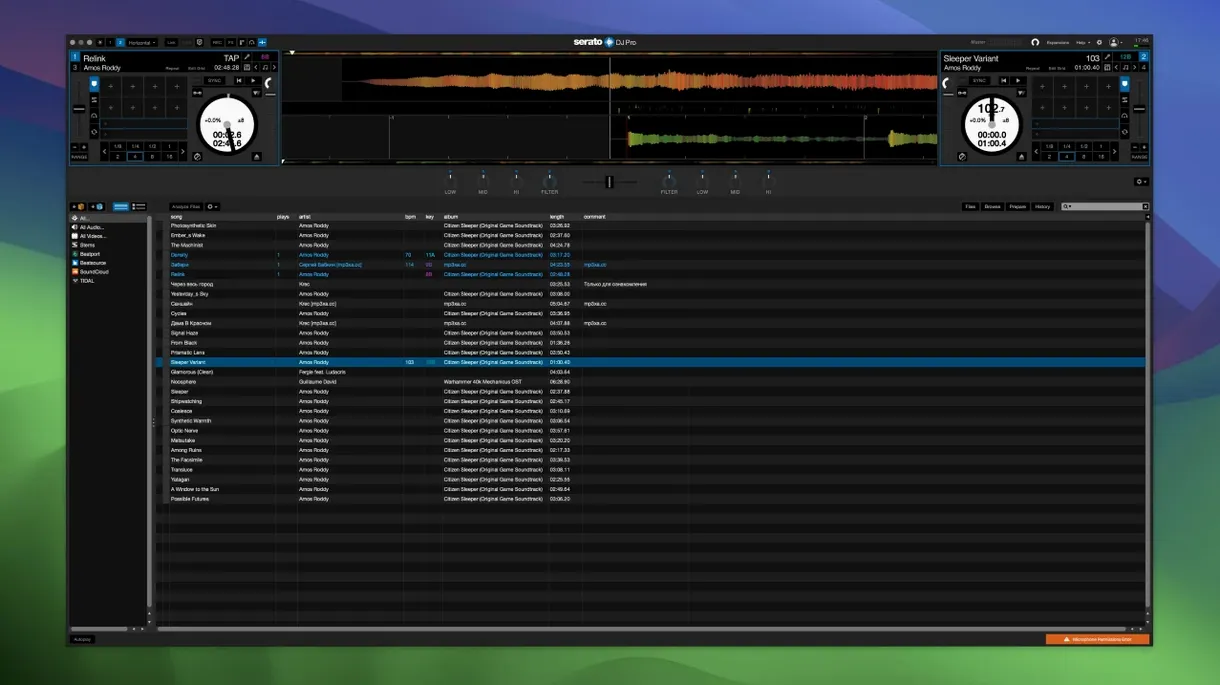
- Play it out. The interface is English-only and streamlined for performance — waveform view, cue points, and library navigation sit where your muscle memory needs them. It's described as reliable DJ software, and in a booth, that's the only compliment that matters.
Where it fits: Serato DJ Pro is the full toolkit, while Serato DJ Lite is the entry-level sibling. If you need stems, deep hardware customization, and a stable engine that's survived real dancefloors, this is the version to run.
Prepping a Stems-Based Transition in Five Minutes
Say you're an hour into a set and the energy needs a shift — you want to drop the vocal from the outgoing track over the incoming beat before the chorus hits. Here's a clean way to do it inside Serato DJ Pro without pre-baked edits.
- Load both tracks. Deck A holds the track with the vocal you want to steal. Deck B gets the instrumental-heavy track that'll carry the next section. Set cue points on both so you know where the switch happens.
- Split Deck A. Hit the Stems button and kill drums, bass, and melody — leave only the vocal stem active. The waveform updates instantly. Drag the isolated vocal with the jog wheel to align phrasing with Deck B's downbeat.
- Layer. Bring Deck B's fader up while Deck A's vocal rides on top. Use the channel EQ to carve out any low-mid mud. A small high-pass on the vocal keeps it from stepping on the incoming hi-hats.
- Apply Pad FX. Throw a Braker on the vocal stem as you fade it out — it stutters and decays instead of just disappearing. The transition lands harder than a simple crossfade.
- Beat-jump out. Once the vocal drops, beat-jump Deck B eight bars forward, loop the new section, and you're already cueing the next track.
That whole move took under a minute once the tracks loaded. No DAW export, no pre-rendered stems — just the software reacting in real time. For a mobile DJ who shows up with a controller and a laptop, that speed is the difference between a mix that breathes and one that just plays.
How a Club Resident Reads the Room
A Thursday-night resident at a small downtown club runs Serato DJ Pro on an M2 MacBook Air paired with a Rane Four. The booth is tight, the crowd is fickle, and requests come in faster than the bar can pour.
At 11:45, someone wants a hip-hop classic that's sitting at 78 BPM while the current house track cruises at 124. Rather than a hard cut, the DJ loads the request into a third deck — the software sees all four decks simultaneously — and drops the tempo slider to zero. Sync locks the BPM, but the real trick is grabbing a four-bar drum loop from the track's breakdown. That loop, stripped of its melody, sits under the outgoing house track for sixteen bars. When the vocal finally drops, the BPM has crept back to its original tempo and the floor doesn't flinch.
Later, a drunk guest spills a drink near the booth. The DJ's backup laptop is in the bag, but Serato's library is mirrored on both machines. Plug the controller into the spare, launch the app, and every cue point, loop, and crate is right where it was. That's the reliability claim playing out in real life — not a spec sheet line, but the reason the night didn't end early.
Can Your System Handle the Install?
Does Stems processing tax the CPU?
It does, but the hit lands differently depending on the chip. On Apple Silicon, stems separation runs efficiently — you can juggle four decks with Stems active and still hover around 40-50% CPU. On an older Intel Mac, two decks with stems is comfortable; four pushes the thermal limits. Closing background apps helps. The software doesn't pre-render stems to disk, so everything is live. That's the trade-off for one-touch isolation.
Why Pulling a Controller Kills the Sound
Audio stops. Serato DJ Pro relies on hardware for output — the laptop's headphone jack won't bail you out unless you're running a secondary interface explicitly routed in the audio preferences. Plug the controller back in and playback resumes from where it left off, but those few seconds of silence are noticeable. A redundant USB cable and a powered hub are cheap insurance.
Will my old crates from an earlier version carry over?
Yes. The library format hasn't changed in a way that breaks backward compatibility. Crates, cue points, and analyzed beat grids from Serato DJ 3.x load into 4.0.5 without conversion. If you're coming from Serato DJ Lite, the library transfers cleanly — only the advanced features unlock when you step up to Pro.
Airplane Mode Doesn’t Lock You Out
Once activated, Serato DJ Pro runs offline indefinitely. No subscription check, no phone-home nag. Streaming services tied to the library obviously need a connection, but local files, Stems, and FX all work in airplane mode. A lot of DJs keep their booth laptops off the network entirely.
Serato DJ Pro vs. rekordbox vs. Virtual DJ: Where Each Lands
Three apps dominate the booth, and each pulls in a different direction. Picking one shapes how you prep tracks, what hardware you can use, and how you improvise during a set.
rekordbox is Pioneer DJ's ecosystem lock-in — it's mandatory if you export to USB for CDJ booths. The library management is deep, with tagging, playlists, and cloud sync that venue riders expect. But its real-time stems are weaker; the algorithms sound thin compared to Serato's, and the processing isn't as snappy on Mac. Where rekordbox wins is pre-show prep, not on-the-fly remixing.
Virtual DJ throws features at the wall — video mixing, karaoke, custom skins, a huge hardware compatibility list that includes controllers Serato ignores. It's versatile but busy. The interface can feel cluttered, and the audio engine, while solid, doesn't have the same tactile connection to hardware that Serato's tight integration provides. Stems are comparable, but the Pad FX and slip controls feel less polished for turntablists.
Serato DJ Pro stays focused on the core job: mixing audio with hardware that responds like an instrument. The waveform display is cleaner, the library is snappy, and the Stems implementation is the best of the three for live isolation. The trade-off is a smaller hardware compatibility list — it supports over 90 devices, but that's curated, not universal. If your controller isn't on the list, it won't work. If it is, the integration runs deeper than on any competitor.
For a club DJ on Pioneer gear, rekordbox is unavoidable for prep. For a mobile DJ who wants one tool to handle audio, video, and a generic controller, Virtual DJ covers more ground. For a turntablist or a controller-based performer who lives inside the mix, Serato DJ Pro is still the standard.
Snags and the Fixes That Actually Work
Even a stable app has its rough edges. Most problems trace back to a few predictable spots.
Controller not recognized. Plug it in before launching the app. If Serato still doesn't see it, try a different USB cable — some controllers are picky about power delivery, and a worn cable will cause dropouts or a blank hardware panel. Reset the PRAM on Intel Macs if the port itself is acting flaky. On Apple Silicon, a cold reboot usually clears the USB stack.
Audio crackles or dropouts. The buffer size lives in the setup menu under audio preferences. Crank it higher — 10 ms or above — if you're running Stems on multiple decks. Disable Wi-Fi and Bluetooth; macOS background scans can interrupt the audio thread. If you're pushing an older Intel Mac hard, freeze an unused deck's stems to lighten the load.
Stems sound phasey or artifacts creep in. The algorithm works best on tracks with clean production — dense, distorted material confuses the separation. For those tracks, isolate one stem at a time instead of trying to play four splits simultaneously. EQ the result aggressively; a narrow band-pass on the vocal stem hides artifacts that crowd the low-mids.
Library analysis stalls. If a folder full of new tracks sits unanalyzed, drag it in smaller batches — fifty at a time instead of five hundred. Corrupt files freeze the analyzer; watch for any track that hangs the progress bar, delete its entry from the library, and analyze the rest. After a crash, hold Shift while launching Serato to skip the audio engine and rebuild the database.
Most of these fixes take thirty seconds. In a booth at midnight, that matters — no one wants to troubleshoot while a room full of people waits for the next track.
- macOS 12 Monterey or later
- Apple Silicon or 64-bit Intel processor
Questions I actually get
Will Serato DJ Pro run on my M1 Mac?
Yes. Version 4.0.5 supports ARM and 64-bit Intel processors, so it runs natively on Apple Silicon Macs with macOS 12 Monterey or later.
Can I make acapellas inside Serato DJ Pro?
You can. The Stems controls isolate vocals, drums, bass, and melody in real time, giving you an instrumental or acapella with one button press during a performance.
Notes from the edit bay · 0
Sign in or get an edit-bay pass to leave a note.
No notes from the edit bay yet. They go up after I read them.