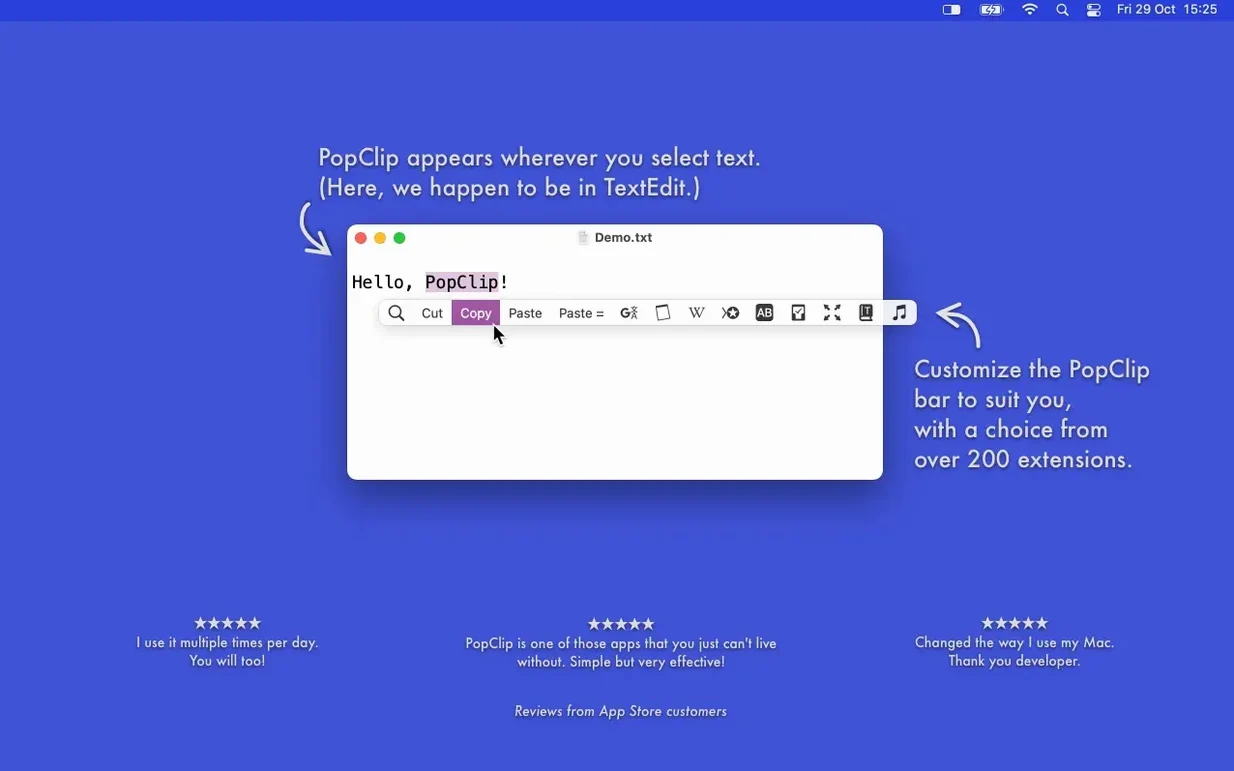
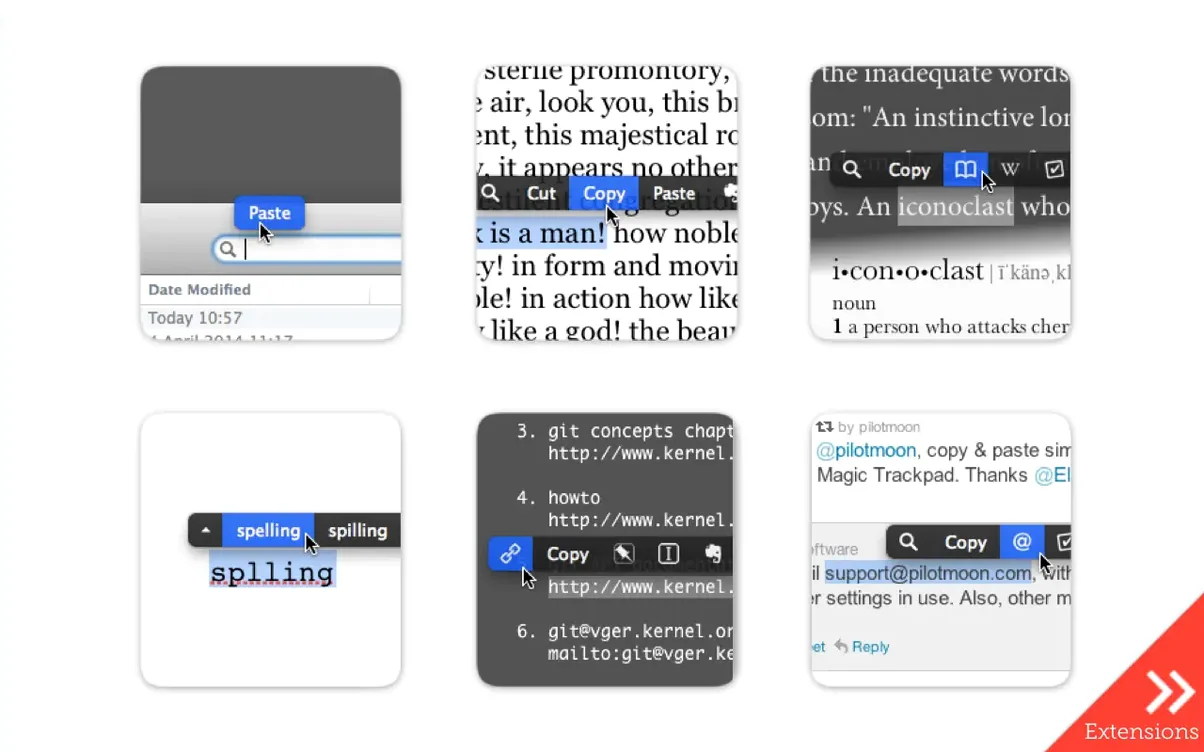
PopClip is a macOS utility that appears automatically when you select text, putting copy, paste, dictionary lookup, and spelling suggestions right at your cursor.
Selection — Highlight any text with your mouse. The PopClip bar springs open above or below it.
Actions — The buttons you see are context-aware. Select a misspelled word and PopClip offers corrections. Select a regular word and you get copy, dictionary lookup, and whatever extensions you've turned on.
iCloud sync — Your installed extensions, button layout, and per-action settings sync between your Macs automatically. Set it up once and it follows you.
Where PopClip Fits in a Real Workflow
The bar doesn't try to replace Spotlight, the Services menu, or a launcher like Alfred. It handles one narrow moment: text is selected with the mouse, and something needs to happen to it next.
Drag through a file path in Terminal, and the "Open File Path" extension resolves that path and opens it in the Finder. That's not something macOS does on its own. Right-clicking the selection gives you a generic contextual menu, but it won't know you're looking at a path. PopClip does, because extensions register for specific patterns.
With Shortcuts, the relationship is complementary. PopClip can trigger a shortcut with the selected text as input, but it's faster for one-shot actions like "search on DuckDuckGo" or "wrap in brackets." Shortcuts takes over when you need multi-step automation. I keep both around and reach for whichever fits the moment.
The iCloud sync works quietly. Extension preferences, the order of buttons, which extensions are enabled — all of it follows you between machines. There's no setup export to run, no config file to copy. If you use popclip mac free on two Macs signed into the same Apple ID, the layout stays identical.
Will the Pop-Up Bar Interrupt My Flow?
Does it get in the way during normal use?
PopClip has a built-in exclusion list for apps where it shouldn't appear. Terminal, password managers, and full-screen games are in there by default. You can add any other app yourself. The bar also fades out after a few seconds of inaction, and it never steals focus from your typing.
Will this slow down text selection?
No perceptible lag. The bar appears instantly on selection, and the animations are light. On an M1 MacBook Air, I've never seen it hitch even when a dozen extensions are active at once.
Is it safe with clipboard managers?
Yes. Copy and paste actions use the standard macOS pasteboard. Clipboard managers like Maccy or Pastebot pick up everything PopClip copies as they would any other copy operation. There's no conflict.
Why It Ignores Shift-Arrow Selections
PopClip triggers on mouse selection. If you select text with the keyboard — shift plus arrow keys — the bar won't appear. It's designed for the moment your hand is already on the mouse. Keyboard-driven workflows are better served by something else, but for mouse-heavy sessions it's a natural fit.
Marking Up Citations Without Right-Clicking
Imagine someone marking up a long-form piece in Google Docs. They need to reformat dozens of citations, check spellings, and occasionally fire off a highlighted quote to their notes app.
Without PopClip, each citation fix means selecting the text, right-clicking, finding "Copy," switching windows, pasting into a citation formatter, formatting, copying back, switching again, and pasting. That's a lot of friction over a hundred citations.
With PopClip and a few extensions loaded, the flow tightens. Selecting text brings up the bar. "Copy" is right there — one click instead of a right-click menu dive. The "Word Count" extension tells them the selection length without leaving the doc. A "Send to Notes" extension pushes that key quote into Apple Notes in one tap.
Spelling suggestions appear on the bar inline. No secondary menu, no squiggly underline right-click. The correction is one click away, and the bar disappears after applying it. Over a full editing session, those saved clicks keep the editor in flow instead of wrestling with context menus.
Impressions of Speed and Stability
PopClip 2026.8.1 is a maintenance release, and it feels that way in the best sense. Nothing has drifted. The bar pops on selection with the same speed as previous versions, no stutter on Apple Silicon, no beachballing even when extensions number in the dozens.
Memory use sits around 60–80 MB on my machine with fifteen extensions enabled. It's not the lightest utility on the system, but for something that watches every text selection across every app, that number is reasonable. CPU time is close to zero unless you're actively triggering actions. When idle, it drops off the radar entirely.
Extensions handle failures gracefully. If a web-based extension like "Translate" can't reach its service, the bar shows a brief error state and moves on. No pop-up dialog, no frozen interface. That matters when you're working offline and forget which extensions need a connection.
Stability across macOS versions has been solid. The app runs on anything from Ventura forward, and Pilotmoon's updates tend to chase Apple's frameworks closely. If you're running the current macOS release, you'll have no trouble. The popclip 2026.7.1 release laid the groundwork for this cleanup, and the 2026.8.1 update tightens things without introducing new features that could break existing setups.
One thing I notice in daily use: the bar never leaves ghost windows behind. Some overlay-based utilities leave artifacts when displays sleep or resolution changes. PopClip cleans its draw layer properly. That might sound like a small thing, but on a multi-display desk where monitors cycle on and off all day, it's the kind of polish that keeps the tool feeling invisible.
The latest update is a maintenance and cleanup release following PopClip 2026.7. No new features, just tightening the bolts.
- macOS 13.5 Ventura or later
- Apple Silicon or Intel (64-bit)
Questions I actually get
What does PopClip actually do?
It detects text you select with the mouse and shows a floating bar of context-relevant actions like copy, paste, dictionary lookup, and spelling fixes for misspelled words.
Does PopClip work on Windows?
No, PopClip is available only for macOS. There is no Windows version.
Can I keep my PopClip settings across multiple Macs?
Yes. PopClip uses iCloud to sync your installed extensions, action layout, and action settings between your Macs automatically.
Notes from the edit bay · 0
Sign in or get an edit-bay pass to leave a note.
No notes from the edit bay yet. They go up after I read them.