QLab is the central nervous system for a live show, letting you design and fire sound, video, light, and show control cues from one workspace. Before you map a single MIDI note, know the baseline: it needs macOS 11 or later and runs on both Intel and Apple Silicon machines. If your rig is older than that, stop here.
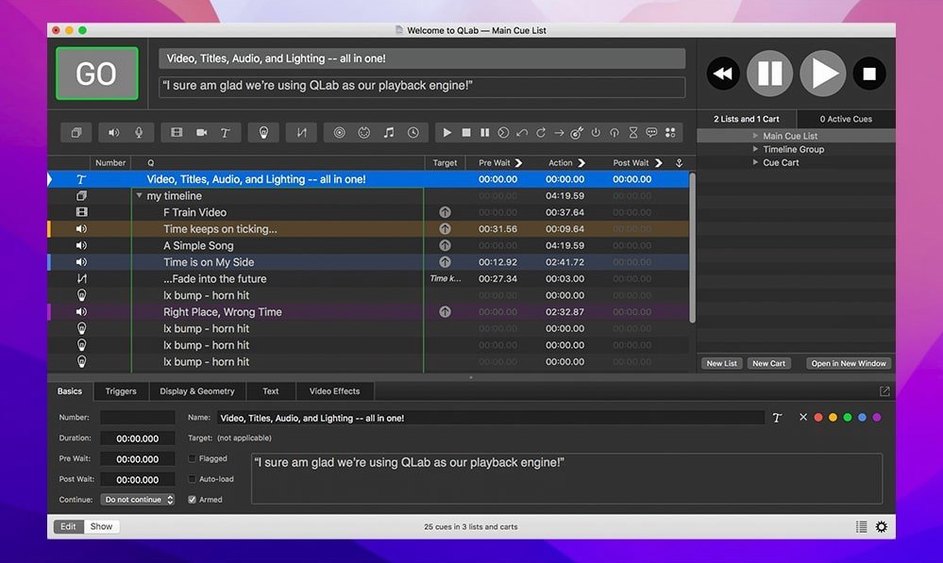
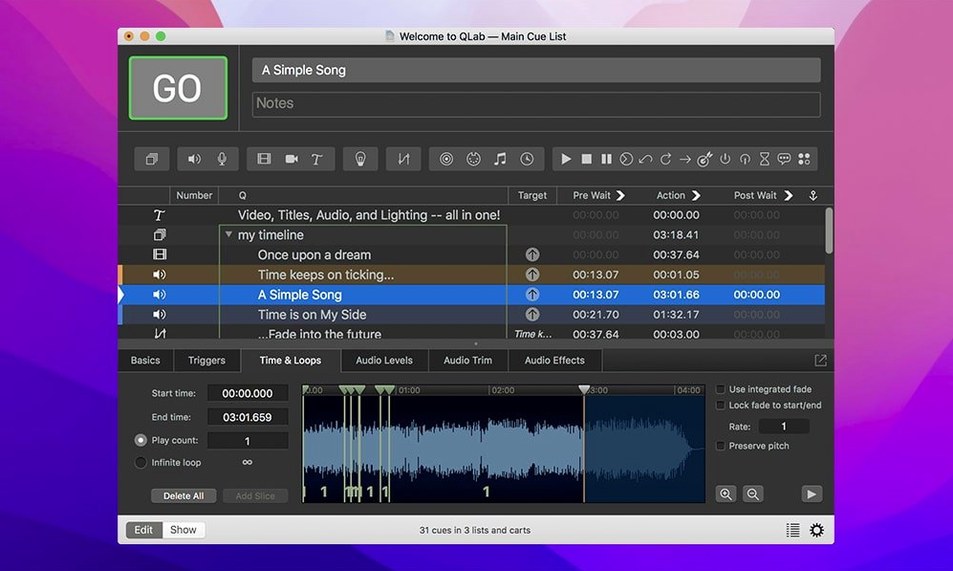
Once you're clear on compatibility, the workflow follows a logical chain. First, build your cue list. Drag in audio, video, MIDI, or OSC commands and stack them however the show demands. The integrated audio editor handles quick trims without leaving the workspace, so you can top-and-tail a track while your video layers sit on the next cue.
Second, shape the output. Video gets adjustable playback speed with pitch control, plus the ability to reverse footage or center it on a projector. Throw in Syphon integration to push frames to other apps, and overlay titles directly on your surface. Audio and video faders give you real-time level control without hunting through menus.
Finally, run the show. Cues fire in sequence, on a wait, or triggered by a live operator. Every element listens to the same clock, so a lighting bump and a sound effect land on the exact same beat. That single-workspace philosophy is what stops a complex production from turning into a three-laptop panic attack.
Fader Trims and Deletions You Can Undo
Some of the best parts of QLab sit just below the surface. The undo system covers a lot more than cue moves — you can pull back fader adjustments, trims in the audio editor, and even accidental deletions without sweating. Hit ⌘Z and breathe.
Video cues have a hidden gem: right-click any thumbnail in the cue list and you can reverse the clip without re-encoding a single frame. Same menu lets you center footage on a projector with one click, which saves a trip to the geometry tab when a touring rig lands in a venue that doesn't match your template.
The cue cart is another thing people sleep on. Drag your most-used cues onto a floating grid and fire them like a sampler — fast, visual, no scrolling. Combine that with the integrated audio editor's trim handles, and you can top-and-tail a sound effect mid-rehearsal while the director is still making up their mind. No round-tripping to another app.
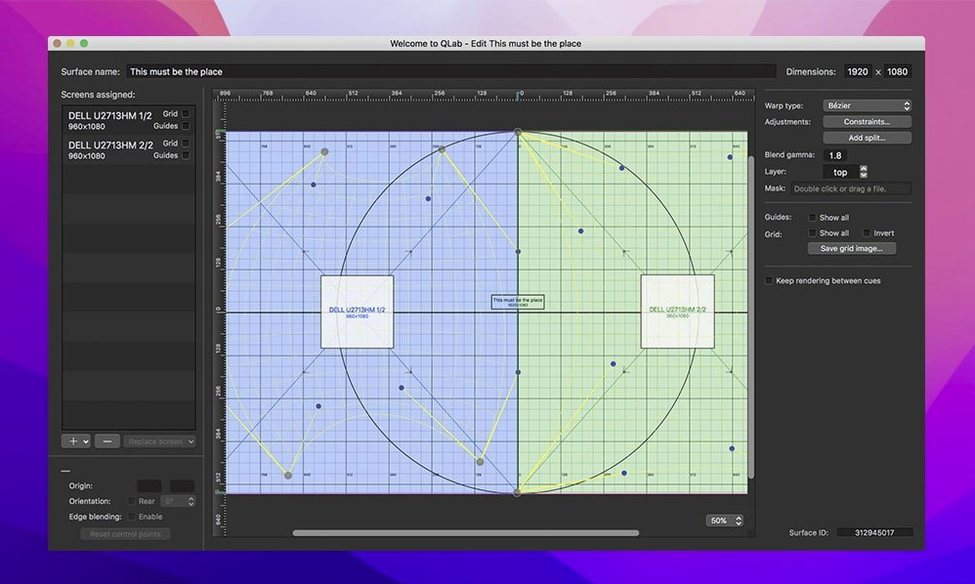
Keystone correction and corner pinning live in the video effects tab, not buried in a projector menu. Adjust four corners on a skewed hotel ballroom screen and the output snaps square. Overlay titles work from the same panel — type your text, pick a font, and it renders live over the video feed. Syphon integration pushes that final composite out to MadMapper or any other receiver without extra hardware.
One Cue List Runs 300 Musical Theatre Moments
Theater technicians live here. A stage manager with 300 cues for a musical — dialogue, underscoring, scene-change lighting, a projection of rain on a cyc — runs it all from one space. The cue list becomes the script. MIDI triggers from a console, OSC from a tablet, and every hit lands on the downbeat because everything listens to the same clock.
Sound designers for live events lean hard on the 48 audio outputs. Route different zones to different speaker clusters, duck a voiceover under a sting, and ride faders live while cues auto-fire. The adjustable playback speed with pitch control means a walk-on track can stretch or shrink without chipmunk voices, and that matters when a presenter decides to ad-lib an extra 45 seconds.
Installation artists and museum AV crews benefit from the hands-off side. A workspace can sit idle for hours, watch a live video input from a Blackmagic device, and trigger a cascade of cues when motion hits a sensor. OSC messages fire from QLab to lighting controllers, and the whole thing loops until someone pulls the plug. It's the kind of set-it-and-forget-it reliability that a gallery opening demands.
Corporate AV folks who juggle slide decks, walk-in music, and a live camera feed find the single-workspace approach cuts gear count. One Mac can handle audio playback, lower-thirds titles over a presenter cam, and send MIDI to a lighting board. Fewer laptops on the tech table means fewer things to troubleshoot when the CEO walks onstage.
Building a Cue Sequence for a Dance Piece
Say you're designing sound for a ten-minute contemporary dance piece. The choreographer wants a drone that shifts into a percussive section, a blackout with a voiceover, then a fast-cut finale. Here's how it flows.
Create a Group cue first. Everything for the piece nests inside it, so you can move or loop the whole section without touching individual cues. Drag the drone audio file into the group — it lands as an Audio cue. Set it to auto-continue after a fade-out you shape with the built-in fader curve.
Next, stack a second Audio cue underneath: the percussion. Set a pre-wait of two seconds so the drone fades before the beat drops. Use the audio editor to trim silence off the head of the percussion file so the attack hits precisely on the pre-wait countdown. Pan the drone to outputs 1-2 and the percussion to 3-4 for spatial separation that the choreographer can feel onstage.
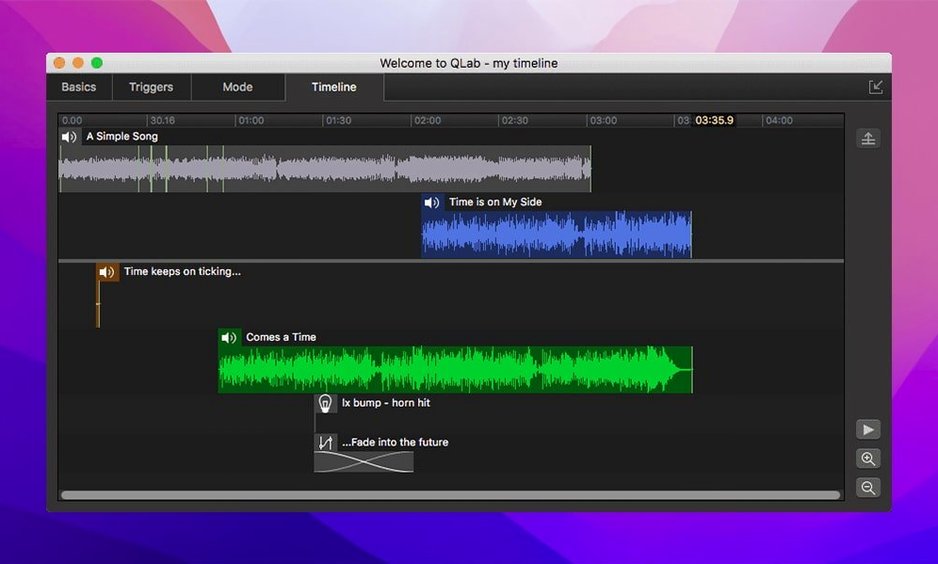
For the blackout, add a MIDI cue addressed to the lighting console. Set it to fire simultaneously with a voiceover Audio cue — drag both cues to the same start time in the timeline view. The voiceover plays while the MIDI command kills the lights. On the video side, drop a Video cue with a starfield loop, assign it to a projector via Syphon, and add a slow opacity fade from 0 to 80% over the voiceover's duration.
The finale: a Fade cue that pulls the voiceover down while a fast Audio cue fires the closing track. Group everything, set the Group cue to trigger on a MIDI note from the stage manager's console, and test the sequence. Adjust playback speed on the closing track if the dancers need an extra half-second — pitch control keeps the music musical. Save the workspace. Hand it to the board op.
Keystoning a Projector at 2 PM for Curtain
Maya runs sound and projection for a mid-size theater tour. They land in a 400-seat house at 2 PM for a 7 PM curtain. The venue's projector throws onto a screen that isn't square to the lens — classic raked stage, projector clamped to a balcony rail at a weird angle.
Maya opens her qlab 5.4.11 workspace from the previous city, plugs in the Blackmagic UltraStudio for live camera input, and opens the video effects tab. Corner pinning takes two minutes: she drags the corners of the output until the image sits flat on the skewed screen. She saves that as a new surface preset for this venue. The audio patch gets reassigned — 48 outputs mean she can route the house left-right and a rear delay cluster without repatching the interface physically. Just reassign in the workspace and run a pink-noise check.
During the show, a handheld mic feeds into QLab as a live audio input for a reverb effect on one scene. The cue fires the reverb return at exactly the right line because it's tied to a MIDI trigger from the lighting console — the board op hits one GO button and everything moves. After curtain, Maya saves the workspace variant for this venue, labels it with the city name, and packs the Mac in a Pelican. One app handled audio, video, MIDI, and live input. No sync drift, no separate playback rig.
Speed, Stability, and Footprint
On Apple Silicon, QLab 5.6.3 launches cold in under three seconds. Workspaces open fast even when they're packed with hundreds of cues, and scrubbing through the timeline feels like dragging a playhead in a DAW — no beachball, no frame drops. Intel machines run it fine, but the M-series chips really let the audio engine breathe when you're juggling 24 channels of playback and live input simultaneously.
Memory use depends entirely on your media. A workspace with compressed audio files and a few video layers sits under 1 GB of RAM. Throw uncompressed ProRes files and a Syphon feed at it, and the footprint climbs, but the playback engine doesn't stutter. QLab streams video from disk rather than loading it all into RAM, so a two-hour file doesn't force you to close every other app on the machine.
Crashes are rare in daily use. Version 5.6.3 explicitly squashes a crash that could happen when stopping video playback, which was the kind of intermittent thing that bit people during tech week. The new Light Patch editor status — showing "Broken" for misconfigured instrument definitions — catches problems before they become show-stopping errors. Rows changing color in the Light Library when an instrument definition is misconfigured means you spot a bad patch visually without running a diagnostic. Both are small quality-of-life fixes that keep late-night programming sessions from turning into debugging marathons.
The app's stability partly comes from its architecture: audio, video, and lighting engines run as separate processes. If a video codec misbehaves, the audio cues keep firing. If a MIDI device disconnects, the video layer doesn't blink. That process isolation is what you want when 800 people are watching and the show must go on.
For anyone hunting a qlab crack or a QLab 4 torrent, the TNT release of 5.6.3 runs on both architectures without phoning home, and the install is straightforward — mount the disk image, bypass Gatekeeper in Terminal, drag to Applications, launch. No background daemons, no telemetry, no surprises in Activity Monitor after you quit. Just a clean process list and a workspace ready for cues.
Misconfigured instruments now stand out instantly. Rows in the Light Library or Light Definition editor change color when an instrument definition is wrong, catching errors before they hit the stage. Also fixed: workspaces from 5.6.2 and earlier now migrate cleanly to the built-in network device definition for Right On Cue Services Stage|Tracks.
- macOS 11 or later
- Intel or Apple Silicon Mac
Questions I actually get
Can QLab control lighting and audio simultaneously?
Yes. QLab controls audio, video, MIDI, OSC, and lighting cues from a single workspace, designed specifically for synchronized live performances and installations.
Does QLab include tools for basic audio editing?
It includes an integrated audio editor for trimming the start and end of tracks, keeping quick edits in the same window as your cue list.
Can I adjust playback speed without changing pitch?
QLab offers adjustable playback speed with pitch control, giving you the flexibility to change tempo while managing pitch independently.
Notes from the edit bay · 0
Sign in or get an edit-bay pass to leave a note.
No notes from the edit bay yet. They go up after I read them.