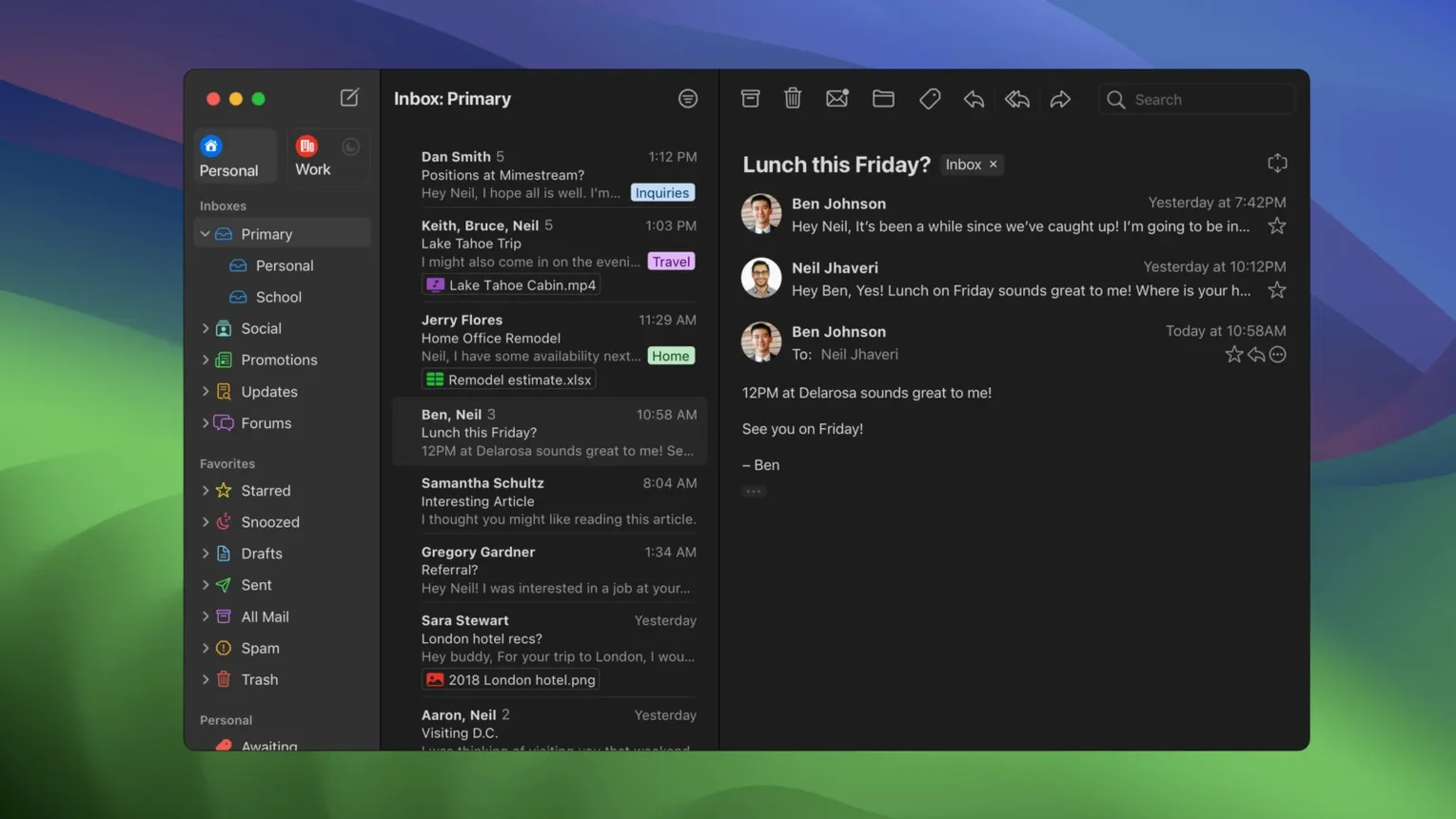
Mimestream is for people who live in Gmail but want out of the browser tab. It’s a desktop client written in Swift that speaks Gmail’s language natively, so categories, labels, and server-side filters work the way you set them up in the web app. The catch: Google accounts only. That focus means every feature maps to something Gmail already does, just faster and without the memory weight of Chrome.
Why Does It Feel So Fast?
The app caches what you need recently and lets the server handle the rest. Disk footprint stays small, search runs against a local index, and even offline you’re scrolling through mail and running Gmail search queries like has:attachment without a pause.
Where Do the Notifications Come From?
Straight from macOS. Mimestream uses system notifications, and on macOS 26 and later it enables Private Push by default. No browser background process, no Electron wrapper burning cycles—just a badge and a banner that respects your Focus modes.
What Makes Triaging Quicker?
Trackpad gestures. Swipe left or right on a message to archive or sort it, same muscle memory as Mail.app. Combine that with the Gmail search bar and an All Inboxes profile, and a morning sweep takes half the clicks it does on the web.
Sits Between Your Calendar and Task Manager, Not on Top of Them
Mimestream doesn’t try to be your calendar or your task manager, and that’s the point. It sits next to Fantastical or BusyCal for schedule peeks, and next to Things or Reminders for the follow-ups you drag out of an email thread. Because it uses the Gmail API, labels you apply in the app show up instantly in the Gmail iOS app or the web client—zero reconciliation. That API link also means you can use Google Contacts as your address book without syncing anything through macOS. Start typing a name, and Mimestream pulls from your Google directory, not from a local copy that’s three months stale.
For people who cut video or audio and need to fire off a quick proof link, the app plays nice with the macOS Share sheet. Select a message, hit the share button, and drop the link into a Slack thread or a Messages window. No copy-paste dance. Attachments handed to Mimestream come straight from Finder or Path Finder, and large files upload through Google’s servers the same way they would in a browser, so you’re not fighting an IMAP attachment limit.
If you rely on Gmail’s server-side filters heavily, Mimestream leaves them alone. You don’t have to rebuild a parallel rule set locally. That’s one fewer thing to maintain when you’re already maintaining a project folder structure and a render queue.
Trying to Use It Like Apple Mail for Non-Google Accounts
The biggest one is treating it like Apple Mail with a Gmail skin. It is not. You cannot add an iCloud or Outlook account, and trying to drag a .mbox file into it gets you nowhere. It expects a Google account and a recent macOS install, and it will not bend on either.
Another common slip: assuming every setting lives in the app’s Preferences window. A bunch of Gmail-specific behaviors—signature placement, default reply behavior, which inbox categories are visible—live in Gmail’s web settings, not in Mimestream’s menus. You set your sending aliases in Gmail, and they appear. You change your signature there, and it syncs. If you dig through Mimestream’s preferences looking for a signature editor, you’ll waste ten minutes.
Offline expectations also catch people off guard. The app caches recent messages aggressively, but if you need every attachment from 2018 available on a plane at 30,000 feet, you’ll want to mark those messages for offline access ahead of time. The local cache is smart, not psychic.
Keyboard shortcut muscle memory can backfire too. Mimestream offers both Gmail-style and Apple Mail-style shortcut sets, but they’re not on by default until you pick one. New users who dive in without checking the Shortcuts preference pane end up pressing e to archive and watching nothing happen.
Skips the IMAP Translation Layer Apple Mail Still Relies On
Mimestream versus Apple Mail. Apple Mail talks IMAP to Gmail, which means labels become folders, and server-side filters don’t always map cleanly to what you see on the desktop. Mimestream skips that translation layer entirely. Apple Mail gives you a unified inbox across any account type; Mimestream gives you one account type done properly. If Gmail is your only email world, the native API approach wins on search speed and label fidelity. If you juggle three providers, Apple Mail is the practical choice, and Mimestream simply doesn’t apply.
Mimestream versus Spark. Spark is a team-inbox tool with collaboration features, a mobile app, and a broader account palette. Mimestream is a solo Gmail power tool. Spark’s smart inbox sorting is its own logic layer on top of your mail; Mimestream uses Gmail’s own categories and filters without adding another layer of curation. For a freelancer who already has Gmail tuned exactly how they like it, Mimestream feels like less overhead. For someone who wants an assistant-like inbox that reorders things for them, Spark’s approach may click better.
Mimestream versus Canary Mail. Canary brings PGP encryption, read receipts, and a cross-platform presence. Mimestream brings none of that—it assumes Gmail’s infrastructure handles what you need. Canary works with Gmail over IMAP, so the same label-versus-folder mismatch applies. If encryption is non-negotiable in your workflow, Canary has the features. If you want Gmail’s search syntax and server-side rules running at desktop speed, a mimestream download mac puts the lighter, more focused tool in your Dock.
Private Push Finally Made Notifications Feel Native
Version 1.10 made push notifications feel native in a way earlier releases didn’t. Before Private Push, the app had to maintain its own connection to Google’s servers to know when new mail arrived. That meant a background process that sometimes lagged behind the Gmail iOS app by several seconds. Now, with Private Push enabled by default on newer macOS builds, the notification arrives through Apple’s push framework, which is the same channel your iMessage pings use. The result is a badge count that updates without the app needing to wake up and poll. For someone who keeps the Mac muted but glances at the Dock badge between renders, that timing matters.
The optional All profile landed in the same release. Before that, you could view All Mail as a folder-like list, but it wasn’t a first-class unified view. Now you can set it as your default, which means a single scroll covers every message across every label without the Gmail web app’s “Conversation View” compromises. Addresses for unknown senders also showed up in 1.10—previously, if someone emailed you for the first time, you had to open the message to see anything beyond the display name. Now the full address sits right in the message list, which makes spotting a misdirected client email faster.
The 1.10.8 update was quieter but meaningful: it locked Private Push as the default on compatible systems, so new users didn’t have to dig into notification settings to get the faster path. Combined with configurable notification actions that arrived earlier in the 1.10 cycle, you can now archive or mark as read straight from a notification banner without opening the full window. That’s three seconds saved per triage tap, and across a fifty-email morning, it adds up.
Private Push notifications are now on by default for macOS 26 and later—no more third-party servers in the delivery path. Version 1.10 also introduces an optional All Inboxes profile, lets you add addresses for unknown senders, and makes notification actions configurable so you can archive or reply from the banner. The 1.10.8 release locks in those changes as the current stable build.
Also fixed: several under-the-hood improvements that keep the notification pipeline smooth on Sonoma and Sequoia.
- macOS 12 Monterey or later
- Apple Silicon or Intel Mac
- Google account
Questions I actually get
Can I use Mimestream with iCloud or Outlook accounts?
No, Mimestream is a dedicated Gmail client and only supports Google accounts.
Does it work on Intel Macs?
Yes, it runs natively on both Apple Silicon and Intel Macs, requiring macOS 12 Monterey or later.
Can I search my mail without an internet connection?
You can. The app supports full offline access and lets you run Gmail-style search queries against a local cache.
Notes from the edit bay · 0
Sign in or get an edit-bay pass to leave a note.
No notes from the edit bay yet. They go up after I read them.