A drive in your edit bay starts stuttering during playback. No beach ball, just micro-pauses that don't belong. You fire up DriveDx to check what SMART isn't telling you outright.
Wear Leveling Count — how evenly your SSD has spread writes across its cells. A low number here means the controller is doing its job.
Reallocated Sectors — bad blocks the drive has already swapped for spares. One or two is normal; a rising graph line is a pre-fail flag.
Pending Bad Sectors — sectors that can't be read right now but haven't been reallocated yet. These are the ones that cause the micro-pauses you just felt.
I/O Errors — raw counts of CRC and communication faults, often pointing to a bad cable or a port issue, not the drive itself. Saves you from misdiagnosing a hardware failure.
Version 1.12.1 sharpens the heuristics behind those readings. The drive diagnostic algorithms now flag problems sooner, and the health change notification thresholds won't cry wolf over normal wear. It's also fully ready for macOS Sonoma, and the installer no longer needs Rosetta 2, so Apple Silicon Macs run it natively end-to-end.
You get both short and full self-tests you can trigger manually. A short test validates the electronics and head positioning; a full test scans every sector. Run one before you trust a refurbished drive with a client project.
Audio mixers and colorists who work off external Thunderbolt arrays get the most out of DriveDx — the utility watches every drive in the chain, not just the boot volume. When a RAID member starts reporting a handful of reallocated sectors, the menu bar icon turns orange before the array even degrades. That early nudge is the difference between finishing a session and spending the evening cloning data.
System administrators managing fleets of Mac minis or iMacs in labs and post houses also lean on it hard. They configure the background daemon to email on any health state change, so a drive in a render node can trigger a ticket before the artist notices a slowdown. Home users who just want a quiet safety net benefit too — set it, forget it, and only interact with DriveDx when the menubar icon changes color.
Speed Up Polling from 60 Minutes to Catch Daily Footage Ingestion
Out of the box the app polls drives every 60 minutes. For a workstation that ingests raw footage daily, that's too slow. Bump the Health Sensors Update Interval to 15 or 20 minutes under Preferences > Monitoring. The CPU hit is negligible.
Next, switch on Notify on drive health degradation and set it to "Warning" level, not just "Failing." Most catastrophic failures are preceded by days or weeks in the warning zone. You want that ping.
The Temperature monitoring threshold defaults are fine for spinning rust but conservative for NVMe blades that routinely cruise at 50°C under load. If your workload regularly pushes an internal SSD into the high 40s, raise the warning threshold a few degrees so you're not desensitized by false alarms.
Also enable Show DriveDx in menu bar with the combined status icon. Seeing green at a glance costs you zero pixels and buys you peace of mind. Right-click that icon and tick "Show drive temperature" — a single digit you'll start checking instinctively.
One Bad SMART Value Isn't a Drive Funeral—Watch the Trend First
The most common: interpreting one bad SMART value as an imminent drive death. A single Reported Uncorrectable Error on a drive with 20,000 power-on hours is a data point, not a funeral. Watch the trend line over a week. If the raw value climbs daily, then act. If it sits flat, it's likely a one-off cosmic-ray flip or a cable glitch.
Another rookie move is running a full self-test on a production drive during a tight deadline window. The long test can take hours on a large spinning disk and will degrade throughput for anything else hitting that volume. Schedule it overnight or before you leave the studio.
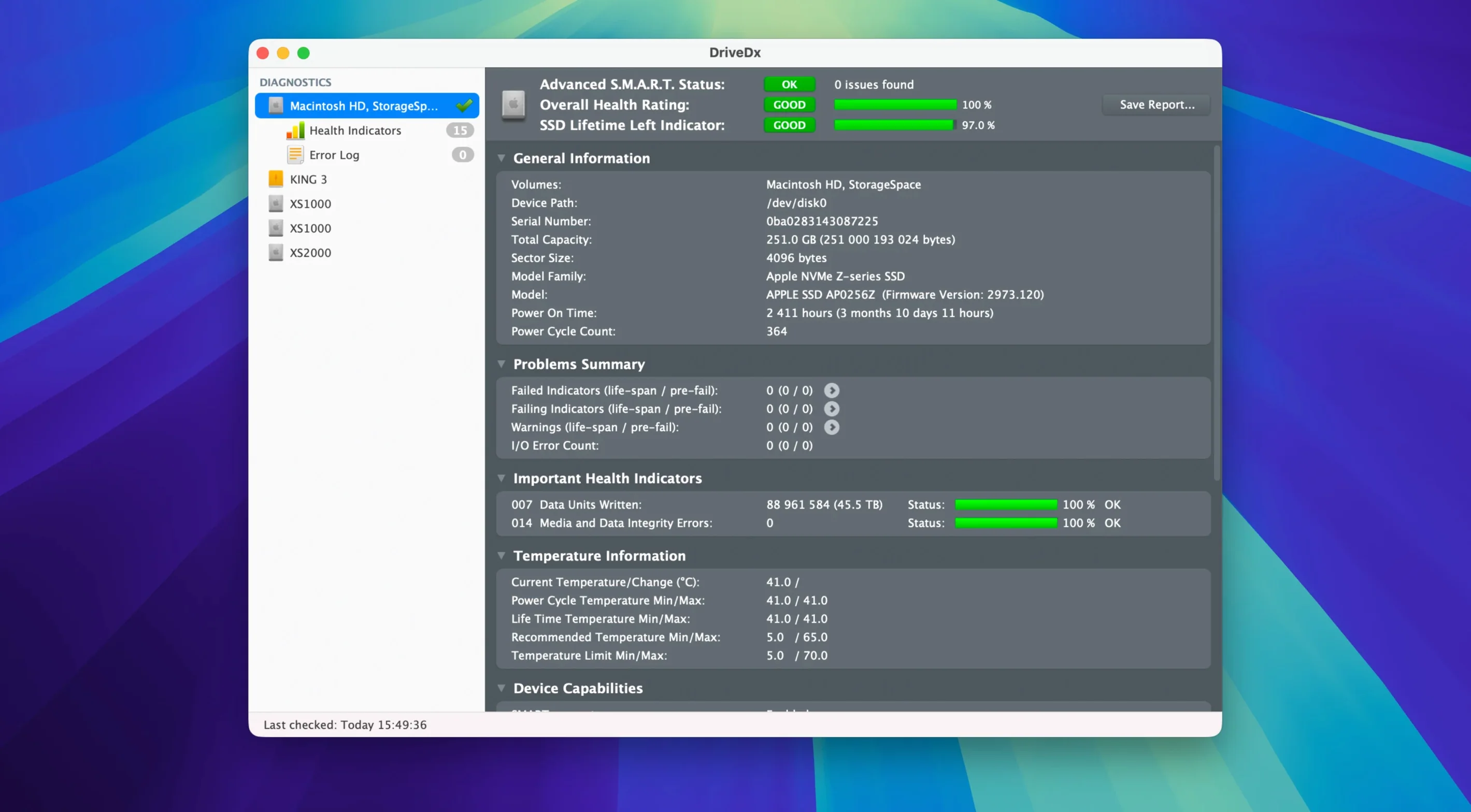
Believing "OK" means "perfect" is also a trap. DriveDx uses a four-tier health model: OK, Warning, Failing, and Failed. An OK drive can still have a handful of reallocated sectors. That's why the detailed attribute panel exists — open it and read the individual counters, not just the green badge.
Ignoring the Lifetime Left indicator on SSDs is another. It's a percentage estimate based on total host writes versus the drive's rated endurance. An SSD reporting 85% after two years in a heavy edit rig is normal. One at 92% after three months suggests a misbehaving application writing logs or cache files excessively, and you can investigate that before it eats the drive alive.
Lastly, some users launch DriveDx only when something feels wrong. The real value is in the background monitoring. If you only open it during a crisis, you've missed the trend data that would have told you the crisis was coming.
Check Every Drive's Health and Temp from the Menubar Icon
The menubar icon supports a quick look without opening the full window. Click it once and every attached drive lists its health status and temperature. Right-click any drive in that dropdown to jump directly to its detailed attributes — no navigating through the main interface.
You can save the current health report to a text file with Cmd-S. Handy when you're selling a used Mac and want to show the buyer concrete drive health numbers, or when you're documenting a failing drive for warranty support. The report includes the raw SMART values, the interpreted health indicators, and the drive's power-on hours and cycle count.
The Health Trend tab tracks attribute values over time as a line graph. If you're troubleshooting a drive that feels sluggish, cross-reference the I/O error graph against your calendar — you'll often spot a correlation with a cable swap, a desk bump, or a thunderstorm that caused a power flicker.
DriveDx can also read the SMART data from drives inside USB and Thunderbolt enclosures, which isn't a given on macOS. If the drive's bridge chip supports SMART passthrough, the utility picks it up automatically. For enclosures that don't pass SMART natively, the installed driver (the one that no longer needs Rosetta 2 in version 1.12.1) handles the translation. The driver loads silently at boot and doesn't interfere with sleep or eject behavior, so you install it once and forget it's there.
For those searching out a drivedx full experience, the unmodified app includes every feature — diagnostics, background monitoring, notifications, and self-tests — with no feature gating. The same goes if you've grabbed a drive dx torrent or looked up drivedx crack or drivedx for mac: the utility you launch is complete and ready to read every supported drive on the bus. A drive dx crack from any source gives you the same heuristic engine and Sonoma-ready driver that the 1.12.1 maintenance release delivers.
This is a maintenance release that puts DriveDx on solid footing for macOS Sonoma. The big under-the-hood change: the driver installer no longer requires Rosetta 2, so Apple Silicon Macs handle it natively.
Drive diagnostic algorithms and heuristics got a tuning pass, and support for Patriot P200 SSDs was improved. Also fixed: drive health change notification thresholds that were too sensitive.
- macOS 10.9 Mavericks or later
- Intel or Apple Silicon Mac
- English interface
Notes from the edit bay · 0
Sign in or get an edit-bay pass to leave a note.
No notes from the edit bay yet. They go up after I read them.