
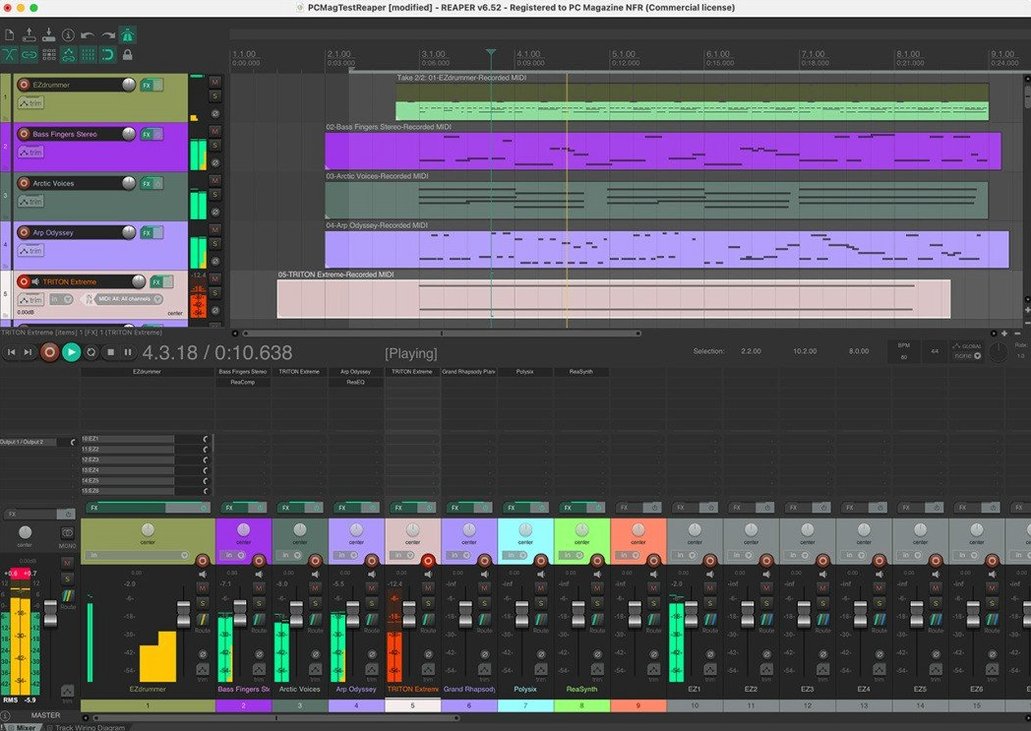
You can open the routing matrix and see every one of those 512 potential hardware inputs laid bare, ready to be mapped. It’s the kind of flexibility that makes sense if you’re miking a drum kit one day and scoring a string section the next—no hoops, just a grid of what connects to what. Cockos REAPER treats every track, bus, and instrument lane as the same fundamental thing: a channel that can hold audio, MIDI, or video. That sounds simple, but it rewires your brain once you stop hunting for track-type menus that don’t exist.
Where Does the 60 Days Actually Take You?
You get the full application, not a feature-gated demo. Import audio, lay down MIDI, throw in whatever third-party plugins your sessions already lean on—nothing is locked behind a purchase screen. The evaluation window is generous because REAPER assumes you’ll want to see how a complex project holds up, not just poke around the transport bar. With up to 128 MIDI input and output devices available, including loopbacks, it scales from a single controller on a laptop to a room full of hardware synths without flinching.
Unlimited Tracks, No Categories
The channel architecture answers this before you even arm a track. You aren’t boxing sounds into “instrument” or “bus” categories; you just add tracks and route them. When you’re recording a band, that means playback stems, headphone mixes, and sidechain triggers all live in the same flexible system. The import pipeline doesn’t care whether you bring in audio, MIDI, or video—it all lands on the timeline ready to edit. Pair it with an audio interface and a microphone, and the only real ceiling is your hardware.
A Session from Silence to Rough Mix
Let’s walk a vocal-and-guitar tracking session from blank project to listenable bounce. You open REAPER, and it doesn’t shove a template wizard at you—just an empty arrange window and the cursor blinking at bar one. First move: set your audio device in Preferences under Audio > Device. Pick your interface, set the block size low (64 or 128 samples) so latency doesn’t trip up the performer, and enable the inputs you’ll actually use.
Now insert two tracks with Track > Insert New Track or the good old Command+T double-tap. Name them “Guitar” and “Vocal” right in the track control panel—click the label and type. Arm both tracks by clicking the red record button on each, then assign inputs. The guitar mic might be input 1; the vocal condenser sits on input 2. You’ll spot the input selector as a small dropdown on the armed track. While you’re there, click the monitoring button (the little speaker icon) so the talent hears themselves.
Hit record. REAPER writes WAV files straight to your project directory as you go—no temporary cache folder, no “save” panic if the power blips. You’ll see waveforms draw in real time. After three takes, stop. Right-click the vocal track, choose Take > Show All Takes in Lanes, and comp the keeper phrases by swiping across the lane sections you want. Each swipe auto-crossfades, so you’re not chasing clicks later.
Now the folder trick. Create a third track above “Guitar” and “Vocal,” label it “Mix Bus,” and click its folder icon. Drag both child tracks so they indent under it. Their audio now sums through “Mix Bus,” where you can drop an EQ and a compressor that affect the whole blend. Dial in a rough level, then hit Command+Option+R to render a stereo WAV of the timeline selection. Session over, rough mix exported, and you never once opened a track-type dialog.
Why the Routing Matrix Overwhelms
The first one is fighting the routing matrix when you don’t need to. Beginners open it, see hundreds of cells, and assume they must manually patch everything. You don’t. A track’s default output already goes to the master; the matrix is there when you want a sidechain feed or a hardware send, not for basic playback. Leave it closed until you have a specific routing problem to solve.
Another classic: ignoring the block size after tracking. That 64-sample buffer that kept latency low during recording will choke your CPU once you stack thirty tracks with plugins. Bump it to 512 or 1024 samples under Preferences before you start mixing, and REAPER breathes again. If you forget, you’ll blame the DAW for crackles that are really just a buffer underrun.
Folder confusion hits anyone coming from track-type-based DAWs. You might drag a track under a folder but forget to enable the folder button on the parent. The child tracks play, but their audio bypasses the parent’s processing chain. The fix is one click on the folder icon—then suddenly that compressor on the parent actually grabs the drum shells.
Lastly, new users sometimes install the reaper full crack and skip the unipatch step, then wonder why things don’t behave. The install order matters: main dmg first, unipatch after. Mix them up and you’ll be reinstalling.
Does It Run Natively on Apple Silicon?
Does it run natively on Apple Silicon, or is it Rosetta-only? Native, full stop. The universal binary covers Intel and ARM64, and it’s been that way long enough that you won’t find yourself flipping a Rosetta checkbox in Get Info. A reaper macos download from any source that gives you a recent build includes both architectures in one dmg.
Will my third-party plugins work, or am I starting over? If they’re AU, VST, or VST3 and you’re on the right architecture, they show up. REAPER scans your system folders on launch and doesn’t gate anything. Some people chasing a reaper daw torrent worry that a non-App Store version will sandbox plugins out—it won’t.
Can I open projects from other DAWs? Not directly—you won’t drag a Logic project onto the REAPER icon and hear your mix. But you can consolidate stems, export MIDI, or render tracks in your old DAW and pull them in. The import dialog handles WAV, AIFF, FLAC, MP3, and raw MIDI without conversion.
Is it stable enough for live use? Musicians run backing tracks and virtual instruments off REAPER on stage. With the right block size and a lean project, it’s been solid for years. The portable install option means you can carry a USB stick with your whole rig—preferences, plugins, and all—and plug into any Mac.
When macOS Steals Your Audio Interface
No input signal, even though the interface is lit up. Check that macOS hasn’t stolen the device. Open Audio MIDI Setup, find your interface, and make sure it isn’t set as the system output for alerts and sound effects. Then back in REAPER, right-click the track’s record-arm button and confirm you’ve selected the correct hardware input from the menu, not just “Input 1” when your mic is in input 3.
MIDI controller works in one project but not another. You probably enabled it per-project under Preferences > MIDI Devices but only for the first session. Right-click the device name in that list and choose “Enable input for control messages” and “Enable input for track record input”—both need to be checked. While you’re there, confirm the controller isn’t stuck in a loopback device slot that REAPER reserves beyond the first 128 IDs.
Render sounds different from playback. This one’s a head-scratcher. Nine times out of ten, a plugin is running at a different sample rate offline. Check the render dialog: is the “Online render” box ticked? If not and you’re using a synth that oversamples during real-time playback but not during offline bounce, the render comes out thinner. Switch to online render for that pass. Also peek at the master track’s FX chain—any plugin in demo mode that inserts silence or noise only during export will sabotage a reaper crack mac setup if the unipatch wasn’t applied properly.
Projects take forever to load after you’ve added sample libraries. REAPER scans your plugin directories each launch, but it also rescans any VST that changed. If you’ve just installed a massive orchestral library, the first scan churns. Let it finish once. Subsequent launches skip what’s already indexed. If it’s still slow, trim the scan paths under Preferences > Plug-ins > VST to only the folders where your plugins actually live.
- macOS 10.15 or later
- Apple Silicon and Intel Macs supported
- Audio interface and microphone recommended for recording
Questions I actually get
Does REAPER limit how many tracks I can use?
No. REAPER doesn't distinguish between track, bus, or instrument types, so you can add as many channels as your hardware supports—up to 512 audio I/O and 128 MIDI devices.
What can I actually do during the evaluation period?
You can record, edit, mix, and master with all features available for 60 days, using any supported hardware interface, digital format, or plugin your projects require.
Notes from the edit bay · 0
Sign in or get an edit-bay pass to leave a note.
No notes from the edit bay yet. They go up after I read them.