Who Reaches for It
Vocal producers, mix engineers and anyone stacking BVs or tightening a double-tracked lead. It lives on the tracks where timing and pitch drift matter most — main vocals, harmonies, ad-libs. You don't slap it on a drum bus. You use it to bully two takes into lockstep or to generate a double that doesn't sound like a chorus pedal.
Feed It Clean Edits First
Here's the usual chain, step by step.
- Comp the guide and doubles first. Get your keeper takes edited and roughly in place. Revoice Pro isn't a comping tool — it needs clean, decided audio.
- Insert on the dub or harmony track. The plugin analyzes your guide signal and applies timing and pitch adjustments to the target. SmartAlign handles takes that start or end at different points without manual slicing.
- Shape pitch with the Shaper Tool. When a note lands flat or a run wavers, you grab it and nudge it into tune. It's manual, visual, and fast.
- Tighten doubles with SmartPitch. For stacked vocals, it matches pitch between the guide and the dub. The result keeps the natural movement but locks the intonation, so the double thickens instead of phasing.
- Render and commit. On a deadline, I'll print the aligned tracks and disable the plugin. Keeps the session moving when you're bouncing stems for a mix revision.
AU, VST3 and AAX 64-bit formats mean it drops into Logic, Pro Tools or whatever DAW is paying the bills. Runs native on Apple Silicon and Intel, macOS 10.14 and up. No translation layer lag when you're scrubbing a tight alignment.
Does It Work on Bass Riffs and Sax Solos?
Does it only do vocals, or can I feed it a guitar line? Monophonic instruments work. A bass riff, a sax solo, a clean DI guitar melody — if it's one note at a time, Revoice Pro can align and tune it. Polyphonic material like piano chords or a full mix will confuse the analysis. Stick to single-voice sources and you're golden.
How heavy is it on CPU during a session? It's not a lightweight, but it's not a session-killer either. Running four or five instances of SmartAlign on a busy chorus will make the render bar twitch on an older Intel machine. On Apple Silicon, it cruises. The trick is to treat it like a surgical tool — process the problem spots, print them, and move on. Don't leave live instances eating cycles across fifty tracks when you're mixing down.
Will it wreck the feel of a loose, vibe-y vocal take? Only if you let it. The alignment isn't a quantize grid — you set the tightness, and you can back it off. A 70% strength setting on SmartAlign pulls things closer without ironing out the human sway. For a lead vocal that needs to breathe, you align the consonants where timing matters and leave the tails alone. The Shaper Tool is manual, so you decide which notes get touched and which stay raw.
Standalone or plugin — which one do I actually open? The plugin version covers 90% of daily work. You insert it, it listens to the guide, it fixes the dub. The standalone app shines when you're prepping tracks before they hit the DAW — batch-aligning a stack of twenty harmony takes from a session tracked elsewhere, or building doubles from a single stem without opening the full mix session. I keep both in the dock, but the plugin gets the daily miles.
Grabbing the revoice pro mac torrent gets you the full installer with both versions — standalone and plugin formats. No feature lockouts between them, same processing engine under the hood.
A Specific Fix, Start to Finish
Here's a real scenario: the artist tracked a verse double that drifts about forty milliseconds late by the third bar. The take is good — same mic, same delivery — but it's just behind enough to smear the attack of each phrase against the lead. You don't want to nudge it by hand because the drift isn't linear; it wobbles.
- Insert Revoice Pro on the double track. Set the lead vocal bus as the sidechain input. The plugin needs a clean guide signal, so I'll solo-check that the lead comp has no stray breaths or chair squeaks confusing the analysis.
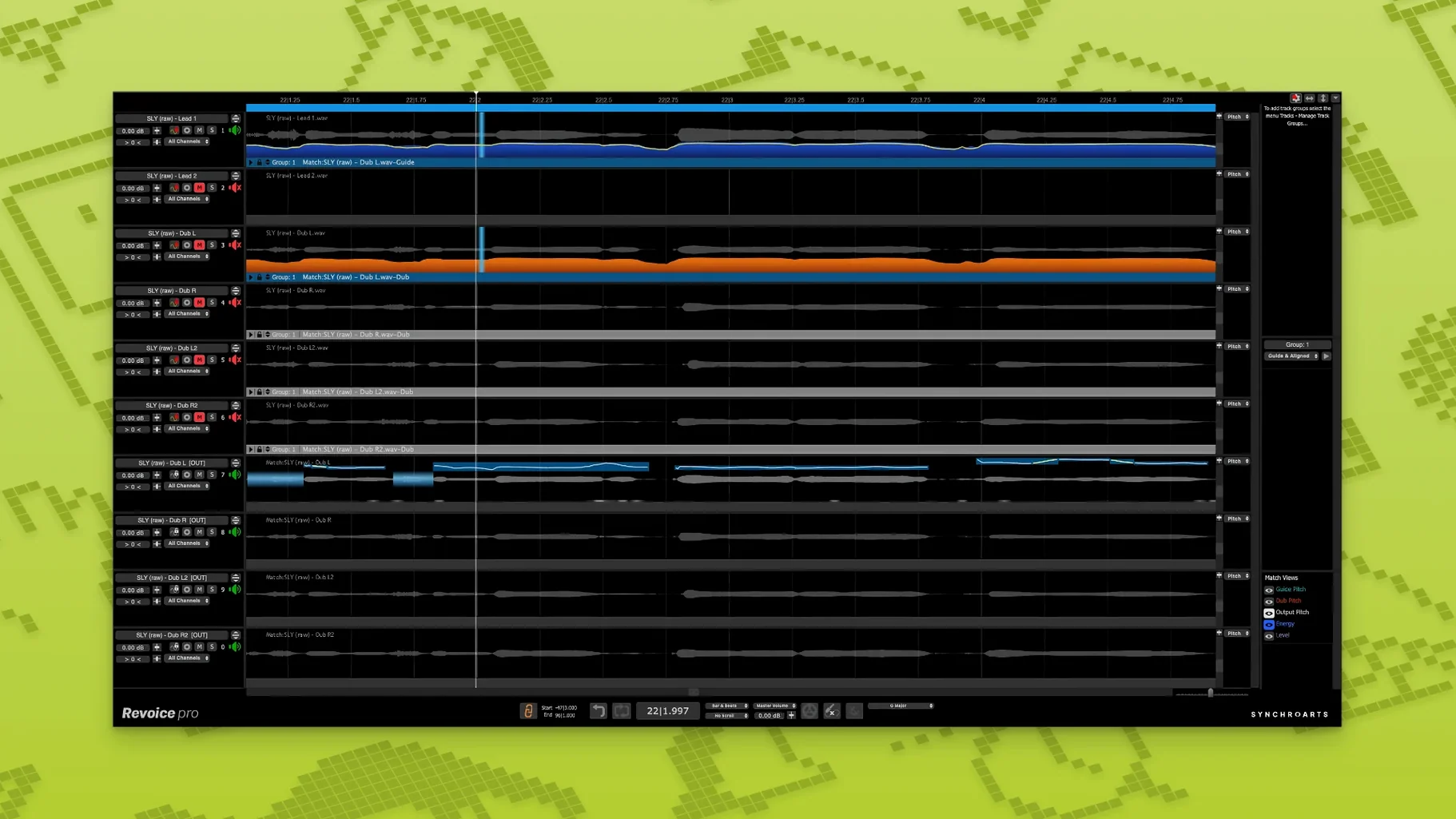
- Capture the guide and the dub. Hit capture, let it run through the section. You see both waveforms in the display — the guide on top, the dub below, with alignment markers snapping across the timeline. The visual feedback tells you immediately whether the algorithm found the right syllable anchors.
- Dial SmartAlign to about 80% tightness. The consonants lock into place, the vowel tails keep some natural decay. I'll spot-check the "t" and "k" sounds — those are the snitches that tell you if the alignment is working or if it's over-correcting into robotic territory.
- Check the last phrase separately. The take ends earlier than the guide because the singer trailed off. SmartAlign handles that without stretching silence. It matches what's there and leaves the gap alone. No manual fade surgery needed.
- Print the track. Bounce in place, disable the plugin, move on. The whole fix takes under three minutes, and the double now sits tight behind the lead like it was tracked that way.
The revoice pro mac crack scene runs this workflow daily — alignment jobs that used to mean elastic audio tweaks and prayer are now a capture-and-render routine. Nobody misses the old way.
Forty Minutes with a Stack of Harmonies
Tuesday afternoon. The client sent over a session with eight harmony tracks for a chorus — two high, two mid, two low, two octave-down. They were tracked in three different studios over a month, so the timing is a mess and the pitch wavers between takes. I've got forty minutes before the mix revision is due.
I pull up the standalone app. Faster for batch work — no DAW overhead, just drag the stems into the session pane. The guide is the lead vocal stem, already comped and tuned. I stack the eight harmony files below it as dubs.
First pass: SmartAlign across all eight. I set the process to batch mode, let it chew. While it runs, I solo through each pair and mark spots where the pitch is audibly clashing. One of the low harmonies has a third that's creeping sharp in the second half of the phrase. Another has a high part where the singer slid into the note late and never quite found the center.
Second pass: SmartPitch on the marked sections. I'm not tuning the life out of them — just tightening the intervals so the stack gels instead of beating against itself. The Shaper Tool gets pulled out for two specific notes where the vibrato rates between takes were fighting. A quick manual nudge, and the warble settles into a cohesive shimmer.
Third pass: Vocal Doubler on the mid pair. The arrangement called for a thick wall, but only one mid take existed per side. The doubler generates a variation that doesn't sound cloned — slight formant shifts, subtle timing changes. It's not a chorus effect, it's a believable second performance. I blend it about 40% under the original mid takes.
Thirty-five minutes in, I render the aligned stems back into the DAW, drop them into the mix session, and hit save. The stack sounds like a group tracked together in one afternoon, not a patchwork assembled across zip codes. I send the revision with eight minutes to spare.
The revoice pro rutracker crowd knows this pace — when the deadline is real, you don't manually slip-edit sixteen bars of eight-part harmony. You let the software do what it was built for.
First Days: What Gets You Up to Speed
Don't start on a lead vocal. Start on a double where the timing is obviously wrong — six or seven clear syllables, at least thirty milliseconds off. You need a problem you can hear instantly, so you learn what the controls actually change. A subtle alignment on a tight take teaches you nothing; a trainwreck double teaches you everything in two minutes.
Learn the capture button like it's muscle memory. Every operation in Revoice Pro starts with capturing audio into its buffer. Miss that step and you're staring at a blank display wondering why nothing works. Run through
The Shaper Tool is the headliner — a direct pitch-adjustment tool for manual note sculpting. SmartPitch locks the pitch of doubles and harmonies to the guide without flattening the character. Also fixed: SmartAlign now handles takes with mismatched start or end positions more gracefully.
- macOS 10.14 or higher
- Intel or Apple Silicon processor
- Host supporting AU, VST3 or AAX 64-bit
- Interface language: English
Questions I actually get
Does Revoice Pro 5 work on Apple Silicon Macs?
Yes, it runs natively on both ARM (Apple Silicon) and x86 64-bit Intel processors.
Notes from the edit bay · 0
Sign in or get an edit-bay pass to leave a note.
No notes from the edit bay yet. They go up after I read them.