
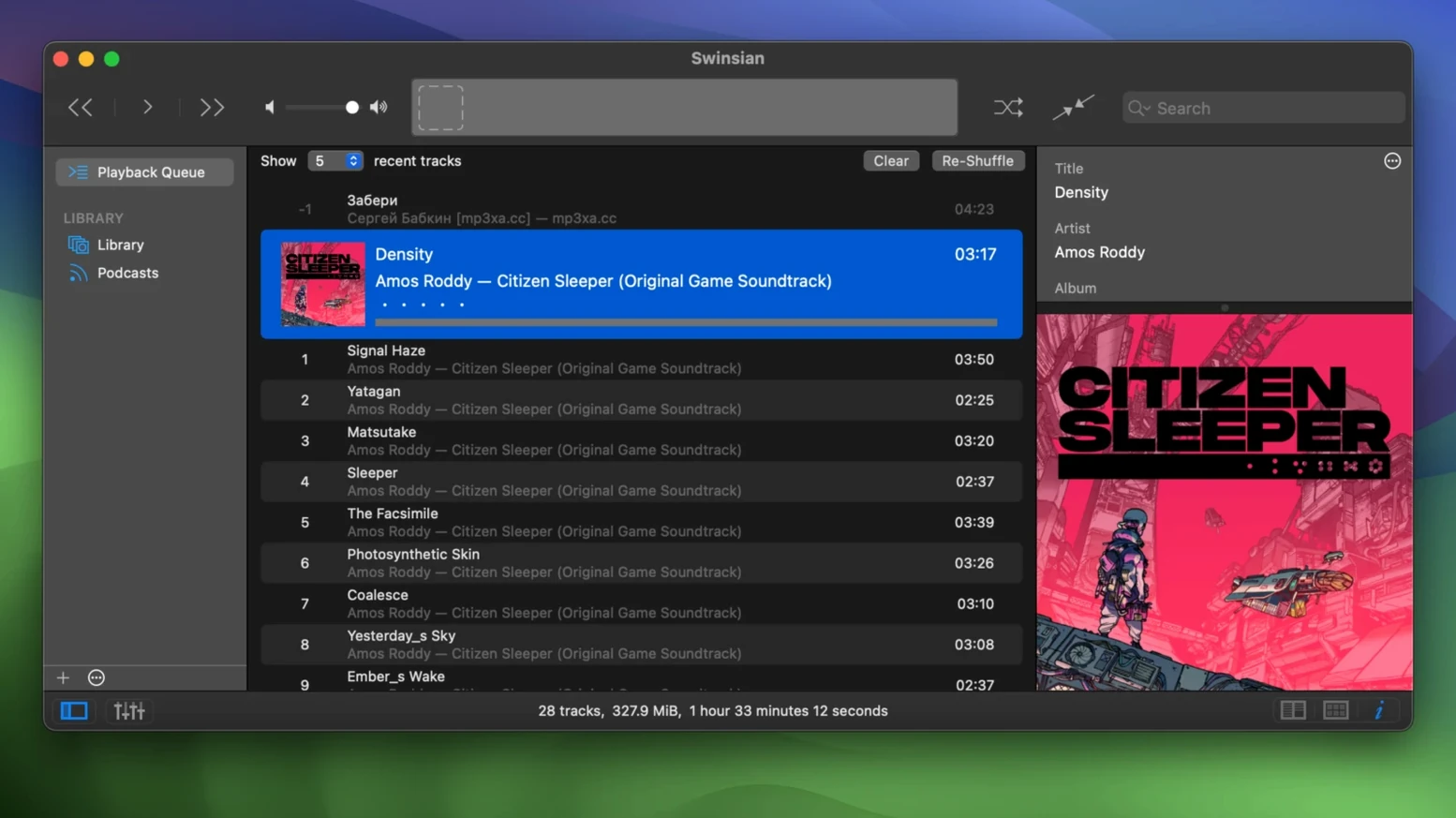
iTunes doesn't watch folders, and the Music app buries your file-based library under a subscription service. Swinsian brings back the direct connection to your audio files.
Folder watching — Add a folder and Swinsian sees new tracks instantly. No manual imports, no "Add to Library" dance.
Wide format support — FLAC, Ogg Vorbis, Opus, WavPack, APE, and the usual suspects like MP3 and AAC all play natively. Version 3.0.8 even fixes quadraphonic FLAC playback.
Tag editor that means it — Open the Complete Tags window, edit everything from standard fields to custom atoms, and sort columns without the app fighting your changes. Regex search finds exactly the batch you need to fix.
Duplicate finder — Scans your library for identical tracks based on audio fingerprints, not just filenames.
iTunes import — Pull your existing library across without rebuilding playlists from scratch.
Interface details — Dark mode comes standard. Art grid labels now have more customization options, and hidden settings let you bump up the text size if the default feels cramped. Global keyboard shortcuts keep playback under your fingers no matter which app is in front.
Why Your Finder Folders Are Already a Swinsian Library
Swinsian doesn't try to be everything. It plays music and manages tags, and it leaves the rest to tools that specialize.
The most obvious pairing is with Finder. Since Swinsian watches folders, your organizational structure in Finder is your library structure. Rename files in Finder, rearrange folders on an external drive, and Swinsian follows along without breaking links. This also means Time Machine backups cover your library automatically — no sealed database files, no proprietary containers.
For audio work, a clean handoff matters. When I'm editing in Final Cut, I drag a FLAC or WAV straight from a Swinsian playlist onto the timeline — no intermediate conversion. If I need a track at a specific sample rate, Swinsian's automatic sample-rate switching confirms what I'm hearing matches the file, which helps when spotting cues against a reference mix. The 10-band equalizer is useful for checking how a reference track translates across frequency ranges before matching it in a session.
With Last.fm scrobbling enabled, playback data flows out to your profile, and the AppleScript hooks let utilities like Keyboard Maestro or Bunch trigger playback states — launch a morning playlist when you log in, pause when you lock the screen.
AirPlay support sits alongside the system-level output. Swinsian streams directly to an AirPlay speaker while the rest of your system audio stays on the Mac's built-in speakers — no routing tricks required in Audio MIDI Setup.
The Quadraphonic FLAC Fix That Keeps a Session Alive
Version 3.0.8 is a maintenance release that smooths out friction points rather than adding headline features. The fixes matter because they hit things that break a session.
The quadraphonic FLAC fix is specific but telling — if you archive surround mixes, those files now play correctly instead of producing silence or noise. Transcoding rules that refused to save were a quiet annoyance; you'd set up a conversion profile for an old iPod, switch away, and find your settings gone. That's fixed. iPod playlist management also got attention: removing tracks actually removes them now, which anyone with a classic iPod still in rotation will notice immediately.
On the interface side, the art grid customization options and the hidden text-size settings address a long-standing quirk — Swinsian's default type was small and non-negotiable. Now you can bump it up without waiting for a redesign.
Turning Two Hundred Bootleg FLACs into a Proper Archive
Say you've got a folder of bootlegs — two hundred FLACs from different tapers, half tagged with "Unknown Artist," the other half with inconsistent venue names and years scattered across the comment field. Here's how Swinsian handles it from start to finish.
Drop the folder into Swinsian's watched list. The library populates in seconds. Open the Duplicate Finder first — audio fingerprinting catches the identical recordings even when filenames don't match. Delete the dupes and move on.
Next, use regex search in the track listing. Search for ^Unknown in the Artist field and you've isolated every untagged track. Open the Find and Replace tool in the tag editor, set it to regex mode, and pull venue names out of the Comment field into the Grouping field with a capture group. Do the same for years — extract four-digit patterns and write them into the Year tag. The Complete Tags window lets you verify the changes across all selected tracks in one scrolling view; the sorting fix in 3.0.8 means columns actually obey your clicks now.
When the tags are clean, build a smart playlist that groups by venue and sorts by year. That playlist becomes your permanent live-recording index. Drag any track to a separate playlist window and you've got a setlist you can rearrange without touching the master library.
The whole job — duplicates, tag extraction, organization — takes under ten minutes. No external tagger needed.
When an Unmounted External Drive Makes Tracks Go Gray
The folder-watching model trips up users coming from iTunes. You add a folder, Swinsian scans it, and you expect everything to appear. If the folder sits on an external drive that isn't mounted, Swinsian shows grayed-out entries — not missing files. The fix is plugging the drive in, not re-importing.
Another common mistake: treating the library as a database rather than a mirror of your files. Deleting a track inside Swinsian deletes the file. If your instinct from other players is to remove an item from the library while keeping the file on disk, you need to un-watch the folder instead, or move the file out first.
Regex search is powerful but literal. Beginners type a partial artist name into the search bar with regex mode enabled and get zero results because they didn't escape special characters. The dot in "Mr. Bungle" needs a backslash. Switch to plain-text search unless you're deliberately building a pattern.
Smart playlists obey rule logic strictly. A common dead end: setting two conditions with "All" matching when the tracks can't satisfy both simultaneously — like "Genre is Rock" and "Year is 1973" when your library has rock tracks and 1973 tracks but none that are both. Check the numbers in the library statistics panel before writing rules.
Version 3.0.8 is a maintenance fix. The developer hasn't published a public changelog for this release, so expect under-the-hood stability improvements rather than new buttons to click. If you've been running into quirks with a large library on Apple Silicon, this is the build to grab.
- macOS 10.13 or later
- Apple Silicon or Intel 64-bit Mac
Questions I actually get
Can Swinsian replace the Music app entirely?
For file-based libraries, yes. It handles playback, tagging, playlists, and device syncing without tying you to an Apple Music subscription or cloud matching.
Does Swinsian sync with iPods?
It does. Version 3.0.8 fixed an issue where removing tracks from iPod playlists wasn't working correctly.
Notes from the edit bay · 0
Sign in or get an edit-bay pass to leave a note.
No notes from the edit bay yet. They go up after I read them.