
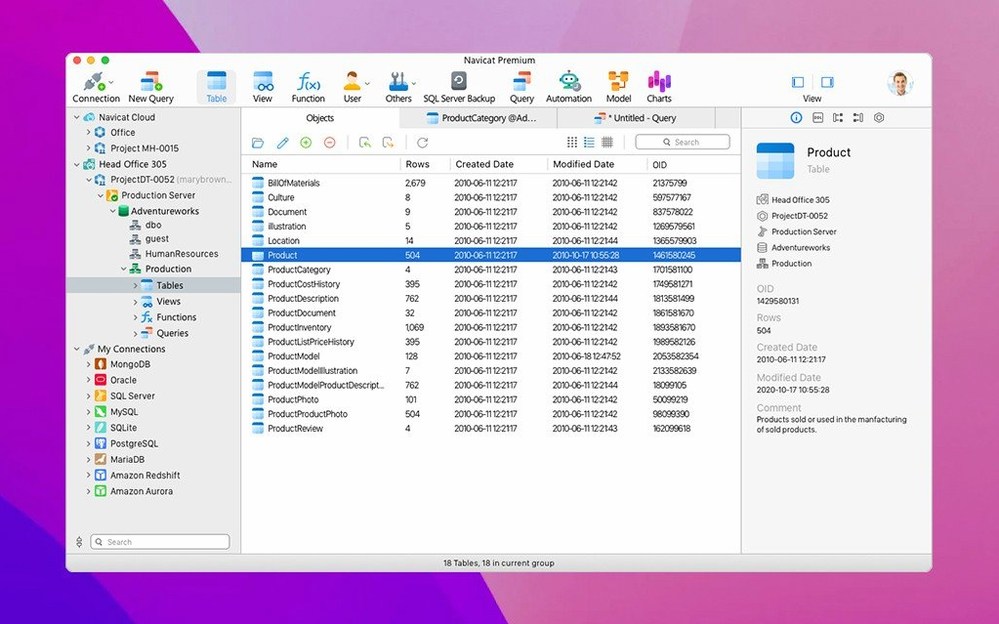
Up to four different database engines running inside a single app window. That's the core pitch of Navicat Premium, and it solves a real headache for anyone who touches MySQL in the morning, Oracle after lunch, and PostgreSQL before a render wraps.
One Launcher for MySQL, PostgreSQL, SQLite, and Oracle
- Juggling multiple connection types — MySQL, PostgreSQL, SQLite, and Oracle — without launching four separate tools.
- Writing and running SQL queries with syntax highlighting and an included console.
- Moving data between MySQL, Oracle, and PostgreSQL databases using the built-in transfer tools.
- Importing and exporting in XLS, CSV, TXT, DBF, and XML formats when a client sends a spreadsheet instead of a dump file.
- Working with stored procedures, events, triggers, functions, and views across supported engines.
- Schedule batch jobs and backups — though backup support is limited to MySQL InnoDB.
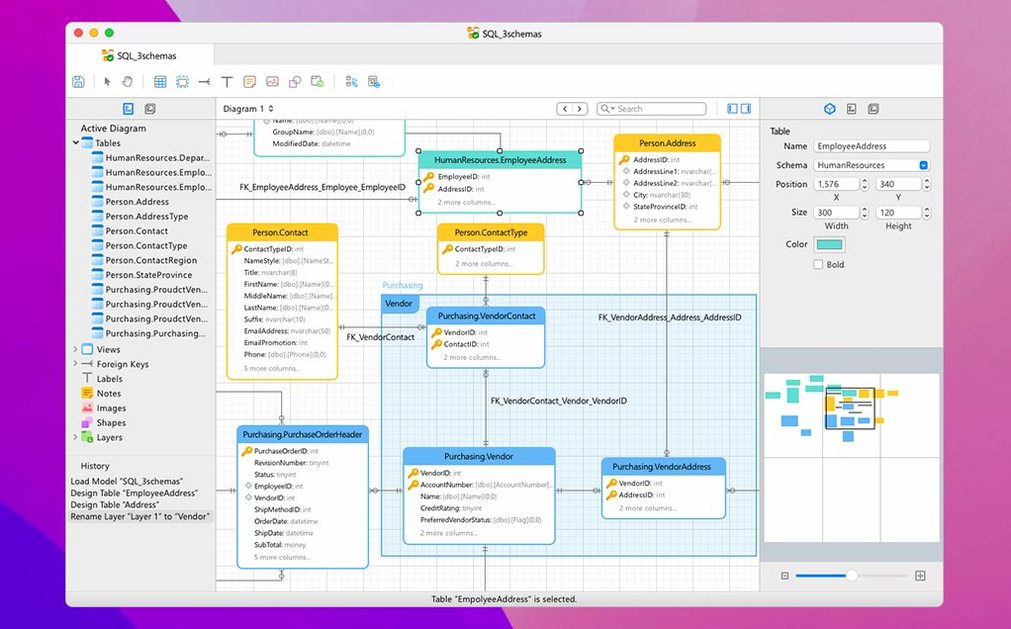
- Modeling data visually before touching a table.
Backup Coverage Stops at MySQL InnoDB
- Database backup is MySQL InnoDB only. For PostgreSQL or Oracle backups, you'll need another strategy.
- The SSH tunnel support is there, but complex key management still requires manual setup.
- Unicode support works, though collation mismatches between engines still fall on you to sort out.
- It's a heavy app — not a lightweight query box for quick checks.
Draft Stored Procedures in VS Code, Then Come Back Here
Navicat Premium doesn't live in a vacuum. On any working Mac, it sits alongside Sequel Pro or TablePlus for quick one-off queries, a text editor like VS Code for stored procedure drafts, and maybe a BI tool like Metabase that reads the databases you're administering. The difference is that Navicat owns the heavy lifting — schema changes, cross-engine migrations, batch scheduling — while those other apps handle the glance-and-go moments.
macOS services tie in where you'd expect. Drag a CSV onto the Dock icon and it opens straight into the import wizard. The app respects Dark Mode and native full-screen spaces, so you can swipe between a query window and Xcode or Terminal without window management gymnastics. If you use Spotlight, saved connection files (.ncx) are indexed, which means you can hop into a specific server faster than digging through a connection tree.
For backup workflows, the MySQL InnoDB backup tool writes directly to local or mounted storage, and you can chain it with a scheduled job that fires a notification to Shortcuts when it completes. For PostgreSQL or Oracle backups, most setups I see pair Navicat with a pg_dump cron job or an RMAN script — Navicat handles the day-to-day management while the engine-specific tools cover disaster recovery.
A Migration Workflow, Start to Finish
Say a client dumps a production MySQL database and wants it moved to PostgreSQL. Here's how that flows inside Navicat Premium.
First, open both connections in the left-hand tree — MySQL source, PostgreSQL target — in a single window. Right-click the source database and choose Data Transfer. The wizard opens with the source already selected; pick the PostgreSQL connection and target database from the dropdowns. The transfer tool scans tables, indexes, and foreign keys automatically, showing you a preview grid of what it'll move.
Toggle off anything you don't need — maybe log tables or cached aggregates — then hit Start. The progress bar shows table-by-table throughput, and any type mismatches (a MySQL TINYINT landing as a PostgreSQL SMALLINT, for instance) get flagged in the log panel without stopping the job. After the transfer finishes, open the target database, spot-check a few row counts, and run a quick VACUUM ANALYZE from the SQL console to update the query planner. The whole thing takes about the length of a coffee break, with no intermediate CSV dumps and no command-line ping-pong.
A Daily Session, Told Straight
Monday morning, first coffee. I launch Navicat Premium and it restores my last session — three connections already open, each with the query tabs I left Friday. MySQL localhost on the left, a remote PostgreSQL staging box next to it, and an Oracle instance on a VPN-tunneled server that takes a few seconds to handshake.
I start in the MySQL tab. A scheduled batch job for cleaning expired sessions ran over the weekend, and I check the job log panel to confirm it completed without errors. One click opens the backup tool — InnoDB only, so I verify the dump file size against last week's number and move on. Over in the PostgreSQL connection, a developer left a comment on a slow view. I open the Query Builder, drag the two joined tables into the workspace, and tweak the join condition visually. The builder generates the SQL, and I copy it into a console tab to run EXPLAIN ANALYZE. Index suggestion noted, I flag it for the afternoon.
The Oracle connection needs a new user with read-only access for a reporting tool. I open the Security manager, create the user, assign the role, and test the login from a second tab. The whole sequence — check, verify, tune, grant — runs inside one window, no app switching, no SSH sessions in Terminal unless something gets weird. When the afternoon report build kicks off from the scheduler, I'm already working in the data modeler on a schema change that won't hit production until Thursday.
Here's a short what's-new sentence for Navicat Premium 17.3.12: Version 17.3.12 ships with the developer's latest round of fixes and performance improvements across the database toolkit.
- macOS 11 or later
- Apple Silicon or Intel 64-bit
Notes from the edit bay · 0
Sign in or get an edit-bay pass to leave a note.
No notes from the edit bay yet. They go up after I read them.