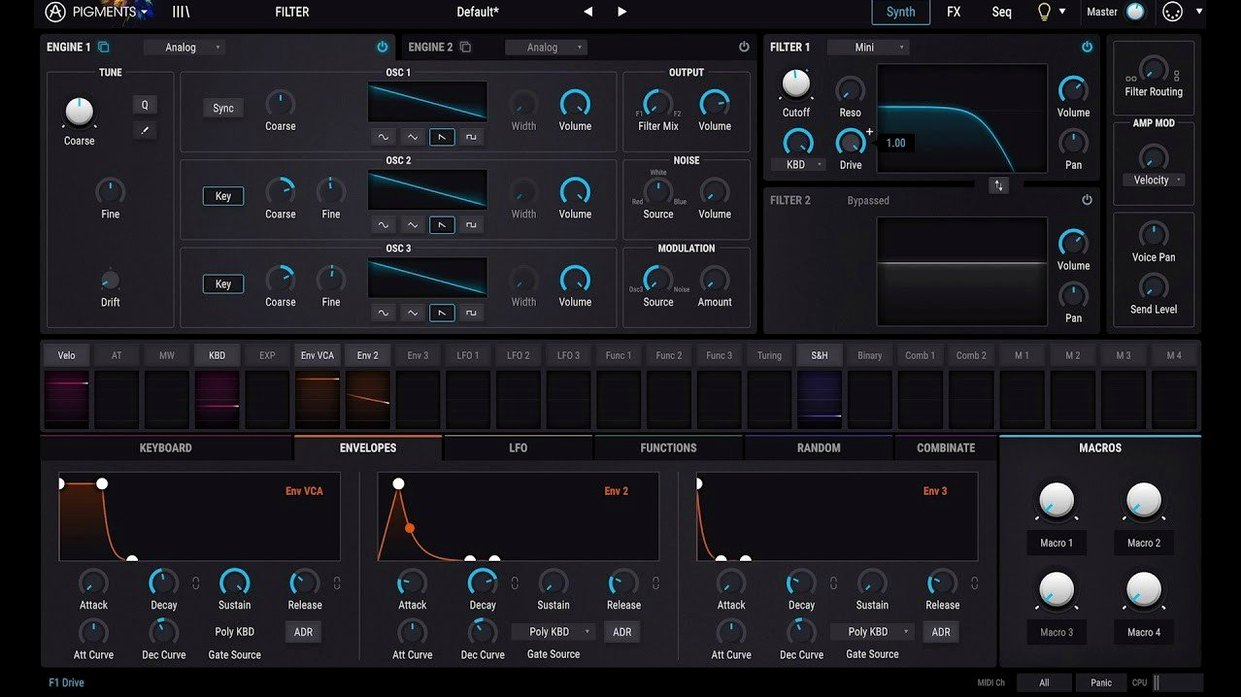
Pigments is Arturia’s flagship software synthesizer that combines six distinct sound engines inside a color-coded interface.
1. Pick your format and host. The plugin runs as VST, VST3, AU, and AAX. That covers every major Mac DAW—Logic Pro grabs the AU straight away, Ableton Live sees the VST3, and Pro Tools loads the AAX. Standalone mode is included for playing without a session open. Apple Silicon support is native, so the CPU meter stays calm on M-series machines.
2. Start with an engine—or two. Analog, wavetable, sample, granular, harmonic, and utility engines sit in parallel slots. You can crossfade between them, modulate one with another, or feed a sample into the granular engine and push the result through an analog-modeled filter. The 7.0.1 update adds 50 wavetables, 30 samples, and 20 noises, so the starting palette is wider than ever.
3. Route through the new filters and effects. Rage, Ripple, and Reverb filters join the Corroder effect in this version. A simple saw wave turns aggressive fast when Rage is in the chain. Corroder adds lo-fi degradation that sits well on drum loops and arps.
The redesigned Play Page pulls everything into a macro-focused view. It’s where you tweak the 150 new factory presets without diving into the modulation matrix. In-app tutorials walk through the new additions, which helps when a preset uses an unfamiliar engine combination.
Right-Click Any Knob to Skip the Mod Matrix
Right-click any knob and the modulation assignment menu pops up without touching the matrix view. It’s the fastest way to hook an LFO to a filter cutoff or map velocity to wavetable position. I forget it’s there half the time, then remember and save five minutes of clicking.
The Tab key cycles through the main panels—Synth, Filter, FX, Seq, Mod—like changing camera angles on the same sound. When you’re tweaking a preset and can’t remember where the reverb tail or the arp gate lives, one finger on Tab beats squinting at tiny icons.
Shift-drag on any parameter slows the mouse movement to a crawl for fine adjustments. It works on the Play Page macros too, so you can dial in a resonant peak or a sequencer rate without jumping values.
The function generators double as extra modulation sources even when you’re not using the sequencer. A quick ramp shape mapped to pan or unison detune adds movement without cluttering the arp. And the random modulator has a “per-voice” mode that scatters slightly different values across stereo voices—thickens a pad instantly.
One hidden gem: hold Alt and click a modulation source in the matrix, and every destination it’s patched to highlights orange. It’s the fastest way to trace a signal and undo someone else’s overly ambitious routing.
Where Serum Precision Meets a Full Synth Stack
Pigments sits in a crowded field. Here’s where it pulls ahead and where it gets pushed.
Compared to Xfer Serum. Serum’s wavetable engine is still the benchmark for precision—warp modes and custom waveform editing are deeper. But Serum stops at wavetables. Pigments gives you granular, harmonic, and sample engines in the same patch. The modulation system in Pigments is more visual; you drag dots instead of picking from dropdowns. Serum wins on raw CPU efficiency for simple patches. Pigments wins on range—one plugin covers more ground before you reach for another synth.
Compared to u-he Hive 2. Hive 2 is a workflow-first synth with a clean UI and a preset browser that loads instantly. Its filters sound rounder and more analog to my ears. But Hive’s modulation grid is limited compared to Pigments’ function generators and per-voice randomization. Pigments also does granular and sample playback, which Hive doesn’t touch. If you want one wavetable-plus-analog machine that loads faster, Hive 2. If you want a sound design sandbox that goes into granular territory, Pigments.
Compared to Native Instruments Massive X. Massive X has a steeper learning curve and a darker, more industrial tone. Its routing is semi-modular, which some sound designers prefer for feedback loops and nonlinear paths. But Pigments’ color-coded layout and in-app tutorials make it easier to learn. Massive X has no built-in tutorials and no sample or granular engines. For someone grabbing a pigments plugin free download or setting up a pigments vst torrent, the immediate playability matters—and Pigments gets you to a usable sound faster.
Questions from the Inbox
“Does it run natively on Apple Silicon, or should I expect Rosetta lag?”
It’s ARM-native, no translation layer. On an M1 Pro I’ve seen instances sit around 8–12% CPU with a three-voice pad and a full effects chain. Complex granular patches can spike higher, but freeze and bounce handle that.
“Can I use it without a DAW?”
Yes. The standalone app launches like any Mac program. MIDI controllers connect directly—Arturia’s own KeyLab maps instantly, but any class-compliant keyboard sends notes and CC data without fuss.
“Will older Pigments presets load in version 7?”
They carry forward. The engine additions don’t break existing patches, though some presets from earlier versions may need filter-type reassignments if they referenced a removed model. The 150 new factory presets in 7.0.1 use the new filters and Corroder, but old banks open fine.
“Is the install straightforward on a Mac?”
The package arrives with clear instructions. Drag the component file for AU, the VST and VST3 bundles to their folders, and the standalone app to Applications. Activation steps are in the included readout—no guesswork.
“I keep seeing pigments vst crack or arturia pigments free download—is that the same as Pigments Play?”
Pigments Play is Arturia’s free, cut-down synth that shares the same core sound engine but limits editing. This full Pigments release is the unrestricted version with all six engines, the modulation matrix, and the complete effects rack. People searching for a pigments vst crack or pigments mac usually mean this full build, which includes everything—granular engine, Corroder, the new filters, the works.
Force Logic to Rescan When It Skips Pigments
Plugin doesn’t show up in Logic Pro after install. Logic rescans AU plugins on launch, but sometimes it skips new additions. Open Logic Pro > Settings > Plugin Manager, find Pigments in the list, and force a rescan. If it still fails, delete the AU cache file at ~/Library/Caches/AudioUnitCache/ and relaunch Logic.
High CPU on a single patch. The granular engine and the Corroder effect are the usual suspects. Reduce polyphony in the voice settings panel, or switch the effects quality from “High” to “Eco” in the global settings. Bouncing the track to audio is the nuclear option that always works.
Presets sound different from the demo video. Check the master tuning and the master effects bypass. Pigments ships with a limiter on the master output by default, and some preset demos run through external processing. Disable the master limiter and the onboard reverb to hear the raw patch, then add your own chain.
MIDI controller mapping resets between sessions. The “MIDI Learn” assignments save per-instance in your DAW project, not globally. If you want permanent mappings across all projects, save your MIDI configuration as a template and load it via the preset browser’s “MIDI Config” dropdown in the upper-right menu.
Granular engine clicks at the loop point. Increase the envelope attack time on the grain, or switch the grain window from “Square” to “Triangle” in the granular engine panel. A small crossfade setting smoothes the transition and kills the click without dulling the texture.
The 7.0.1 update reworks the browsing experience with a redesigned Play Page and adds three new filter types—Rage, Ripple, and Reverb—alongside the Corroder effect. Also new: 150 factory presets, 50 wavetables, 30 samples, and 20 noises. In-app tutorials cover the fresh content.
- macOS 11 or later
- Apple Silicon and Intel native support
- VST, VST3, AU, AAX, and standalone operation
- Interface language: English
Questions I actually get
Which synthesis engines does Pigments include?
It includes analog, wavetable, sample, granular, harmonic, and utility engines that can be used in parallel.
What filter and effect additions come with the 7.0.1 update?
The update adds Rage, Ripple, and Reverb filters plus the Corroder lo-fi degradation effect.
Notes from the edit bay · 0
Sign in or get an edit-bay pass to leave a note.
No notes from the edit bay yet. They go up after I read them.