
Every project starts with good intentions and a spreadsheet. Then the milestones drift, the resource pool turns into a tug-of-war, and you can't see the actual path through the mess. OmniPlan is what you reach for when the Gantt chart in Numbers stops being useful and starts being the problem.
The Deep End of Mac Project Management
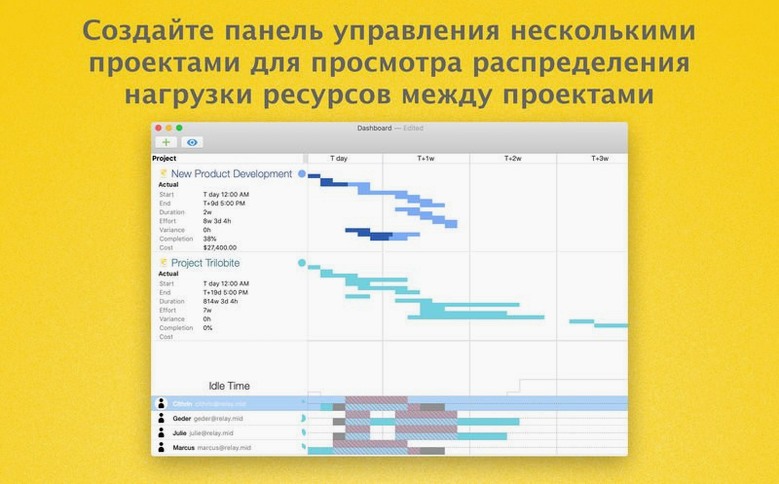
This isn't a lightweight to-do list. OmniPlan sits at the serious end of Mac project management—the place where network diagrams, critical paths, and resource leveling actually matter. The Pro version talks to Microsoft Project files directly, so you can import an MPP from a client or export your plan to a PM who lives in Windows. It also exchanges data with OmniOutliner for structured brainstorming and OmniGraffle for visual mapping, which makes it a natural hub if you already use those apps. When you're juggling several projects, the multi-project dashboard keeps the chaos visible without burying you in tabs.
When Tasks, Resources, and Dates Actually Interlock
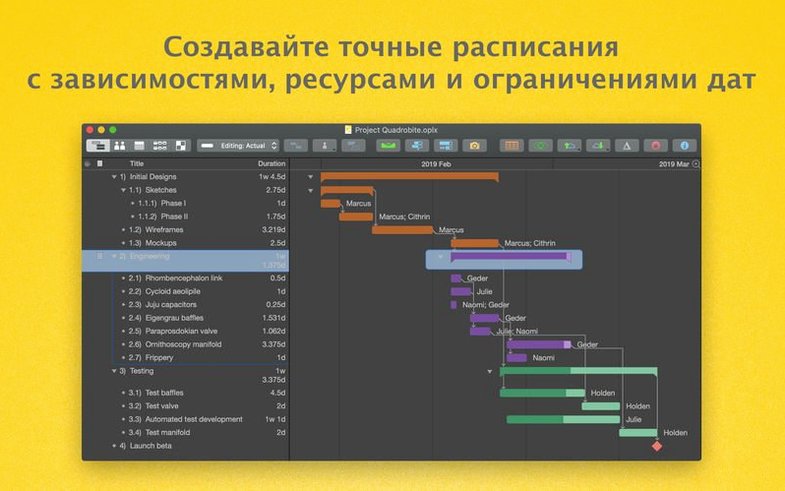
You split work into tasks, attach resources, and watch the app calculate what drives the finish date. Change tracking in the Pro edition lets you accept or reject updates one at a time or all at once—useful when a stakeholder rewrites half the schedule on a Friday. Export options cover PDF, CSV, ICS, and the other Omni apps, so your plan can feed a calendar or a report without retyping anything. Version 4.11.0 tightens macOS compatibility and speeds up editing for tasks with a long list of assigned resources, which is the kind of fix you appreciate when a single task touches a dozen freelancers.
Why Your Gantt Chart Lies and Reality Does Not
New users often treat OmniPlan like a fancy to-do list. They type task names, eyeball durations, and ignore the resource outline entirely. Two weeks in, the Gantt chart shows everything finishing on time, but reality disagrees. The calendar was never set up. No one's sick days or holidays exist in the system, so the critical path pretends every Friday is a full workday.
Another classic move: linking every task with a finish-to-start dependency when half of them could run in parallel. The network diagram turns into a single thread, and the projected end date stretches months past what's actually possible. OmniPlan won't stop you from doing this—it just draws exactly the bottleneck you built.
The biggest trap, though, is ignoring the leveling controls. Beginners assign three big tasks to the same person, see the red resource conflict indicator, and manually drag bars around to fix it. That works for a while, then something shifts and the whole schedule needs re-leveling by hand. The automatic leveling engine is right there in the toolbar. Use it early, even on rough drafts, so you learn what your team's actual capacity looks like.
Spend an Afternoon on a Five-Task Throwaway Plan
Before you build a real project, spend an afternoon on a throwaway plan. Something small—maybe five tasks, two people, and a calendar that includes a public holiday. The goal isn't a useful schedule; it's learning where the switches live.
Open the calendar view first and block out non-working days for each resource. OmniPlan pulls from system calendars, but you'll likely want a separate project calendar for team-wide closures. Set effort estimates on tasks instead of fixed durations when the work scales with the person doing it—the Monte Carlo simulation in the Pro version feeds on that data later.
Then run the leveling command and watch what moves. Note which tasks slip and why. Check the critical path toggle. Turn on change tracking for the practice file and make a few edits, then review them in the tracking pane so the interface doesn't surprise you when a real project is on the line.
The Effort-Duration Mismatch That Fakes Overallocation
Resources appear over-allocated when they aren't. This usually means a task's effort doesn't match its duration. If someone works two hours a day on a five-day task, you've assigned ten hours of effort. Check the task inspector—the numbers there override the bar on the chart.
Importing an MPP file drops custom fields. Microsoft Project import is solid for tasks, dependencies, and resources, but custom columns don't always survive the trip. Before you import, strip the MPP down to structural data, or plan to rebuild those fields inside OmniPlan's outline.
The dashboard shows stale data. The multi-project dashboard reflects what's in each file at last save. If you publish to Omni Sync Server, there's a small lag. Forgot to save a child project before switching windows? The dashboard hasn't seen the change yet. Hit save, refresh, and the numbers update.
AppleScript isn't firing. On newer macOS versions, scripting permissions can trip up. Grant OmniPlan access under System Settings > Privacy & Security > Automation, then try the script again. Simple compile errors are the other culprit—run a one-line test first.
A Coordinator's Afternoon
A video post-production coordinator gets an omniplan torrent and installs it on a Tuesday, right after a client greenlights eight deliverables with a fixed air date. She imports the client's MPP file, which arrives with 40 tasks and a mess of unrealistic durations. Ten minutes of cleanup later—merging redundant milestones, setting effort-based estimates on the color grade and sound mix—the critical path snaps into focus. The finish date lands three days late.
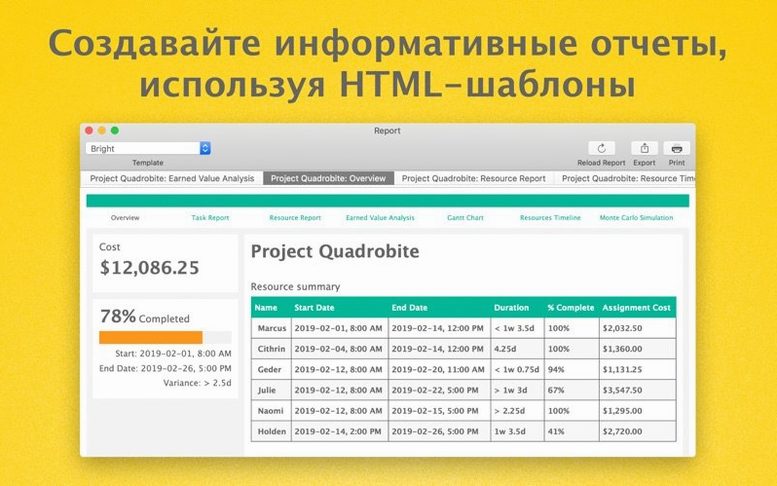
She opens the resource outline, adds the lead editor and two freelancers, and blocks a public holiday on the project calendar. Leveling pushes the conform task to the freelancer who has slack, and the late penalty drops to one day. She runs a Monte Carlo simulation on the remaining risky tasks to see completion probability. The report shows 82% confidence on the air date, so she sends an HTML report to the producer and subscribes the post supervisor to the published file through Omni Sync Server. When the supervisor adds a revision task at 9 p.m., change tracking flags it in her morning review. One click accepts it. The Gantt adjusts, the dashboard updates, and no one had to send an email.
OmniPlan 4.11.0 refines the rough edges. Editing a task that has a ton of assigned resources no longer stutters—the performance bump is real and welcome. Compatibility with recent macOS versions also got a pass, so the app runs clean on current systems.
- macOS 12 or later
- Apple Silicon and Intel Macs
Questions I actually get
Can OmniPlan Pro open Microsoft Project files?
Yes, the Pro version can import and export Microsoft Project (MPP) files, which is essential for cross-platform workflows.
Notes from the edit bay · 0
Sign in or get an edit-bay pass to leave a note.
No notes from the edit bay yet. They go up after I read them.