
Sixty bug fixes. That's the number that jumps out in GraphPad Prism 11.1.0, a maintenance release for the biostatistics and curve-fitting workhorse that also slips in a few quiet workflow upgrades. The variable selection inside analysis dialogs now feels less like filling out a tax form—for t tests, ANOVA, nonlinear regression, and simple survival analysis, picking your columns takes fewer clicks and less scrolling.
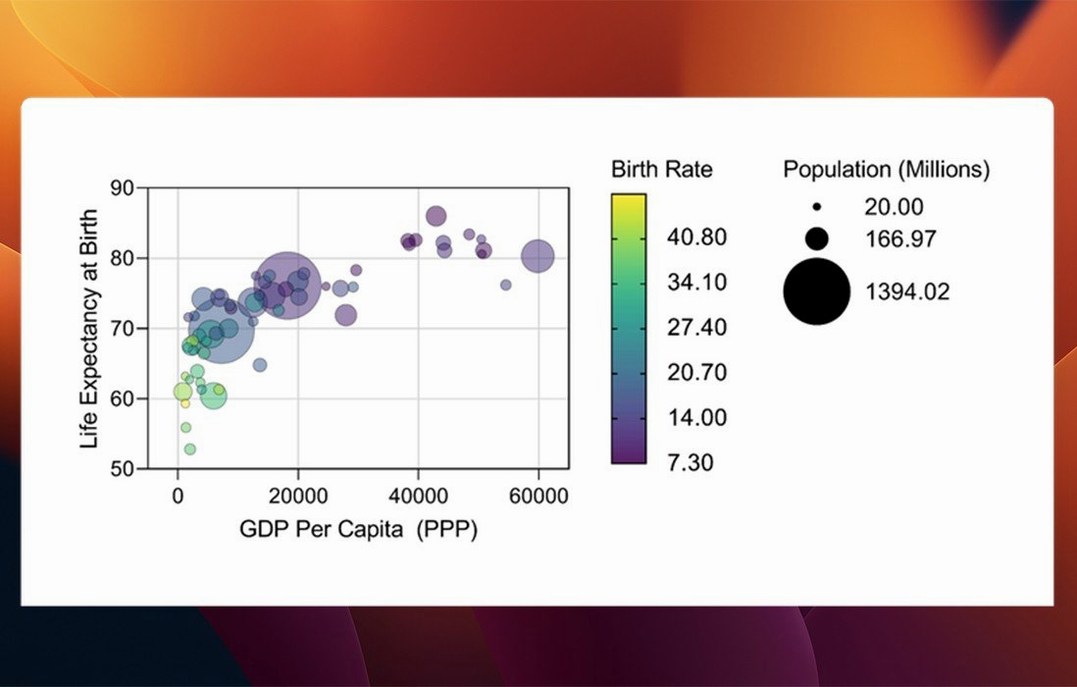
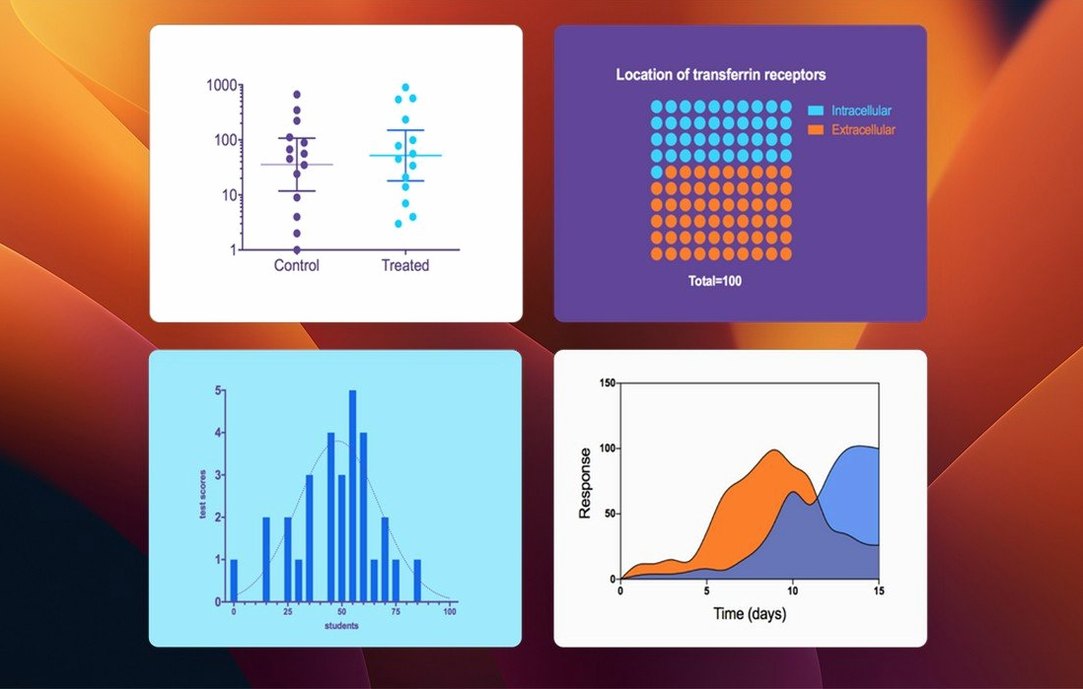
New graph types arrive for multiple variables tables. Bars, box-and-whisker plots, and violin plots give you more ways to visualize data without bouncing out to another tool. Categorical level ordering for those same multiple variables tables means you control the sequence your categories appear in, rather than letting the software decide alphabetically. Small change, big time saver when you're prepping a figure for a paper at 2 AM.
The core of Prism hasn't shifted. You still organize repeated experiments, run analyses, and build publication-ready graphs in one window. The interface stays English-only. Native Apple Silicon support remains, alongside Intel 64-bit Macs running macOS 11 or later. If you've used Prism 10, version 11.1.0 will feel like the same chair with better casters—nothing radical, just easier to move around in.
What didn't change matters too. The analysis engine, the data table structure, the graph customization panel—all untouched. This release fixes more than it adds, which for a tool that handles p-values and dose-response curves is exactly the right priority.
Does It Feel Bloated on an Older Mac?
Does it feel bloated on an older Mac? I hear this one constantly from lab managers juggling machines that haven't been refreshed since 2019. Prism 11.1.0 launches cold in under four seconds on an M1 Air with 8 GB of RAM, and it idles at around 180 MB of memory with a modest dataset open. Intel machines from the 2018–2020 era run it fine—the sixty bug fixes in this release cleaned up a few memory leaks that used to creep in during long sessions with multiple graphs. It's not a lightweight, but it's not Photoshop either.
Can I open files from colleagues on Windows? Yes, and they won't notice you're on a Mac. The file format is identical across platforms. Someone sends you a .pzfx file from a Windows machine running Prism 10 or 11, you double-click it, it opens. No converter, no export-import dance. The only hiccup I've seen is font substitution in graphs when Windows uses a typeface not installed on macOS, and that's a two-click fix in the Format Graph panel.
What about the graphpad prism crack search everyone seems to run? Researchers in underfunded labs and students with stipends that barely cover rent often ask whether a graphpad prism cracked version mac actually works. The short answer is that cracked versions floating around tend to be older builds—10.x or early 11.0.x—missing the analysis dialog streamlining and the sixty bug fixes from 11.1.0. A prism 10 mac crack won't give you the new multiple-variables graph types. And graphpad prism 10 crack files can trigger macOS's code-signing checks, so you'll want to handle the quarantine attributes and permissions yourself. The graphpad prism free download mac searches point to the same reality: the 11.1.0 release doesn't require activation in the traditional sense, so a clean install behaves without phoning home. That's worth knowing if you're evaluating it.
Nonlinear Regression Finishes Before You Lift Your Finger
Nonlinear regression with a thousand data points finishes before you lift your finger off the mouse button. I'm not exaggerating—the fitting engine is compiled natively for Apple Silicon, and it leverages the Neural Engine for some matrix operations that used to peg the CPU. On an M2 Pro, a four-parameter logistic fit across twelve dose-response curves completes in under a second. The same task on a 2019 Intel i9 MacBook Pro takes maybe two and a half seconds. Both are fine. Neither interrupts your train of thought.
Stability is where 11.1.0 earns its keep. The sixty fixes address crashes that users of 11.0.x reported when switching between data tables with mismatched row counts, a bug in the survival analysis module that could corrupt the output sheet, and a handful of redraw glitches in the graph view when using Dark Mode. I've thrown messy datasets at it—missing values, unbalanced groups, variable names with special characters—and it hasn't beachballed once.
Disk footprint lands around 380 MB after install. It doesn't install kernel extensions or background daemons. No menu bar icon, no login item. When you quit Prism, it actually quits. For a scientific tool, the restraint is refreshing.
A Workflow: Dose-Response Curve to Publication Figure
Say you've run an ELISA with eight concentrations of a compound, four replicates each, and you need a graph with a fitted curve, IC50, and 95% confidence bands—ready for a journal that wants 300 dpi TIFFs. Here's how that plays out in one session.
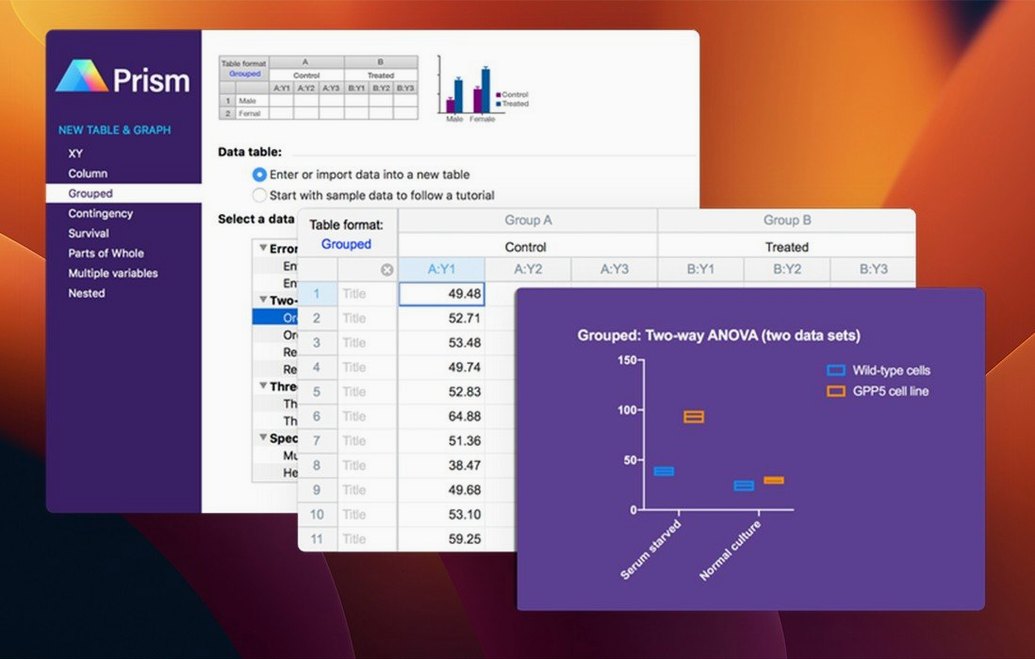
You open the XY data table, paste your concentrations in X and the mean absorbance values in Y. The replicates go into subcolumns. Prism automatically recognizes the table structure and pre-selects "XY: Enter replicate values in side-by-side subcolumns" in the Welcome dialog, so you skip that step entirely in 11.1.0—the variable selection streamlining means the analysis parameter dialog now defaults to the table format you're already using, rather than making you confirm it.
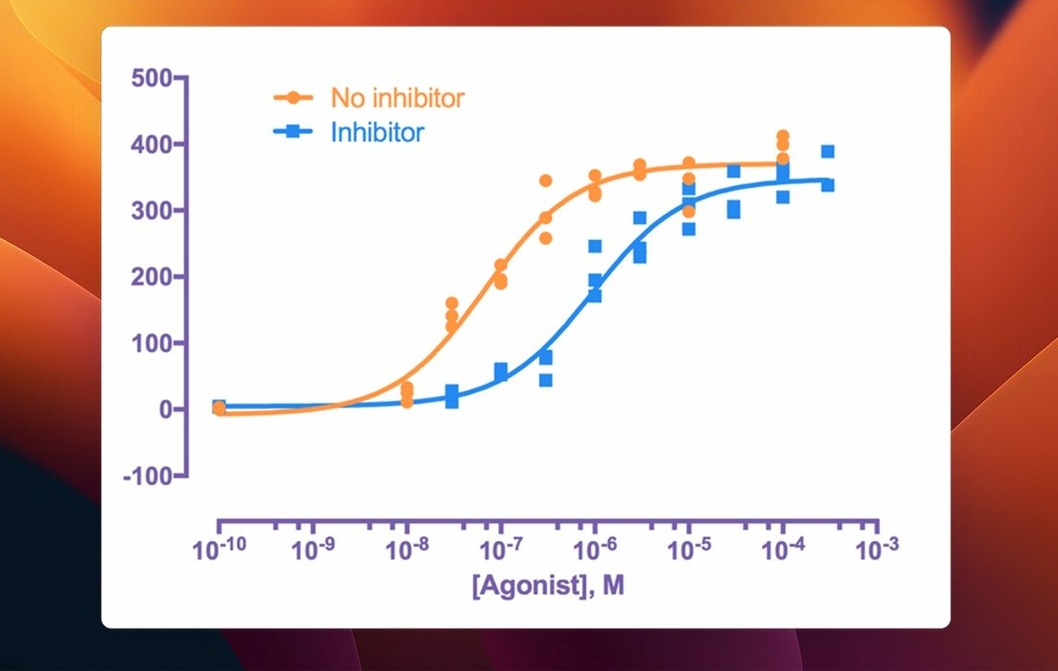
Click Analyze, choose "Nonlinear regression (curve fit)" from the XY analyses list. The dialog presents the dose-response equation library. You pick "log(agonist) vs. response -- Variable slope (four parameters)." The new streamlined variable selection means you don't scroll through a list of every column in the project; Prism shows only the relevant data sets. Two clicks, you're in the Parameters tab. You check "Interpolate unknowns from standard curve" and leave the constraints at default. Hit OK.
The results sheet populates with best-fit values, standard errors, the IC50, and goodness-of-fit metrics. You switch to the graph view. Prism has plotted the mean ± SEM for each concentration, overlaid the fitted curve, and added the 95% confidence bands as dashed lines. You open the Format Graph panel, switch the color palette to something colorblind-safe, bump the line weight to 1.5 pt, and set the axes to log scale for X. The graph updates live with every change—no Apply button, no render delay.
Export: File > Export, choose TIFF, set 300 dpi, CMYK color space, LZW compression. Done. The whole workflow from paste to press-ready file took under four minutes.
Built for Dose-Response, Kinetic Assays, and Group Comparisons
Bench scientists running repeated experiments with small-to-medium datasets—biochemists, pharmacologists, neuroscientists, anyone doing dose-response, kinetic assays, or group comparisons. The data table structure mirrors how they actually work: one table per experiment, with built-in slots for replicates. They're not writing R scripts at 11 PM; they need a curve fit and a graph that a journal won't reject.
Graduate students and postdocs who inherit datasets from a predecessor's Excel spreadsheet. Prism's "Paste Special" and "Transpose Paste" functions save hours of reformatting. The analysis checklists—little plain-English explanations of which test to pick and why—are genuinely useful if you haven't taken biostatistics since your first year.
Core facility managers who produce the same five graph types for every client. They build a template once, save it as a method, and apply it to new data with two clicks. The categorical level ordering in 11.1.0 means they can enforce a consistent treatment order across every graph in a multi-page report without manually dragging columns in every sheet.
People who searched for graphpad prism 10 crack last year because their PI wouldn't approve the purchase. The 11.1.0 release matters most to them—the bugs that made older 10.x builds tricky on Ventura and Sonoma are gone. A clean install of the current version behaves on Apple Silicon without the kernel panics that plagued older cracked binaries.
Dragging qPCR Data Straight from a USB Drive
Tuesday afternoon. A postdoc opens Prism with a coffee in one hand and a USB drive of qPCR data in the other. She drags the .csv onto the Prism icon in the Dock. The Welcome dialog disappears, replaced by a new Multiple Variables table. She renames the table "Gene Expression – Cortex" and pastes the Ct values from three treatment groups, six genes each, four animals per group.
She clicks the graph thumbnail in the Navigator panel. Prism shows a prompt: "Multiple variables table detected. Choose a graph type." She picks violin plot—new in 11.1.0—and the graph renders in under a second. Each gene is a cluster, each treatment is a color, the violins show distribution shape, and the medians are marked with a line. She types a figure legend directly below the graph in the layout view, using Prism's built-in text tool that supports superscript and Greek characters. No Illustrator. No post-processing.
She runs a two-way ANOVA from the Analyze button. The new streamlined variable selection shows her exactly which factors are in the table—gene and treatment—and she assigns them without scrolling through a list of every column in the project. She checks the box for Tukey's multiple comparisons test and hits OK. The results sheet opens with the ANOVA table, the post-hoc comparisons, and a summary paragraph she'll copy-paste into the paper's results section.
She saves the project, exports the graph as an EPS for the journal, then exports the ANOVA results as a PDF for her lab notebook. She closes Prism. The whole session—import, graph, analyze, export—spans eighteen minutes. The coffee is still warm.
- macOS 11 or later
- Apple Silicon or Intel 64-bit Mac
- Interface language: English
Notes from the edit bay · 0
Sign in or get an edit-bay pass to leave a note.
No notes from the edit bay yet. They go up after I read them.