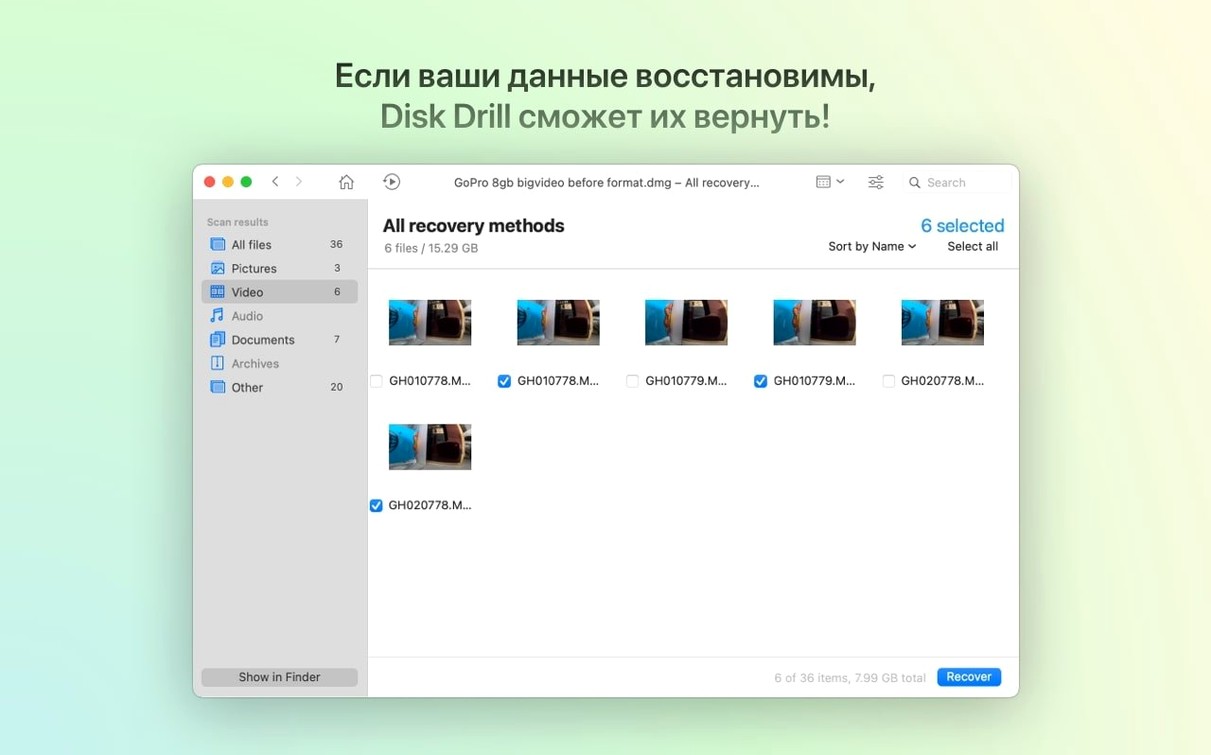
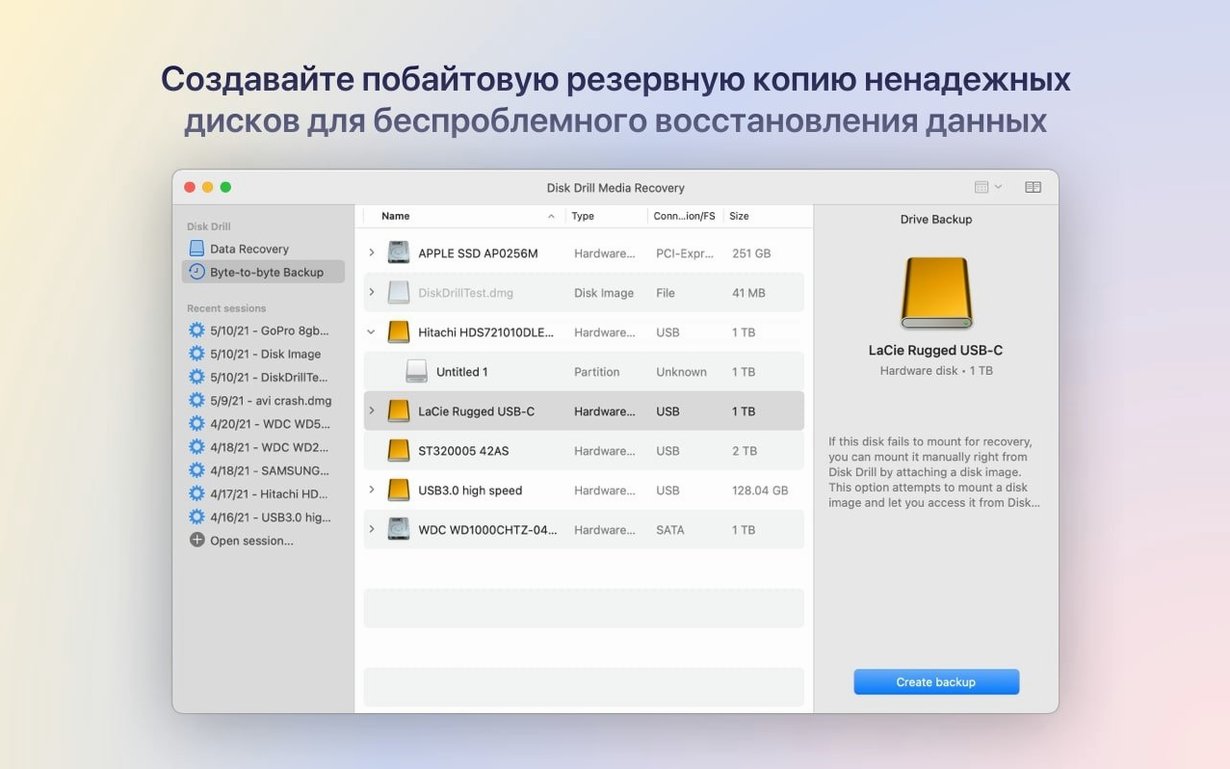
If you've ever stared at the Finder, refreshing a folder and hoping a missing file magically reappears, you know that sinking feeling. Time Machine is your first line of defense, but when a file wasn't backed up or a drive gets corrupted, you need something deeper. Disk Drill steps in as the forensic-level scan you run after that initial panic, digging into the raw data on a drive to piece things back together.
The questions people usually ask boil down to two things: what can it actually get back, and will it choke on a half-dead disk? The recovery list is long—deleted files, data from formatted devices, and entire lost partitions. This latest build even adds detection for lost BitLocker partitions, so a drive that won't mount isn't necessarily a lost cause. It improves handling of encrypted APFS volumes too, which is crucial on modern Macs. The scanner doesn't just look at file tables; it reads the disk surface, which is how it pulls photos and documents from a damaged or unreadable drive.
Beyond recovery, the extra tools keep it open on my machine. The duplicate finder alone has saved me gigabytes of stray audio stems and render files. There's a disk health monitor that gives you a heads-up before a drive fails, and a cleanup tool that hunts down cache files bloating your system. It's a whole disk toolkit where recovery is the main event, but the supporting acts actually earn their place.
One thing to know: it's not a magic wand for every situation. A file overwritten by a new render is truly gone. But for that moment when an SD card gets ejected too early or a folder vanishes during a crash, Disk Drill is the tool you launch to stop hyperventilating and start scanning.
A Typical Session: The Card That Wouldn't Read
Last Tuesday, a director handed me an SD card fresh from a shoot. The camera swore it was fine. My Mac disagreed — "The disk you inserted was not readable." Initialize? Eject? Ignore? None of those sounded good.
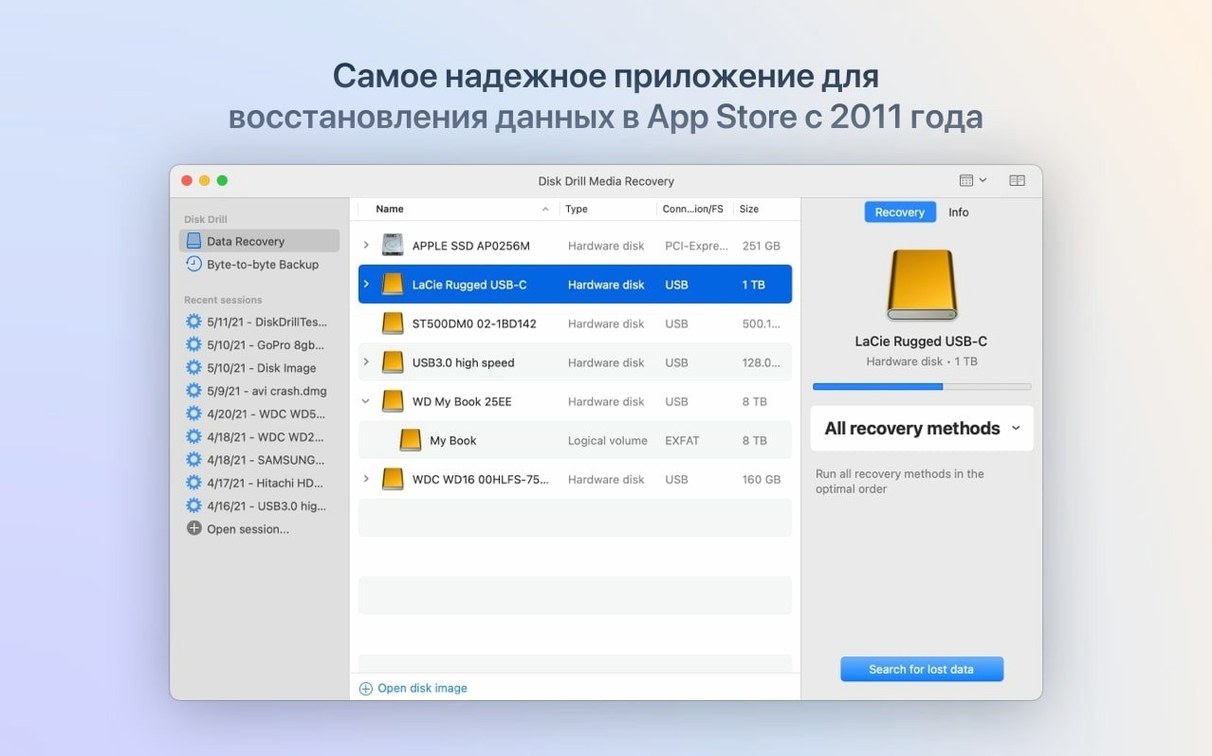
I launched Disk Drill. The card appeared in the drive list immediately, even though Finder refused to touch it. I selected it and hit Search for lost data. The scan method defaults to Quick Scan first, which trawls the file system metadata. In about forty seconds, it had reconstructed a folder tree of the morning's footage. I could preview the first clip right in the app — a clean .mov playing back without glitches. That alone calmed the room down.
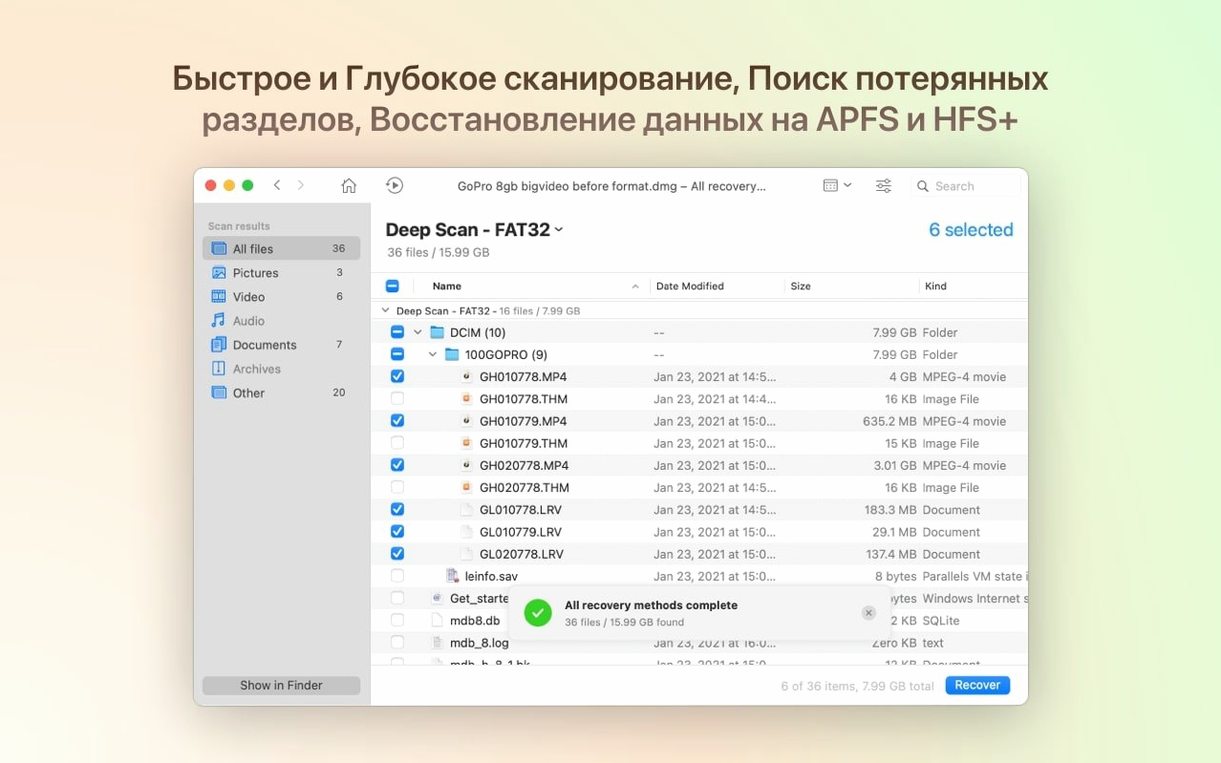
But Quick Scan missed the B-roll from the second half of the day. The camera had probably formatted the card mid-shoot, overwriting the directory entries. I clicked Deep Scan and let it run while I made coffee. Deep Scan ignores the file table entirely and reads every sector, matching raw data against a signature database. Ten minutes later, a raw list of files appeared with generic names like file012.mov. I filtered by file type, previewed a few, and selected the missing clips. I pointed the recovery destination at an external SSD — never restore to the same card, that's rule one — and let it copy them out. The director bought lunch.
The whole workflow follows the same rhythm every time: select device, preview what the Quick Scan finds, decide if Deep Scan is warranted, recover to a different drive. It's not complicated. The app doesn't bury you in hex editors or ask you to choose block sizes manually. It presents a clean, dark interface with a progress bar and a growing list of recoverable items. For video editors and photographers who need results fast, that lack of friction matters.
Where Disk Drill Pulls Ahead of EaseUS and R-Studio
Three names dominate the Mac recovery space: Disk Drill, EaseUS Data Recovery Wizard, and R-Studio. They overlap, but they pull ahead in different scenarios.
EaseUS Data Recovery Wizard matches Disk Drill's approachability. The interface is similarly clean, and both apps offer previews before recovery. Where they diverge is the extra toolkit. EaseUS sticks to recovery alone. Disk Drill bundles the duplicate finder, disk health monitor, and cleanup tools under one roof. If you only ever need recovery, that doesn't matter. If you manage a lot of media drives, the health monitor alone catches failing disks before they become recovery jobs.
R-Studio is the technician's choice. It handles RAID reconstruction, hexadecimal editing, and forensic-level carving that Disk Drill doesn't touch. If you run an IT department or do data forensics, R-Studio is the deeper tool. For everyone else, it's overkill wrapped in a UI that feels like Windows 98. Disk Drill gives up some of that raw power in exchange for not needing a manual to recover a deleted folder. The new BitLocker partition detection in version 6.3.2326 narrows the gap a little, but R-Studio still wins on complex RAID setups.
TestDisk and PhotoRec are the open-source wildcards. They recover a staggering amount of data for zero cost, and PhotoRec's file carving is genuinely excellent. They also run in Terminal with no graphical interface. For a command-line user who knows exactly what they're doing, they're brilliant. For someone who just wants their wedding photos back from a corrupted SD card at midnight, Disk Drill's previews and guided scanning are the difference between solving the problem and adding frustration to panic.
Where Disk Drill carves its niche is the balance. It has enough depth for most real-world disasters — formatted drives, dead partitions, phones that won't boot — without demanding a certification to operate. The ACR module's improved .m4a and .rwl support in the latest build shows the developer is filling in format gaps that used to send people to more technical tools.
BitLocker Partitions Now Show Up Without a Windows Machine
Version 6.3.2326 landed July 2026, and the practical impact breaks down into a few areas I noticed right away.
The BitLocker partition recovery is the headline. If you shuttle drives between Macs and Windows machines, a BitLocker volume that suddenly refuses to unlock is a nightmare. Previously, Disk Drill couldn't even see the partition. Now it detects the lost partition and attempts recovery. This alone saved a producer I know from losing a project drive that got BitLocker-encrypted on set and corrupted during transport.
The encrypted APFS improvements are quieter but affect more people. Every modern Mac runs APFS, and many users encrypt their drives with FileVault. In older versions, scanning encrypted volumes could stall or return incomplete results. The 6.3.2326 build processes these partitions more reliably, and the scan times on my encrypted system drive dropped noticeably.
On the media side, the ACR module — which handles raw photo and audio formats — now supports .m4a audio and .rwl image files. The .rwl addition matters for Leica shooters, a format that other recovery tools often skip. The fix for .dng file detection means raw photo recovery from Adobe workflows no longer has a blind spot. And the fix for poor iPhone photo grouping means scrolling through recovered images no longer leaves you staring at a chaotic, ungrouped mess.
The byte-to-byte DMG scanning fix is one of those under-the-hood improvements you don't celebrate until you need it. If you create disk images for archival or cloning, scanning them used to fail silently. Now it works, which means you can recover files from a DMG backup of a dying drive without mounting it and risking further damage.
When You’re Handed a Card That Was Just Formatted on Set
Not every Mac user needs Disk Drill. But a few groups live with it in their dock.
Video editors and DITs on set face a constant stream of media cards, shuttled drives, and the occasional camera format button pressed by mistake. The ability to scan a card before anyone panics, preview the clips, and pull them to a safe location is a daily production insurance policy. The duplicate finder also earns its keep when render drives fill up with versioned exports nobody remembers making.
Photographers who shoot RAW benefit from the format support and preview engine. An SD card that corrupts during a wedding is a business-ending disaster. The deep scan with visual previews — now with fixed .dng detection — gives you a fighting chance while the couple is still on the dance floor.
IT support staff managing fleets of Macs get the disk health monitor and cleanup tools alongside recovery. Getting a SMART warning before a drive fails is cheaper than a recovery attempt after. The ability to scan phones and tablets from one app consolidates a lot of tool sprawl.
Musicians and audio producers juggle external drives full of project files. A drive that unmounts mid-session can corrupt a Logic project. Deep Scan's file carving finds .wav and .aif files by their data patterns even if the file system gives up. The improved .m4a support in the ACR module now covers compressed audio formats that producers working with reference tracks or stems encounter regularly.
The common thread is people whose livelihood sits on a disk. They don't need a hex editor. They need to stop panicking, see their files, and get them back before the next deadline hits.
Why Your External Enclosure Isn’t Appearing in the List
No recovery tool is immune to head-scratching moments. Here are the ones that come up repeatedly and how to work through them.
"The drive doesn't show up in the list." This happens more with external enclosures than the drives inside them. Try a different cable and a different port. If the drive still doesn't appear, check System Information under USB or Thunderbolt to see if the Mac detects the hardware at all. If the hardware is visible but Disk Drill doesn't list it, the drive may have a physical failure beyond software recovery. Stop scanning and consider a professional service — every read attempt on a mechanically failing drive risks making things worse.
"Deep Scan found nothing." A blank result usually means one of two things: the data was overwritten, or the drive was securely erased. SSDs with TRIM enabled make deleted files unrecoverable almost immediately — the controller zeros out the blocks in the background. A spinning hard drive that's been in heavy use since the deletion likely had its sectors reused. File carving can't reconstruct what isn't there.
"The recovered file won't open." This stings. A file with the right name and size that refuses to play or open is often fragmented. Deep Scan reconstructs files contiguously based on file signatures, but if a large video file was scattered across the drive, the recovery may be incomplete. Try Quick Scan first — it uses the file system's map and handles fragmentation better for recently deleted files. If only Deep Scan finds the file, recovering a lower-resolution preview or an earlier version may be the best you can do.
"Scanning is taking forever." Deep Scan reads every sector. On an 8 TB external drive, that's a coffee-run-and-errands situation. You can pause and resume scans, which helps when you're on a laptop. If you know which file types you need, narrow the scan to specific signatures — limiting it to video formats on a media drive cuts scan time significantly.
"Disk Drill wants Full Disk Access but I already granted it." macOS privacy controls can get tangled. Open System Settings, go to Privacy & Security, find Full Disk Access, remove Disk Drill from the list, then add it back. A relaunch after toggling the permission usually clears the problem. The same trick works if the app can't see an external drive it should detect.
Lost BitLocker partitions now show up in scans and can be recovered. Support for .p8 and .pfx files is new, alongside .m4a handling in the ACR module. Encrypted APFS partition handling is tighter across the board.
Also fixed: byte-to-byte DMG scanning no longer fails, and the scan results are just more reliable when you're staring down a drive that won't behave.
- macOS 10.15.7 or newer
- Runs on Intel and Apple Silicon Macs
Notes from the edit bay · 0
Sign in or get an edit-bay pass to leave a note.
No notes from the edit bay yet. They go up after I read them.