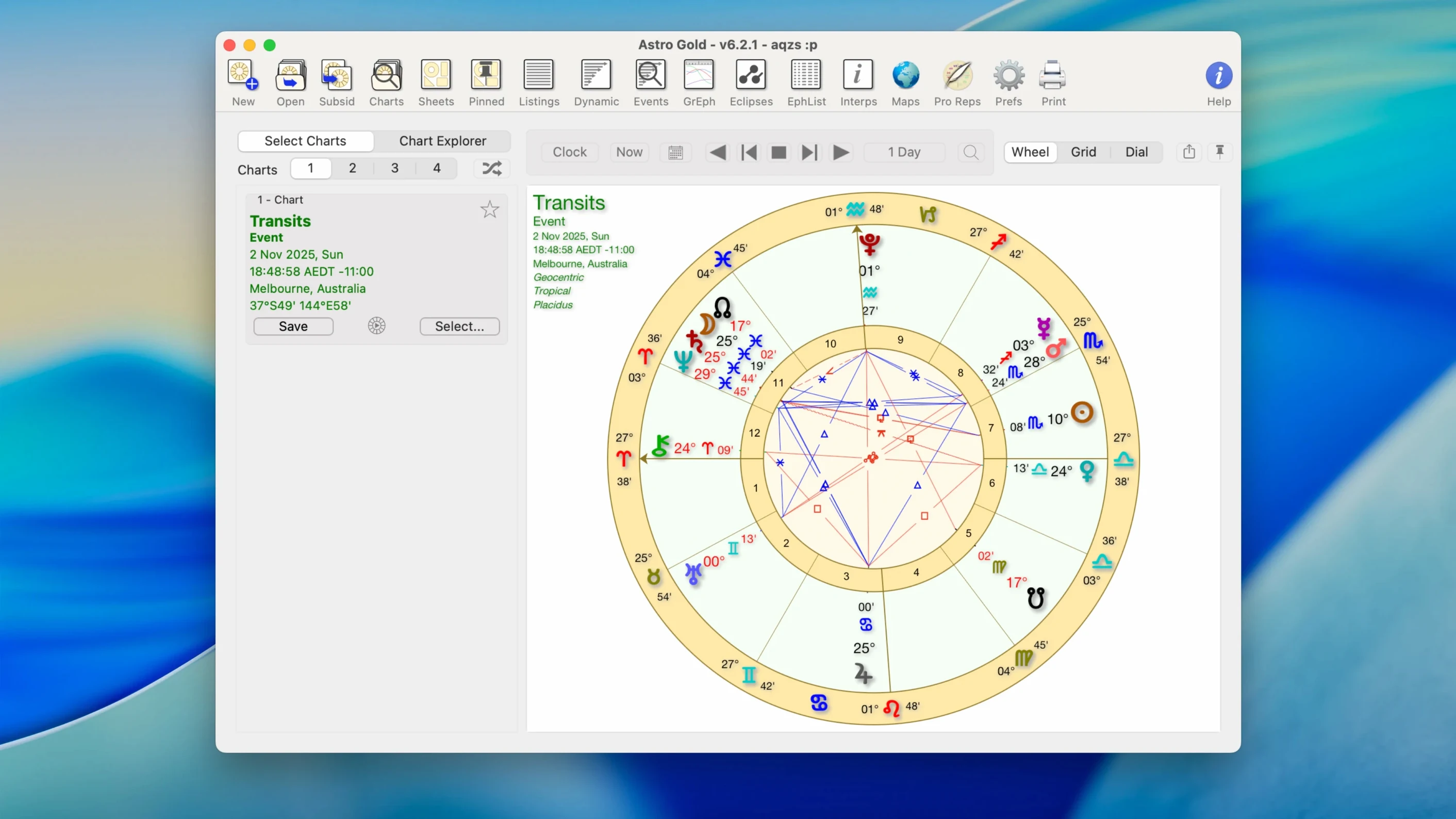
A client has just asked for a detailed synastry breakdown and a relocated chart for their upcoming move to Tokyo. I open their natal file, pull up the bi-wheel view, and overlay the transits for this week's consultation. The wheel renders cleanly on my MacBook the instant I select the chart style. No waiting.
The chart module handles the heavy lifting. It builds natal charts with a long list of bodies—you get the usual planets plus asteroids like Chiron and Proserpina right out of the gate. Round or square wheels, your call. Medieval techniques sit alongside modern ones, so a traditional dignity score and a trans-Neptunian object can share the same screen without switching apps.
Where it really earns its place in a working astrologer's dock is the predictive and relational toolkit. Transits and solar, lunar, and Saturn returns are a few clicks away. The synastry module overlays two charts cleanly for relationship work, and the astrocartography view plots planetary lines so you can see why someone's Mars line runs right through their new zip code.
Under the hood, it's a universal binary that feels at home on Apple Silicon and older Intel machines, all the way back to macOS 10.13. No Rosetta translation lag when you're hopping between charts. The interface is in English, and the app stays out of your way so you can focus on the interpretation, not the tool.
Tightening the Moon's Applying Orb for Sharper Transits
The default orb table is a sensible starting point, but most working astrologers tweak it within the first hour. Open Preferences and head to the Orbs tab—cutting the Moon's applying orb from 8° to 6° tightens up transit timing noticeably, especially for lunar returns. I also switch on show seconds of arc for longitude readouts under the Display pane. The extra precision makes a real difference when you're checking a fixed star conjunction.
One setting that ships turned off: aspect filter by planet. Enable it. When you're staring at a chart with a dozen asteroids and three minor bodies lit up in red, filtering out everything except the traditional seven clears the noise instantly. You can always toggle it back for a full modern reading.
The sidereal zodiac toggle lives under Chart Defaults. If you split your practice between tropical and sidereal, set the default to whichever you use more often—switching per chart is fast, but forgetting to switch is faster. While you're there, pin your preferred house system. The app remembers it per chart file, not globally, so the default is what really sticks.
Option-Click the Calendar to Jump a Month or Year
The ephemeris viewer has a hidden muscle you'd ignore if you only click the toolbar button. Hold Option while clicking a date in the calendar strip—it snaps to the same day next month. Hold Shift-Option and you jump a year. For an astrologer checking every Saturn ingress of a six-year cycle, those keystrokes save real minutes.
The aspect grid in chart view does more than list orbs. Right-click any cell and the app centers the wheel on that planet pair, dimming the rest of the chart slightly. It's a quiet visual cue that helps when you're explaining a tight square to a client and don't want them losing focus on the one relationship that matters right now.
Another one people miss: you can drag a chart file straight from Finder onto the synastry slot in the sidebar instead of navigating the Open dialog. If you keep a folder of client charts on the desktop, this cuts the click count in half. The app also respects macOS tags, so a chart tagged "rectification" or "horary" appears under that tag in the Open Recent list.
Export Vector Wheel Lines to Keynote for a Projector
Chart images export as PDF or PNG, and the PDF output carries vector paths for the wheel lines. Drop that into a Keynote slide deck for a workshop and it scales clean to a projector. I send the same PDF to Preview, crop the bi-wheel, and paste it into a Mail message without ever opening Photoshop.
The app writes chart data as plain text that other tools can read—no locked database. If you keep a research log in Numbers or a plain CSV for rectification patterns, a quick copy from the ephemeris grid or the planet positions table lands in your spreadsheet without parsing headaches. Some astrologers pipe that data into Excel for Mac to run their own statistical tests on aspect frequency.
macOS accessibility features play surprisingly well here. VoiceOver reads the degree positions and house cusps from the aspect table if you navigate it with the keyboard, and the high-contrast chart style option sits under View alongside the round and square wheel choices. Dark Mode follows the system setting automatically, which matters during a late-night electional session when every screen in the room has gone warm-white except yours.
For those looking to round out a full astrology toolkit on the Mac, an astro gold free download search often turns up alongside requests for an astro gold for mac setup guide—people want to know how it coexists with screen-capture utilities, note apps, and the macOS clipboard stack. The answer is: quietly. It uses standard system file dialogs and doesn't override the Services menu, so a shortcut to append selected chart text to a Bear note or a Drafts inbox works exactly like it does in any other well-behaved Cocoa app.
Runs Natively on Apple Silicon—No Rosetta Needed
Will it run on an M1 or M2 Mac?
Yes—natively. No Rosetta. The universal binary means it launches as an ARM process on Apple Silicon and a 64-bit Intel process on older hardware, all the way back to macOS 10.13. I've run it on an M2 MacBook Air without a single compatibility hiccup, and the same build works on a 2017 iMac sitting in my spare room.
Can I open charts from other astrology software?
Not directly as proprietary files, but the chart data import handles the common intermediate formats. If your old Windows app exports a birth data text file or a standard-format database dump, you can usually bring the core positions in without retyping longitude for forty planets. The ephemeris-based calculations are internal, so a saved chart in Astro Gold stores the birth data, not just the computed positions—recalculating a chart under a different zodiac or house system takes one click, no re-entry needed.
Does it handle the asteroids and fixed stars I actually use?
Chiron and Proserpina are built in. The fixed star catalog covers the major bodies any traditional or medieval practitioner expects. For the fringe objects, check the planet selection dialog—if it's in the Swiss Ephemeris it's probably available under the extended body list. No promises on a freshly named centaur from last month's circular, but the catalog is deeper than the toolbar buttons suggest.
What happens if I search for an astro gold mac torrent and find an older build?
The 6.2.1 release covered on this page is the one with the universal binary and the astrocartography fixes that landed after the 6.0 major update. Earlier builds from an Astro Gold Mac torrent might run, but you'd miss the Apple Silicon native performance and a handful of crash fixes in the synastry overlay. No judgement on where you find the installer—just make sure it's 6.2.1.
Is this an astro gold free download for pc situation, or Mac-only?
The macOS build is macOS-only. There's a separate Windows version from the same developer, but the two apps don't share a codebase, and chart files aren't cross-compatible between them without exporting plain birth data. If you spotted an astro gold free download for pc link, it's the Windows sibling, not this one. The Mac app lives entirely in the Apple ecosystem and relies on Cocoa frameworks that have no Windows equivalent.
- macOS 10.13 or later
- Intel or Apple Silicon Mac
- Interface language: English
Questions I actually get
Does Astro Gold run on Apple Silicon Macs?
Yes, Astro Gold 6.2.1 is a universal app with native support for both ARM (Apple Silicon) and x86 64-bit Intel Macs.
What chart types can I create in Astro Gold?
You can create natal charts, synastry bi-wheels, transit charts, and various return charts including solar, lunar, and Saturn returns.
Which asteroids are included with the software?
The software includes a selection of asteroids and centaurs such as Chiron and Proserpina, accessible directly within the chart calculation settings.
Notes from the edit bay · 0
Sign in or get an edit-bay pass to leave a note.
No notes from the edit bay yet. They go up after I read them.