A raw DI track can feel lifeless in a dense mix, no matter how tight the performance is. You need an amp that pushes the guitar forward without burying the transients in fizz. The Neural DSP Soldano SLO-100 X solves that by modeling one of the most articulate high-gain circuits ever built, giving you a signal chain that cuts through a wall of synths and drums while keeping every note defined.
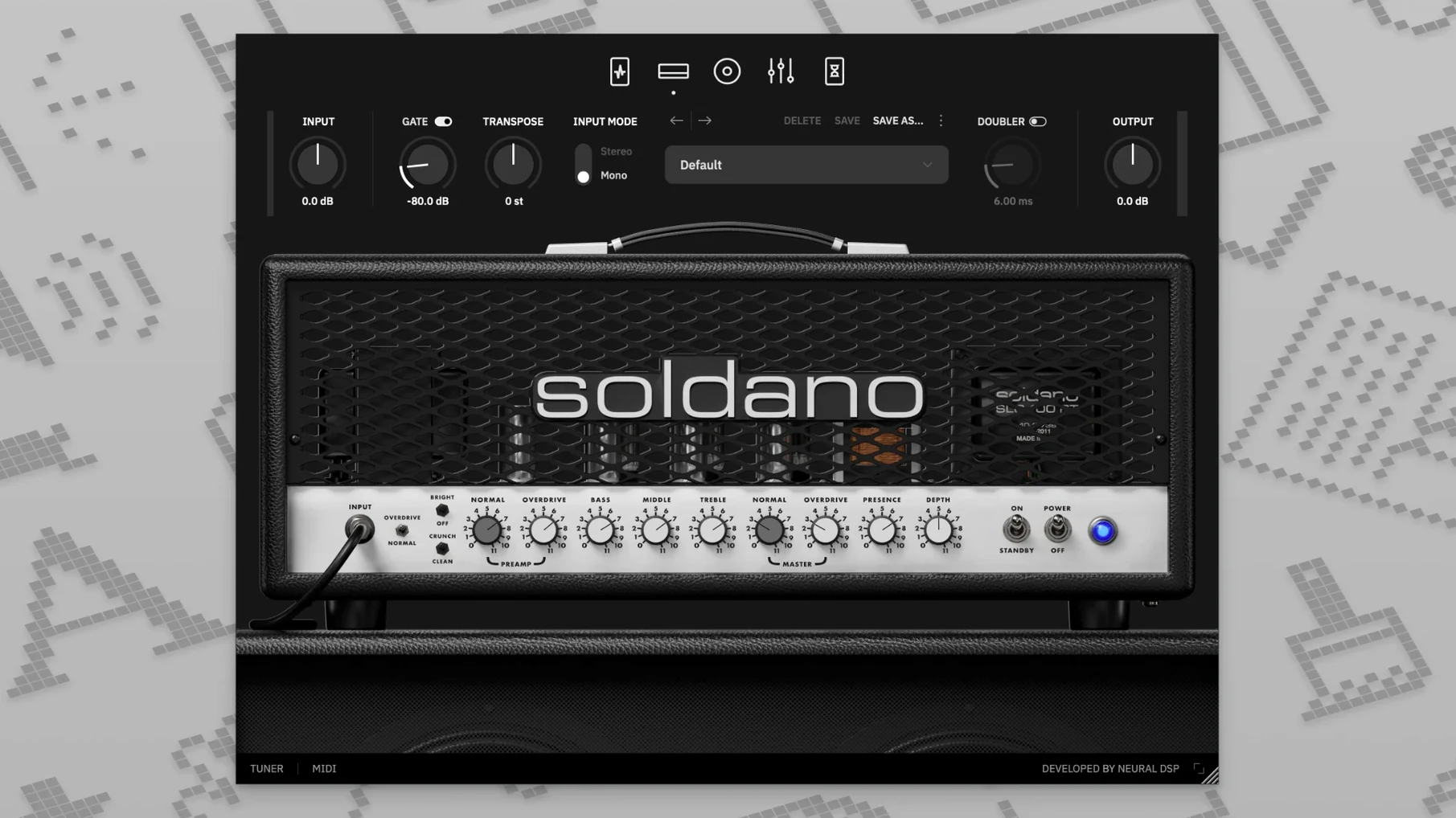
The controls are where the mix decisions happen. The Clean and Bright modes give you a spanky, percussive attack that sits perfectly in a verse, while the Crunch and Overdrive modes tighten up a chorus without adding mud. Dialing in the right tone isn't just about the amp though. The preamp section lets you shape the DI before it hits the tubes with a compressor for evening out palm-mutes, a boost for solos, an overdrive for extra saturation, and a vintage chorus that can add a subtle stereo spread to a lead line without washing it out.
Once the tone is right, the built-in delay and reverb save you from jumping to a send. A short slapback delay and a dark plate reverb can push a dry crunch track to the back of a room, making space for the vocal without a separate effects chain. It keeps the session moving fast.
The amp reacts like hardware, cleaning up with the volume knob and getting nastier as you dig in. It's a tool for a deadline, where getting the sound right in the first few clicks is what actually matters.
Why the Input Gate and Overdrive Need a Nudge Right Away
Out of the box the plugin loads a default preset that shows off the Overdrive channel, but a couple of tweaks make it feel like your own amp. Start with the input gate. It defaults to a conservative threshold that works for humbuckers, but if you're running single-coils or a noisy pedal chain, drag it down just until the hiss disappears between palm-mutes. Too aggressive and you'll choke note tails on a sustained bend.
Next, flip the cabinet section to a different IR. The stock cab sounds great for a modern rock mix, but loading a G12-65 or a Greenback impulse from your own collection shifts the midrange character entirely. The user cabinet loader accepts standard WAV files, so pull in a darker IR for a lead tone that sits behind a vocal, or a brighter one for a rhythm part that needs more pick attack. The nine-band EQ is the real surgical tool though. Cutting a narrow 4 dB at 4 kHz removes the fizz that cheap headphones exaggerate, and rolling the high-pass filter up to 80 Hz cleans up low-end rumble before it hits your bus compressor.
The Doubler Isn't Just for Width
The doubling effect can quickly turn into a chorus-y mess if you set it and forget it. Dial the detune to about 6 cents sharp on one side and leave the other at zero, then pull the mix back to 30%. You get a stereo spread that doesn't sound like a pedal, more like a double-tracked performance where the guitarist actually nailed the timing.
No Sound? Check the Output Knob and Cabinet Bypass First
The most frequent headache is no sound when loading the plugin in a DAW. Nine times out of ten the output knob on the amp section is turned down, or the cabinet bypass button got clicked by accident. Check those before you start reinstalling anything. If you're running the standalone app and get silence, open Audio/MIDI Setup and confirm your interface is selected as the output device. The standalone app doesn't always default to the right hardware after a macOS update.
Latency complaints usually trace back to the buffer size, not the plugin itself. At 128 samples it's playable for tracking; at 32 it feels like an amp in the room. But if you're stacking multiple Neural DSP instances on a dense session, bump the buffer to 256 during mixing and let the session breathe. The transposition feature adds a tiny bit of latency when engaged, so track in standard tuning and transpose afterward unless you're just sketching ideas.
Some users run into an AU validation failure in Logic after installing. The fix is usually deleting the AudioUnit cache file in ~/Library/Caches/AudioUnitCache, then restarting Logic. It forces a rescan and typically pulls the plugin in without further fuss. On Apple Silicon machines the plugin runs natively, but if your DAW is still in Rosetta mode you might see a VST3 mismatch. Switch the DAW to native ARM and the problem disappears.
More Focused Than AmpHub’s Modular Pedalboard Playground
Against STL Tones AmpHub, the Soldano SLO-100 X feels more focused. AmpHub gives you a modular pedalboard and a rotating cabinet section drawn from a subscription library, which is great for experimenting with signal chains you'd never build in real life. But the Soldano plugin sounds more like one specific amp that has already been dialed in by a producer who knows exactly what they want. AmpHub rewards browsing; the SLO-100 X rewards committing to a sound and moving on.
Next to IK Multimedia AmpliTube 5, the difference is in the cabinet section depth. AmpliTube offers room mics, multiple speaker pairs, and per-mic phase alignment that can eat up an afternoon. The Soldano's cabinet section is simpler — a mic placement slider, a handful of room simulations, and the IR loader. That simplicity means you stop tweaking sooner. AmpliTube wants to be a studio full of gear; the SLO-100 X wants to be one amp in a live room that a good engineer pointed a 57 at.
Compared with the free Nalex Crunchman, the gap widens quickly. Crunchman does one high-gain texture well and sounds impressive for a free amp sim, but it falls apart when you roll the guitar volume back. The SLO-100 X cleans up gradually across the entire knob range, which makes it an instrument rather than just a distortion box. If you're tracking a part that moves from clean fingerpicking to a full-stack chorus, the Soldano handles it in one instance without touching the plugin window.
- macOS 10.15 or later
- Apple Silicon or Intel 64-bit processor
- 64-bit host software (VST, AU, or AAX)
Questions I actually get
What is the difference between the original plugin and the X version?
The X version revisits the original Soldano SLO-100 plugin with updated modeling technology for more accurate amp response.
Does this plugin work on an Intel Mac?
Yes, it supports both ARM and x86 64-bit Macs running macOS 10.15 or later with a 64-bit host.
Notes from the edit bay · 0
Sign in or get an edit-bay pass to leave a note.
No notes from the edit bay yet. They go up after I read them.