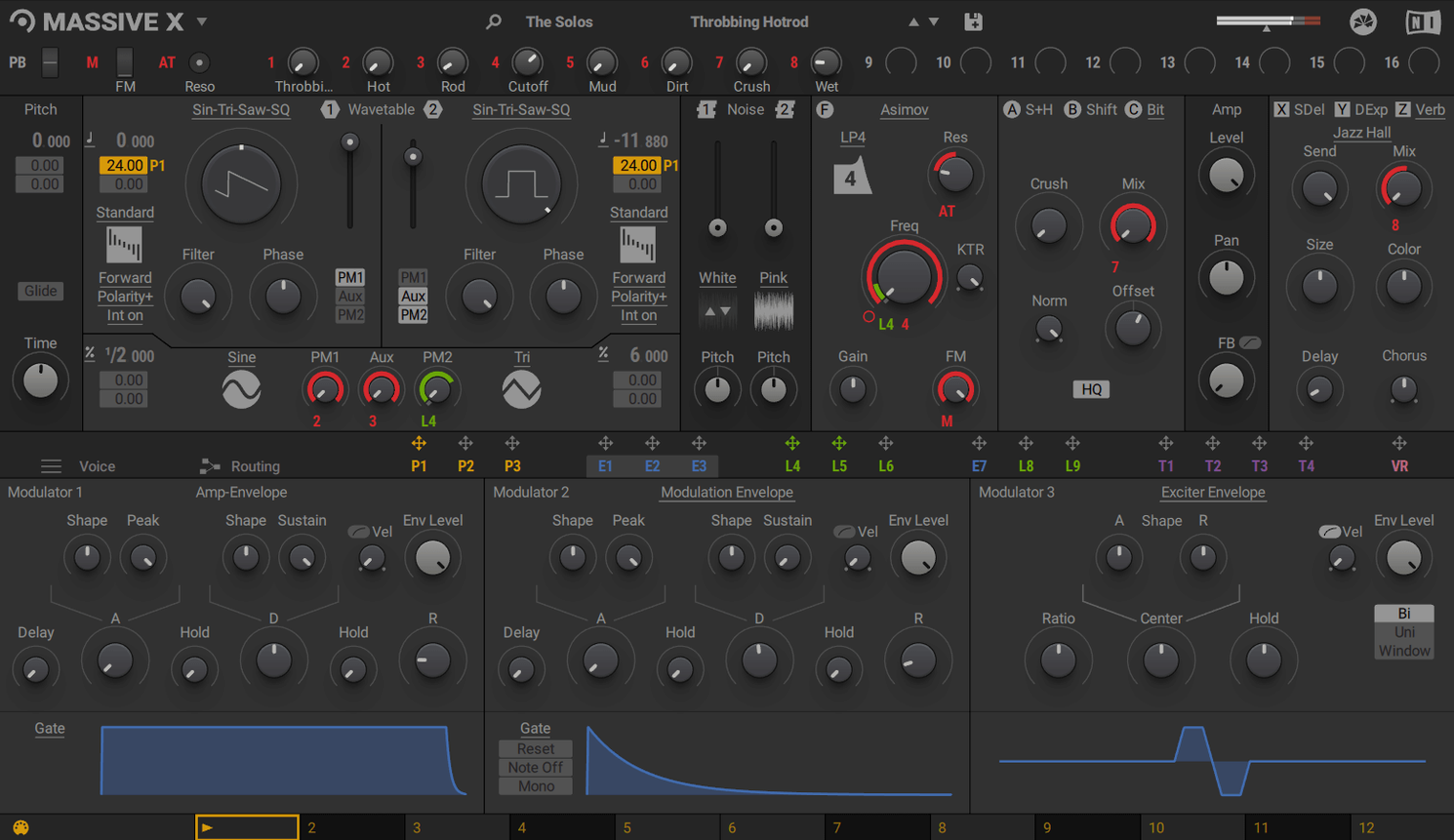
Phase Modulation in the new oscillator section bends harmonics before they hit a filter. It’s the first thing I reach for when a static wavetable needs motion that isn’t just an LFO wobble.
No Standalone App—AU, VST3, or AAX Only
No standalone mode here — Massive X lives inside a DAW. On a Mac that means AU in Logic, VST3 in Cubase or Ableton Live, VST for older hosts, and AAX if Pro Tools is your main timeline.
Route Anything to Anything
The routing system flips the usual fixed signal path. Grab an output from one voice and feed it into a filter’s FM input, or let an envelope modulate another voice’s wavetable position. It feels patched, not pre-wired.
Start From a Wavetable, Not a Blank Page
With 170+ wavetable options and a 780-preset factory library, you’re sculpting, not building from scratch. The KOMPLETE lineage shows in how the mod sources are laid out — deep enough to lose an afternoon, fast enough when a cue is due.
On a recent corporate job that needed bed music with motion but no obvious melodic hooks, I threw Massive X on a track, loaded a complex wavetable, and routed a slow Performer curve to the wavetable position. CPU in Logic sat around 12% on an M1 Max with eight voices of polyphony — perfectly fine for tracking. A few instances later, I had a drone, a bass pulse, and a rhythmic pad all running, and the fan hadn't spun up once. That's not magic, it's just how the synth scales when you don't pile on every voice and unison layer at once.
Resource use scales with your routing choices more than your preset count. A single voice with two phase modulation generators and a busy insert chain hits the CPU harder than six voices of a simple wavetable sweep. On Intel Macs, the AVX requirement means older Xeon workstations might not load it at all — something I've seen trip up composers still holding onto cheese-grater Mac Pros. On Apple Silicon, the plug-in loads as native, and I've yet to see a crash that wasn't my own fault for automating the wrong parameter mid-render.
Stability in Logic and Ableton Live has been uneventful, which is exactly what I want during a deadline. One session with 14 instances in Live 12 stayed solid across a four-hour sound design session. The only hiccup: swapping wavetables while audio is running occasionally causes a half-second dropout. Pause, switch, unpause — problem solved.
Old Massive Patches Won't Translate Here
The biggest trap is expecting Massive X to sound like its predecessor right away. The filter character and routing flexibility mean a patch imported from old Massive sessions won't translate — you're better off rebuilding the idea with the new oscillators. Another common misstep: ignoring the Remote Octave control. A producer I work with spent 45 minutes drawing Performer patterns in the GUI before realizing they could trigger them from a MIDI keyboard. One octave, eight patterns, no automation lanes required.
Beginners also tend to skip the routing page entirely, treating the synth like a subtractive chain where oscillator hits filter hits output. The moment you realize a voice's output can FM another voice's phase modulation generator, the sound palette opens up. Start small: route an LFO to the wavetable position of oscillator two, then feed oscillator two's output into oscillator one's phase input. That's three minutes of work for a texture that'd take half an hour with external processing.
Unison stacking without purpose is the last classic mistake. Cranking voices to 16 with full detune and wide stereo spread sounds huge in solo — and disappears the moment a bassline and drum bus enter the mix. Use unison when the patch needs to carry a section alone, and pull it back when other elements arrive.
Will This Break My Legacy Sessions?
Does this replace the original Massive? No. Existing projects referencing Massive keep working, and both plug-ins coexist without conflict. Massive X is a different engine with a different sound — keep the original installed if you rely on legacy sessions or prefer its specific filter models.
Will it run on my Intel Mac? If the processor supports AVX instructions, yes. Most Macs from 2013 onward qualify, but older Mac Pro towers with Xeon chips sometimes don't. Check the Intel ARK page for your specific CPU if you're unsure — Native Instruments' installer will refuse to proceed without AVX support.
Can I use it without an internet connection after activation? Once authorized, Massive X runs offline. The internet requirement is only for the initial download and activation step. I've taken a MacBook Pro into a cabin with no Wi-Fi and the synth opened without complaint for the entire week.
How does the torrent version handle activation? The download includes a pre-patched authorization that skips the online check, so the synth loads immediately after running the standard installer from the disk image. No Native Access, no account, no connection needed beyond the initial download.
Where Massive X Sits in a Real Workflow
I treat it as a texture and motion machine, not a bread-and-butter subtractive synth. For a pad that needs to evolve over 16 bars, I'll reach for Massive X before Serum or Diva — the Performer section draws modulation curves that'd take three LFOs and an envelope follower to approximate elsewhere. For bass duties, it's my third choice after a hardware Moog emulation and a simple FM synth, but when the track needs a bass that morphs from pluck to growl over two bars, Massive X takes the slot.
It plays nicely with other Native Instruments tools. Dragging a Massive X instance into Komplete Kontrol gives you Light Guide integration on NI keyboards, and the NKS mapping means presets are browsable with previews from the hardware. Outside the NI ecosystem, it's just another AU or VST3 — Logic's Smart Controls map to exposed parameters without fuss, and Ableton's Macro knobs latch on the same way.
With macOS Spotlight or Finder tagging, I keep a folder of custom wavetables organized by character — dark, vocal, metallic, glassy — and drop them into the wavetable browser when a project needs a specific starting point. The synth doesn't integrate with iCloud or Handoff, but dragging a .wav file from an iCloud Drive folder into the oscillator section works exactly as you'd expect from any Mac audio app.
For mix sessions, I bounce early. A complex Massive X patch with four insert effects and heavy modulation can chew enough CPU that a 40-track mix session starts to stutter. Commit the part, disable the instrument track, and move on. The sound is worth the extra render step.
- macOS 13 or later
- Apple Silicon or Intel with AVX support
- 4 GB RAM (6 GB recommended)
- OpenGL 2.1 or higher graphics card
- Internet connection for download and activation
Notes from the edit bay · 0
Sign in or get an edit-bay pass to leave a note.
No notes from the edit bay yet. They go up after I read them.